
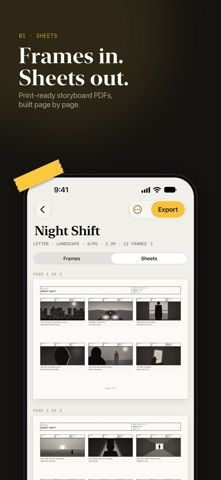
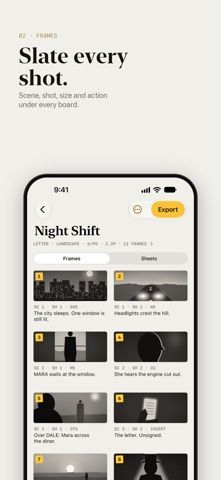
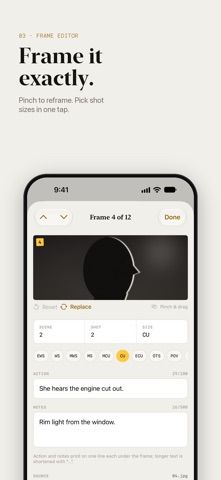
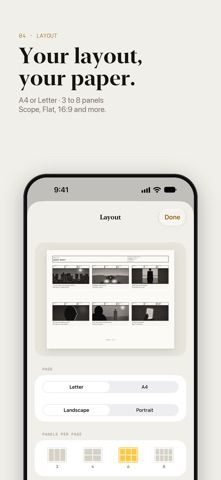
StorySheet: Storyboard PDF is an iPhone app in the storyboarding category. Apple’s U.S. listing introduces it with the short description “StorySheet turns storyboard frames into clean, print-ready storyboard PDFs — the sheets your crew…” The app’s workflow centers on planning a visual sequence with frames, panels, or shots, with tools such as plan a sequence using storyboard panels, frames, or shots. and sketch or place visual references where supported. Reorder panels to communicate the intended sequence. Export, print, or share a storyboard when offered. It may suit filmmakers, writers, and creators planning a visual sequence. Users who need to sketch, arrange, or export storyboard panels. Panel formats, device compatibility, export options, and collaboration vary; confirm that the output matches the intended production workflow. The listing currently shows the download as Free; the public lookup does not confirm whether every feature is included or which upgrades may be available. Check in-app purchase and renewal details before subscribing. The App Store page lists iOS 17.0+ compatibility. This summary reflects Apple’s U.S. listing checked on 2026-11-19; pricing, availability, privacy terms, supported devices, and features can change. Review current terms before uploading personal data or relying on a particular export or integration.

StorySheet: Storyboard PDF
StorySheet: Storyboard PDF is an iPhone app for storyboarding. It is presented as a tool for planning a visual sequence with frames, panels, or shots.
Overview
A closer look at StorySheet: Storyboard PDF.
A closer look
App screenshots
Choose with confidence
The useful details.
What it does
- Plan a sequence using storyboard panels, frames, or shots.
- Sketch or place visual references where supported.
- Reorder panels to communicate the intended sequence.
- Export, print, or share a storyboard when offered.
A good fit for
- Filmmakers, writers, and creators planning a visual sequence.
- Users who need to sketch, arrange, or export storyboard panels.
Worth knowing
- Panel formats, device compatibility, export options, and collaboration vary; confirm that the output matches the intended production workflow.
- Review current listing and developer privacy or purchase terms before use.
Frequently asked questions
Answers based on the app’s official listing and reviewed information.
What is StorySheet: Storyboard PDF used for?
StorySheet: Storyboard PDF is an iPhone app for storyboarding. It is presented as a tool for planning a visual sequence with frames, panels, or shots.
What can you do with StorySheet: Storyboard PDF?
Plan a sequence using storyboard panels, frames, or shots. Sketch or place visual references where supported. Reorder panels to communicate the intended sequence. Export, print, or share a storyboard when offered.
Who is StorySheet: Storyboard PDF designed for?
Filmmakers, writers, and creators planning a visual sequence. Users who need to sketch, arrange, or export storyboard panels.
What should you know before downloading StorySheet: Storyboard PDF?
Panel formats, device compatibility, export options, and collaboration vary; confirm that the output matches the intended production workflow. Review current listing and developer privacy or purchase terms before use.
What does StorySheet: Storyboard PDF cost?
Free to download. Free to download according to the current U.S. App Store listing (Free); optional purchase and subscription terms should be verified in the store.
Which platforms support StorySheet: Storyboard PDF?
Greatooly's reviewed app information lists iOS.
Researched from official sources; this is not a hands-on review. Last checked 2026-11-19.
Keep exploring
More apps that might be a good fit.

Storyboard 2020
Storyboard 2020 is an iPhone app for storyboarding. It is presented as a tool for planning a visual sequence with frames, panels, or shots.

StoryBoard - Story Planner
StoryBoard - Story Planner is an iPhone app for storyboarding. It is presented as a tool for planning a visual sequence with frames, panels, or shots.
Storyboard Creator AI
Storyboard Creator AI is an iPhone app for storyboarding. It is presented as a tool for planning a visual sequence with frames, panels, or shots.