
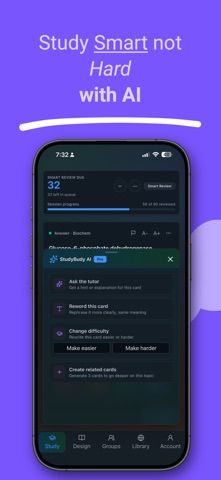
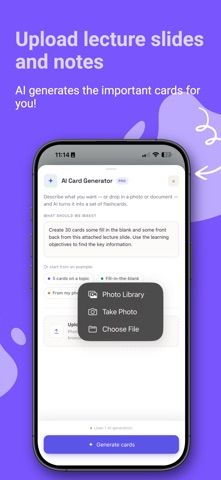
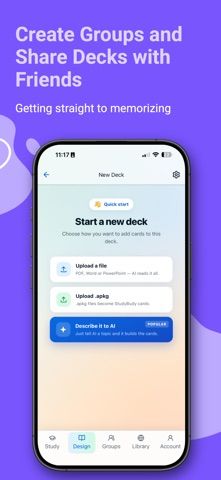
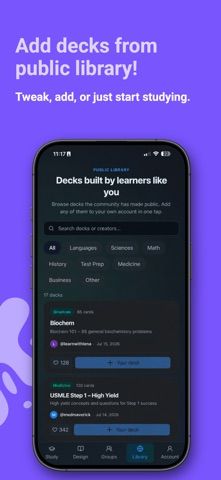
Study Buddy is a flashcard and study app for learners who want to spend less time formatting cards by hand. It can generate cards from a prompt or materials such as PDFs, presentations, Word documents, photos, and images, then lets users edit and organize the results. Different card formats, including fill-in-the-blank and image occlusion, support different kinds of practice. Spaced repetition schedules reviews, while an AI tutor can explain a concept or answer a question. Decks can be shared or edited collaboratively, and folders, search, streaks, and progress tracking help keep study materials organized across devices. The listing does not specify current pricing or feature limits. Since generated cards and explanations can contain mistakes, learners should check them against trusted course materials before using them for exams or professional study.

Study Buddy - Flashcards
Study Buddy creates flashcards from prompts, notes, documents, and photos, then schedules reviews with spaced repetition. It includes multiple card types, an AI tutor, study modes, progress tracking, shared decks, collaboration, folders, and cross-device sync. The listing does not specify current pricing.
Overview
A closer look at Study Buddy - Flashcards.
A closer look
App screenshots
Choose with confidence
The useful details.
What it does
- Generate flashcards from prompts, documents, photos, and images
- Multiple card types and spaced-repetition review
- AI tutor, study modes, and progress tracking
- Share decks and collaborate with permission controls
A good fit for
- Students converting class notes and documents into study cards
- Learners who want shared decks and scheduled review
Worth knowing
- Current pricing is not specified; generated cards and AI explanations should be checked against course materials.
Frequently asked questions
Answers based on the app’s official listing and reviewed information.
What is Study Buddy - Flashcards used for?
Study Buddy creates flashcards from prompts, notes, documents, and photos, then schedules reviews with spaced repetition. It includes multiple card types, an AI tutor, study modes, progress tracking, shared decks, collaboration, folders, and cross-device sync. The listing does not specify current pricing.
What can you do with Study Buddy - Flashcards?
Generate flashcards from prompts, documents, photos, and images Multiple card types and spaced-repetition review AI tutor, study modes, and progress tracking Share decks and collaborate with permission controls
Who is Study Buddy - Flashcards designed for?
Students converting class notes and documents into study cards Learners who want shared decks and scheduled review
What should you know before downloading Study Buddy - Flashcards?
Current pricing is not specified; generated cards and AI explanations should be checked against course materials.
Does Study Buddy - Flashcards include paid features?
The reviewed listing does not confirm current in-app purchase options.
Which platforms support Study Buddy - Flashcards?
Greatooly's reviewed app information lists iOS.
Researched from official sources; this is not a hands-on review. Last checked 2026-11-04.
Keep exploring
More apps that might be a good fit.

Garden Planner: Landscape AI
Garden Planner: Landscape AI redesigns a yard or patio photo in 24 styles, with before-and-after comparison and private local designs.

Homefolio: Home Inventory
Homefolio records household belongings, values, receipts, serial numbers, and warranties, then exports a claim-ready inventory report.

Reading Log: Nightly Minutes
Reading Log: Nightly Minutes tracks children’s reading minutes or pages, streaks, and weekly summaries for school logs.