
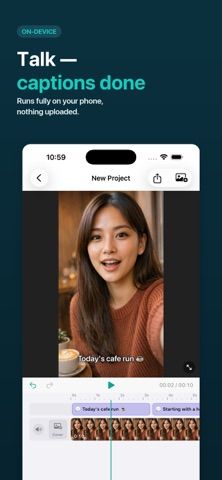
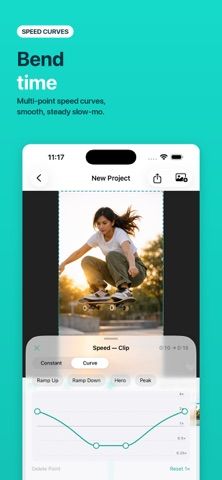
Suila is a video editor for iPhone and iPad that keeps editing on the device. It can generate captions in multiple languages, add a second translated caption line, and export or import SRT subtitle files. Users can trim and reorder clips, build speed ramps, add voiceovers with a teleprompter, apply color adjustments and transitions, or blur faces with tracked mosaics. The timeline also supports stickers, picture-in-picture, audio extraction, and six canvas ratios, with exports up to 4K. The developer describes the editor as free, without ads or sign-in, and says video projects stay on the device. App Store purchase options are optional developer-support items rather than a required editing subscription. The listing supports iPhone and iPad; confirm the minimum iOS version for the target device before installing. Caption generation and translation depend on supported language models and device performance.

Suila — Video Editor
An on-device video editor with bilingual captions, translation, face blur, speed curves, and 4K export.
Overview
A closer look at Suila — Video Editor.
A closer look
App screenshots

Choose with confidence
The useful details.
What it does
- Generate on-device captions, translate a second line, and exchange SRT files.
- Edit clips with a timeline, speed curves, transitions, and keyframes.
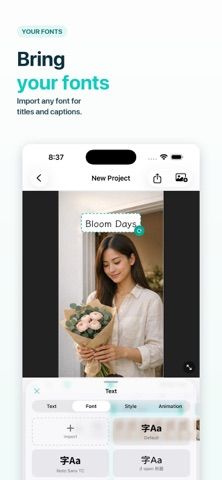
- Add voiceovers, teleprompter text, stickers, filters, and picture-in-picture.
- Blur or pixelate faces and export in multiple aspect ratios up to 4K.
A good fit for
- Creators who want a mobile video editor with local captioning and privacy-focused tools.
Worth knowing
- The app’s newest editing features require a recent iOS version; check device compatibility before installing. The App Store lists optional developer-support purchases, while the developer says editing tools remain free. Caption quality and export speed depend on source media and device performance.
Frequently asked questions
Answers based on the app’s official listing and reviewed information.
What is Suila — Video Editor used for?
An on-device video editor with bilingual captions, translation, face blur, speed curves, and 4K export.
What can you do with Suila — Video Editor?
Generate on-device captions, translate a second line, and exchange SRT files. Edit clips with a timeline, speed curves, transitions, and keyframes. Add voiceovers, teleprompter text, stickers, filters, and picture-in-picture. Blur or pixelate faces and export in multiple aspect ratios up to 4K.
Who is Suila — Video Editor designed for?
Creators who want a mobile video editor with local captioning and privacy-focused tools.
What should you know before downloading Suila — Video Editor?
The app’s newest editing features require a recent iOS version; check device compatibility before installing. The App Store lists optional developer-support purchases, while the developer says editing tools remain free. Caption quality and export speed depend on source media and device performance.
Does Suila — Video Editor include paid features?
The developer describes all editing features as free, with no account or ads. Optional developer-support purchases are listed in the US App Store at several price tiers; they are not required for editing.
Which platforms support Suila — Video Editor?
Greatooly's reviewed app information lists iOS.
Researched from official sources; this is not a hands-on review. Last checked 2026-11-04.
Keep exploring
More apps that might be a good fit.

Verde: AI Backyard Design Plan
Verde turns photos of gardens, balconies, and rooms into AI redesigns that account for existing structures and practical dimensions.

RoomMakeover: AI Room Design
RoomMakeover previews AI interior-design ideas from room photos, with style controls, credit packs, and Pro plans.

Zu3D
Zu3D combines stop-motion capture, drawing, video editing, green-screen effects, sound, and export tools for animated films.