
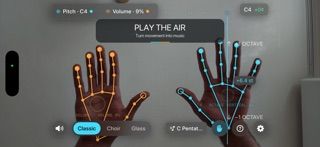
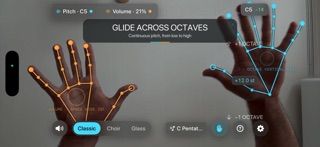
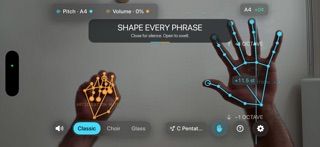
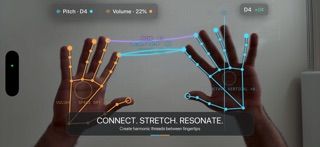
Syntheremin is a touch-free music instrument controlled by hand movement in front of an iPhone’s TrueDepth camera. Move one hand through a pitch field to glide across notes, and use the other to control volume. Wrist rotation adjusts tone and echo, while fingertip gestures add layered harmonies. Classic, Choir, and Glass synth characters, scale-based note guidance, a tuner, live pitch lanes, and left- or right-handed layouts support experimentation. The developer says camera frames and hand landmarks are processed on the phone and never saved or uploaded, but the bundled Google MediaPipe SDK sends limited usage and performance metrics to Google. Syntheremin is free, requires iOS 17 or later, and needs an iPhone with a front TrueDepth camera such as the hardware used by Face ID. It is designed for live performance, not a multitrack recording studio.

Syntheremin: Theremin Synth
Syntheremin uses iPhone hand tracking to turn air gestures into continuous pitch, volume, filter changes and layered harmony without touching the screen.
Overview
A closer look at Syntheremin: Theremin Synth.
A closer look
App screenshots
Choose with confidence
The useful details.
What it does
- Glide continuously across pitch using hand position rather than tapping keyboard notes.
- Control volume and sound character with the second hand and wrist rotation.
- Layer octaves and scale intervals with fingertip gestures and shape the effect with hand movement.
- Choose synth characters, see live pitch feedback, tune notes, and select a left- or right-handed layout.
A good fit for
- Musicians curious about expressive, theremin-like performance controlled by hand gestures.
- People who want an experimental instrument for improvisation without touching the screen.
Worth knowing
- Requires iOS 17 or later and an iPhone with a front TrueDepth camera; it is not listed for iPad. Low-latency headphones or built-in speakers are recommended for responsive play.
- The camera frames and landmarks are processed on-device, but the bundled Google MediaPipe SDK sends limited usage and performance metrics to Google. The app is listed as free with no in-app purchases.
Frequently asked questions
Answers based on the app’s official listing and reviewed information.
What is Syntheremin: Theremin Synth used for?
Syntheremin uses iPhone hand tracking to turn air gestures into continuous pitch, volume, filter changes and layered harmony without touching the screen.
What can you do with Syntheremin: Theremin Synth?
Glide continuously across pitch using hand position rather than tapping keyboard notes. Control volume and sound character with the second hand and wrist rotation. Layer octaves and scale intervals with fingertip gestures and shape the effect with hand movement. Choose synth characters, see live pitch feedback, tune notes, and select a left- or right-handed layout.
Who is Syntheremin: Theremin Synth designed for?
Musicians curious about expressive, theremin-like performance controlled by hand gestures. People who want an experimental instrument for improvisation without touching the screen.
What should you know before downloading Syntheremin: Theremin Synth?
Requires iOS 17 or later and an iPhone with a front TrueDepth camera; it is not listed for iPad. Low-latency headphones or built-in speakers are recommended for responsive play. The camera frames and landmarks are processed on-device, but the bundled Google MediaPipe SDK sends limited usage and performance metrics to Google. The app is listed as free with no in-app purchases.
What does Syntheremin: Theremin Synth cost?
Free to download. Free to download and use; the US App Store does not list in-app purchases.
Which platforms support Syntheremin: Theremin Synth?
Greatooly's reviewed app information lists iOS.
Researched from official sources; this is not a hands-on review. Last checked 2026-11-10.
Keep exploring
More apps that might be a good fit.

Movie Nerd: Movie & TV Tracker
Movie Nerd combines movie and TV reference details with watch history, episode progress, watchlists, streaming availability, alerts, and Apple Watch controls.

Title Card: Media Diary
Title Card is an on-device media diary for movies, TV, books and podcasts, with notes, ratings, annual top tens, imports and backup exports.

Groupiez: Local Concerts
Groupiez logs concert memories and upcoming shows, discovers nearby events and fans, and supports taste matching, chats and live-music recaps.