
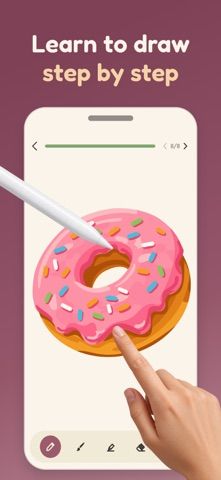
Talma teaches drawing by breaking an illustration into small steps. A learner follows highlighted lines with a finger or Apple Pencil, fills shapes with color, and sees the finished drawing come together. Lessons cover subjects such as animals, birds, sea creatures, and food, with difficulty levels that range from first doodles to more detailed pictures. The app is designed to let beginners draw at their own pace, without grades or penalties for imperfect lines. Users can keep drawings and progress on their device, and downloaded lessons work offline. Some lessons are free without a subscription; the full lesson library requires Talma Premium. The listing does not state subscription prices.

Talma: Learn to Draw & Color
A step-by-step drawing app for beginners, with guided tracing lessons, coloring, progress tracking, and offline practice.
By Alina DauhaliovaReleased 2026/09/09App Store rating 4.8 (59)Official store informationPublished 2026/11/04Checked 2026-11-04
Overview
A closer look at Talma: Learn to Draw & Color.
A closer look
App screenshots


Choose with confidence
The useful details.
What it does
- Follow highlighted tracing steps to build a drawing one line at a time.
- Color completed shapes with a preset or custom palette.
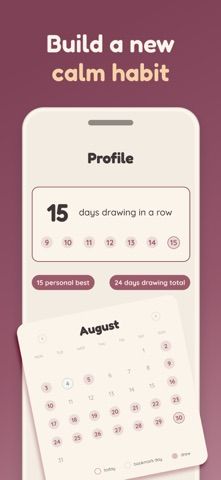
- Browse lessons by subject and difficulty and track progress through an artist path.
- Use downloaded lessons offline on iPhone or iPad with a finger or Apple Pencil.
A good fit for
- Beginners who want guided drawing practice without the pressure of a blank canvas.
Worth knowing
- Only some lessons are free; the full library requires a Talma Premium subscription.
- The App Store description does not state subscription prices or billing periods.
Frequently asked questions
Answers based on the app’s official listing and reviewed information.
What is Talma: Learn to Draw & Color used for?
A step-by-step drawing app for beginners, with guided tracing lessons, coloring, progress tracking, and offline practice.
What can you do with Talma: Learn to Draw & Color?
Follow highlighted tracing steps to build a drawing one line at a time. Color completed shapes with a preset or custom palette. Browse lessons by subject and difficulty and track progress through an artist path. Use downloaded lessons offline on iPhone or iPad with a finger or Apple Pencil.
Who is Talma: Learn to Draw & Color designed for?
Beginners who want guided drawing practice without the pressure of a blank canvas.
What should you know before downloading Talma: Learn to Draw & Color?
Only some lessons are free; the full library requires a Talma Premium subscription. The App Store description does not state subscription prices or billing periods.
Does Talma: Learn to Draw & Color include paid features?
Talma Premium unlocks the full lesson library through a subscription; local price and billing terms are shown in the app.
Which platforms support Talma: Learn to Draw & Color?
Greatooly's reviewed app information lists iOS.
Researched from official sources; this is not a hands-on review. Last checked 2026-11-04.
Keep exploring
More apps that might be a good fit.

Garden Planner: Landscape AI
Garden Planner: Landscape AI redesigns a yard or patio photo in 24 styles, with before-and-after comparison and private local designs.

Homefolio: Home Inventory
Homefolio records household belongings, values, receipts, serial numbers, and warranties, then exports a claim-ready inventory report.

Reading Log: Nightly Minutes
Reading Log: Nightly Minutes tracks children’s reading minutes or pages, streaks, and weekly summaries for school logs.