
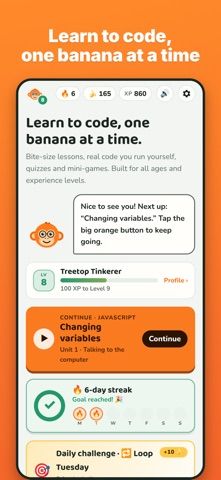
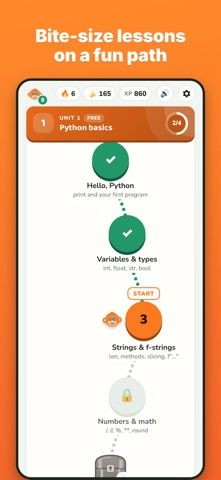
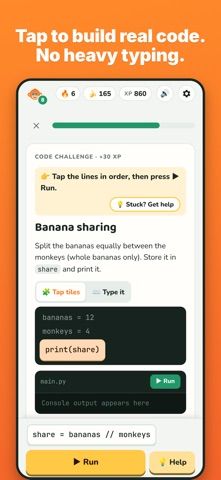
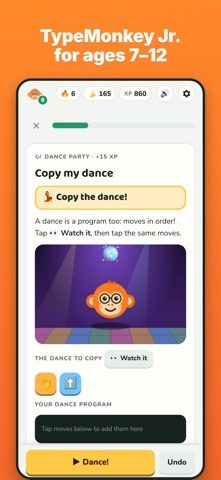
TypeMonkey teaches programming through short lessons, code tiles, projects, and debugging exercises. The listing names JavaScript, Python, HTML and CSS, SQL, C#, C++, Java, and Swift. Beginners can build code by tapping blocks and run what they make, while a separate junior mode uses puzzles that require no typing. Project examples include simple games, a to-do app, and text adventures. The developer says learning and code execution work offline on the device, with progress syncing through iCloud. Unit one of each course is free; a one-time purchase unlocks the rest, with no subscription. The app is designed for a broad age range, but parents should review course content and purchase controls with younger learners. The US listing had two ratings when checked, so public feedback is still limited.

TypeMonkey: Learn to Code
Learn programming through short interactive lessons, code-building puzzles, small projects, and offline practice.
Overview
A closer look at TypeMonkey: Learn to Code.
A closer look
App screenshots
Choose with confidence
The useful details.
What it does
- Practice concepts in nine listed programming languages through guided lessons.
- Build and run code using interactive tiles, a playground, and small projects.
- Use a no-typing puzzle mode for introductory coding concepts.
- Review missed material and continue lessons offline, according to the listing.
A good fit for
- Beginners who want short, interactive programming lessons on an iPhone.
Worth knowing
- Only the first unit of each course is free; a one-time purchase unlocks full access.
- Touch-first lessons can introduce concepts but may not replace a full development environment or formal instruction.
- The listing had two user ratings when checked; parents should review purchases and suitability for younger learners.
Frequently asked questions
Answers based on the app’s official listing and reviewed information.
What is TypeMonkey: Learn to Code used for?
Learn programming through short interactive lessons, code-building puzzles, small projects, and offline practice.
What can you do with TypeMonkey: Learn to Code?
Practice concepts in nine listed programming languages through guided lessons. Build and run code using interactive tiles, a playground, and small projects. Use a no-typing puzzle mode for introductory coding concepts. Review missed material and continue lessons offline, according to the listing.
Who is TypeMonkey: Learn to Code designed for?
Beginners who want short, interactive programming lessons on an iPhone.
What should you know before downloading TypeMonkey: Learn to Code?
Only the first unit of each course is free; a one-time purchase unlocks full access. Touch-first lessons can introduce concepts but may not replace a full development environment or formal instruction. The listing had two user ratings when checked; parents should review purchases and suitability for younger learners.
Does TypeMonkey: Learn to Code include paid features?
The listing says the first unit of each course is free and one purchase unlocks everything, with no subscription. Confirm the current price in the App Store.
Which platforms support TypeMonkey: Learn to Code?
Greatooly's reviewed app information lists iOS.
Researched from official sources; this is not a hands-on review. Last checked 2026-11-04.
Keep exploring
More apps that might be a good fit.

Garden Planner: Landscape AI
Garden Planner: Landscape AI redesigns a yard or patio photo in 24 styles, with before-and-after comparison and private local designs.

Homefolio: Home Inventory
Homefolio records household belongings, values, receipts, serial numbers, and warranties, then exports a claim-ready inventory report.

Reading Log: Nightly Minutes
Reading Log: Nightly Minutes tracks children’s reading minutes or pages, streaks, and weekly summaries for school logs.