
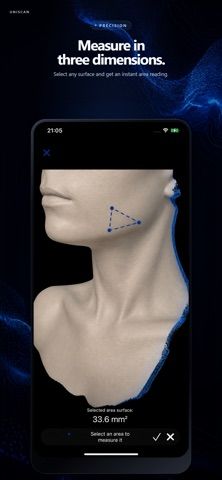
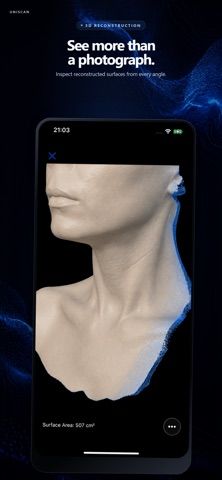
UniScan uses an iPhone's TrueDepth camera to capture color and depth information and reconstruct a 3D model on the device. Users can view the model interactively, organize scans in a categorized catalog, and export or share them in supported formats. A remote viewfinder helps with positioning, while secure streaming to a companion desktop client supports advanced stitching workflows. The developer positions UniScan for design, research, fabrication, digital archiving, and fitness visualization. Scanning requires a compatible TrueDepth-equipped device. Some advanced features require a subscription or the companion desktop software, and the App Store listing does not specify the plan prices or included limits.

UniScan - 3D scanner
A TrueDepth-based 3D scanning app for capturing color and depth, reviewing models, organizing scans, and exporting files.
By Improvis LLCReleased 2026/09/24No ratings yetOfficial store informationPublished 2026/11/04Checked 2026-11-04
Overview
A closer look at UniScan - 3D scanner.
A closer look
App screenshots
Choose with confidence
The useful details.
What it does
- Capture color and depth data using a compatible iPhone's TrueDepth camera.
- Reconstruct and inspect 3D models on-device with real-time capture feedback.
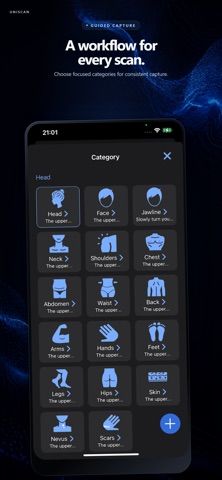
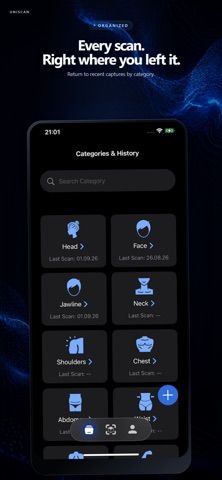
- Organize scans into custom categories and export or share them in supported formats.
- Use a remote viewfinder or stream scans securely to the desktop client for advanced stitching.
A good fit for
- Designers, researchers, and makers who need mobile 3D capture and model export.
Worth knowing
- Scanning requires a compatible TrueDepth camera; some advanced workflows also need desktop software.
- Advanced capabilities require a subscription, but the App Store description does not state prices or plan limits.
Frequently asked questions
Answers based on the app’s official listing and reviewed information.
What is UniScan - 3D scanner used for?
A TrueDepth-based 3D scanning app for capturing color and depth, reviewing models, organizing scans, and exporting files.
What can you do with UniScan - 3D scanner?
Capture color and depth data using a compatible iPhone's TrueDepth camera. Reconstruct and inspect 3D models on-device with real-time capture feedback. Organize scans into custom categories and export or share them in supported formats. Use a remote viewfinder or stream scans securely to the desktop client for advanced stitching.
Who is UniScan - 3D scanner designed for?
Designers, researchers, and makers who need mobile 3D capture and model export.
What should you know before downloading UniScan - 3D scanner?
Scanning requires a compatible TrueDepth camera; some advanced workflows also need desktop software. Advanced capabilities require a subscription, but the App Store description does not state prices or plan limits.
Does UniScan - 3D scanner include paid features?
Subscription plans unlock advanced capabilities; the available App Store description does not specify prices or billing periods.
Which platforms support UniScan - 3D scanner?
Greatooly's reviewed app information lists iOS.
Researched from official sources; this is not a hands-on review. Last checked 2026-11-04.
Keep exploring
More apps that might be a good fit.

Verde: AI Backyard Design Plan
Verde turns photos of gardens, balconies, and rooms into AI redesigns that account for existing structures and practical dimensions.

RoomMakeover: AI Room Design
RoomMakeover previews AI interior-design ideas from room photos, with style controls, credit packs, and Pro plans.

Zu3D
Zu3D combines stop-motion capture, drawing, video editing, green-screen effects, sound, and export tools for animated films.