
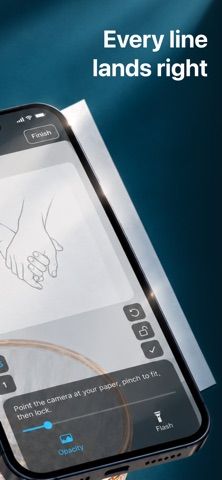
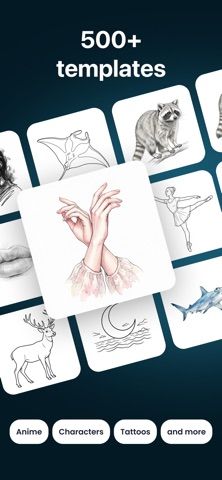
VanDraw uses a phone camera to place an outline over a sheet of paper, helping a learner trace a picture by hand. Users can choose from a library of drawings or start with their own photo, then adjust the overlay with controls such as zoom, image lock, autofocus, flashlight, and opacity. Guided lessons highlight the next stroke and explain the steps, while progress is saved as learners move through a drawing. The US App Store offers a free download with VanDraw Pro purchases for additional features. Because the experience depends on a steady camera view and real paper, the phone is a drawing aid rather than a screen-based canvas. Apple rates the app for ages 13 and older.

VanDraw
A camera-assisted drawing tutor that projects a picture outline onto paper and guides each tracing stroke.
By VanDraw LimitedReleased 2026/08/31App Store rating 4.7 (555)Official store informationPublished 2026/11/04Checked 2026-11-04
Overview
A closer look at VanDraw.
A closer look
App screenshots


Choose with confidence
The useful details.
What it does
- Trace a library picture or personal photo onto paper using a camera overlay.
- Follow guided lessons that highlight and explain the next stroke.
- Adjust zoom, opacity, focus, and image lock to keep the outline in place.
- Save lesson progress and practice drawing on paper.
A good fit for
- Beginners who want visual step-by-step drawing practice with a pencil and paper.
Worth knowing
- Requires a camera, a stable phone position, and physical paper; Pro features require an in-app purchase, and the App Store age rating is 13+.
Frequently asked questions
Answers based on the app’s official listing and reviewed information.
What is VanDraw used for?
A camera-assisted drawing tutor that projects a picture outline onto paper and guides each tracing stroke.
What can you do with VanDraw?
Trace a library picture or personal photo onto paper using a camera overlay. Follow guided lessons that highlight and explain the next stroke. Adjust zoom, opacity, focus, and image lock to keep the outline in place. Save lesson progress and practice drawing on paper.
Who is VanDraw designed for?
Beginners who want visual step-by-step drawing practice with a pencil and paper.
What should you know before downloading VanDraw?
Requires a camera, a stable phone position, and physical paper; Pro features require an in-app purchase, and the App Store age rating is 13+.
Does VanDraw include paid features?
The reviewed listing does not confirm current in-app purchase options.
Which platforms support VanDraw?
Greatooly's reviewed app information lists iOS.
Researched from official sources; this is not a hands-on review. Last checked 2026-11-04.
Keep exploring
More apps that might be a good fit.

Garden Planner: Landscape AI
Garden Planner: Landscape AI redesigns a yard or patio photo in 24 styles, with before-and-after comparison and private local designs.

Homefolio: Home Inventory
Homefolio records household belongings, values, receipts, serial numbers, and warranties, then exports a claim-ready inventory report.

Reading Log: Nightly Minutes
Reading Log: Nightly Minutes tracks children’s reading minutes or pages, streaks, and weekly summaries for school logs.