
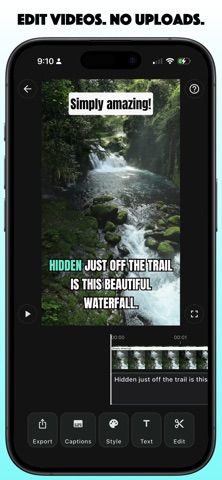
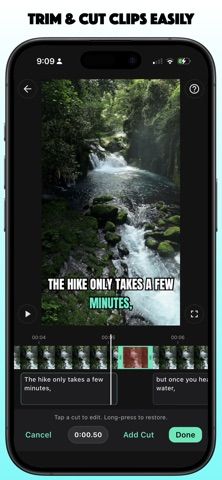
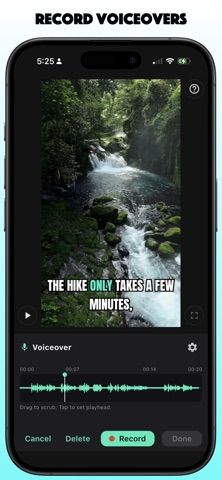
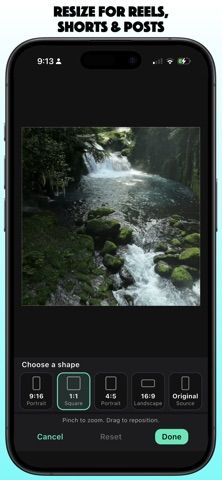
Verbatim combines captions and straightforward video editing in an iPhone app designed to keep media on the device. Users can trim clips, remove unwanted sections, resize for social formats, record voiceovers, add text overlays, and edit caption segments on a timeline. Automatic captions can be corrected, styled, and exported; Premium also unlocks subtitle-file export and longer videos. The developer says projects work offline without sign-in or uploads, and free users can export up to three videos per month. The US App Store lists a single-video unlock for $0.99, Premium at $4.99 monthly, and Premium at $39.99 yearly. The download is relatively large and requires iOS 18 or later on a supported device. Verbatim is a practical option for creators who need mobile captions and edits without sending footage to a cloud editor.

Verbatim: Video Editor
A privacy-focused iPhone video editor for captions, voiceovers, trimming, reframing, and clean exports without cloud uploads.
Overview
A closer look at Verbatim: Video Editor.
A closer look
App screenshots
Choose with confidence
The useful details.
What it does
- Generate and edit captions, including segment corrections and styled text overlays.
- Trim clips, remove sections, resize video, and record voiceovers in a project.
- Work offline without signing in or uploading videos, according to the developer.
- Export caption files and longer videos with Premium, or unlock a single video.
A good fit for
- Creators who need private, on-device captioning and basic video edits on iPhone.
Worth knowing
- The free plan allows three video exports per month. The app requires iOS 18 or later on supported hardware and has a large download; US pricing is $0.99 per video, $4.99 monthly, or $39.99 yearly for Premium.
Frequently asked questions
Answers based on the app’s official listing and reviewed information.
What is Verbatim: Video Editor used for?
A privacy-focused iPhone video editor for captions, voiceovers, trimming, reframing, and clean exports without cloud uploads.
What can you do with Verbatim: Video Editor?
Generate and edit captions, including segment corrections and styled text overlays. Trim clips, remove sections, resize video, and record voiceovers in a project. Work offline without signing in or uploading videos, according to the developer. Export caption files and longer videos with Premium, or unlock a single video.
Who is Verbatim: Video Editor designed for?
Creators who need private, on-device captioning and basic video edits on iPhone.
What should you know before downloading Verbatim: Video Editor?
The free plan allows three video exports per month. The app requires iOS 18 or later on supported hardware and has a large download; US pricing is $0.99 per video, $4.99 monthly, or $39.99 yearly for Premium.
Does Verbatim: Video Editor include paid features?
US App Store: Single Video Unlock is $0.99. US App Store: Verbatim Premium is $4.99 monthly or $39.99 yearly.
Which platforms support Verbatim: Video Editor?
Greatooly's reviewed app information lists iOS.
Researched from official sources; this is not a hands-on review. Last checked 2026-11-04.
Keep exploring
More apps that might be a good fit.

Verde: AI Backyard Design Plan
Verde turns photos of gardens, balconies, and rooms into AI redesigns that account for existing structures and practical dimensions.

RoomMakeover: AI Room Design
RoomMakeover previews AI interior-design ideas from room photos, with style controls, credit packs, and Pro plans.

Zu3D
Zu3D combines stop-motion capture, drawing, video editing, green-screen effects, sound, and export tools for animated films.