
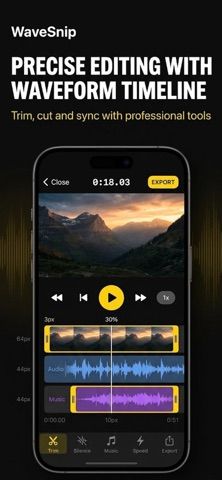
WaveSnip focuses on the sound and pacing of short video edits. Add music from your library or extract audio from another clip, trim or loop it, and use keyframes to lower music under speech. A waveform timeline helps align edits to beats, while automatic silence removal trims pauses using adjustable sensitivity. Projects are processed on device, and the developer says exports have no ads or watermark. The listing describes support for clips up to 15 minutes, but its App Store header currently says the app is designed for iPhone while the description also mentions iPad; verify device support before downloading. The US App Store lists WaveSnip Pro at $3.99 weekly, $8.99 monthly, $29.99 yearly, or $99.99 lifetime. Apple’s unverified privacy label lists unlinked purchase history, device ID, product interaction, and diagnostic data. It requires iOS 16 or later.

Video & Audio Editor WaveSnip
Edit video sound with a waveform timeline, music extraction, keyframe volume control, beat snapping, speed changes, and silence removal.
Overview
A closer look at Video & Audio Editor WaveSnip.
A closer look
App screenshots

Choose with confidence
The useful details.
What it does
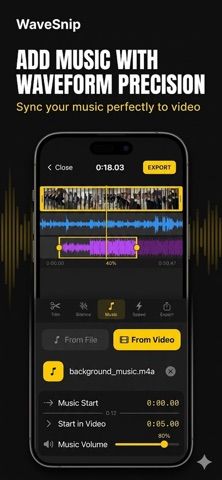
- Add music from a library or extract an audio track from a video.
- Trim, loop, and fade audio, and lower music under speech with volume keyframes.
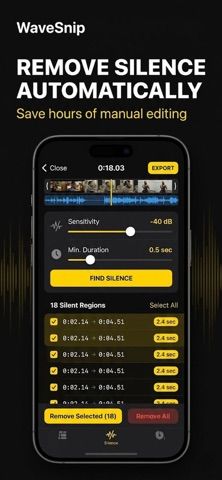
- Remove silent gaps with adjustable sensitivity and minimum pause length.
- View a waveform, detect beats, and align cuts to the rhythm.
- Change playback speed from 0.5× to 2× and export without a watermark, according to the developer.
A good fit for
- Video creators who want detailed control over music, silence, and spoken audio on iPhone.
- Podcasters, interviewers, and tutorial makers who need quick pause removal and audio balancing.
Worth knowing
- The App Store header says designed for iPhone, although the description also mentions iPad; confirm compatibility on the device listing.
- The developer says the app handles clips up to 15 minutes; longer projects may need another editor.
- Apple’s unverified privacy label lists unlinked purchase history, device identifiers, product interactions, and diagnostics.
Frequently asked questions
Answers based on the app’s official listing and reviewed information.
Can I extract audio from a video?
Yes. The listing says WaveSnip can extract audio from a clip and export it for reuse.
Can WaveSnip remove pauses automatically?
Yes. Automatic silence removal can trim dead air, with controls for sensitivity and minimum silence length.
Can I lower music under dialogue?
Yes. Use volume keyframes to reduce music under speech and raise it during other parts of the edit.
Can cuts be aligned to music beats?
Yes. WaveSnip detects beats and provides a waveform timeline for placing cuts in time with the music.
How much does WaveSnip Pro cost?
The US App Store lists $3.99 weekly, $8.99 monthly, $29.99 yearly, or $99.99 for lifetime access.
Does WaveSnip work on iPad?
The description mentions iPhone and iPad, but the store header currently says designed for iPhone. Check the App Store compatibility section for your device before installing.
Researched from official sources; this is not a hands-on review. Last checked 2026-11-19.
Keep exploring
More apps that might be a good fit.

AI Song & Music Maker - Foxify
An AI music creation app for generating songs, lyrics, beats, voice-based covers, and remixes from ideas or audio.

Photo Collage EZ
Arrange photos in grid or creative layouts, customize backgrounds and borders, adjust crop and shadows, and export collages up to 4K.

GreyForge - Miniature painting
Preview paint schemes on a miniature photo, get step-by-step painting recipes, and organize projects for tabletop figures.