
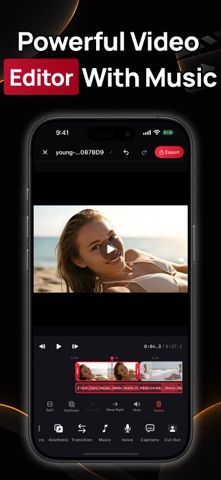
VidWing is an iPhone and iPad video editor that keeps editing on the device without an account or media upload. Its timeline supports trimming, splitting, reordering, and duplicating clips, with undo and a live preview. Users can adjust color, apply filters and effects, add captions recognized offline from a clip's speech, and remove or replace a background. Text, stickers, emoji, music, voiceovers, and voice effects can be placed and timed. Videos can be exported in MP4 or MOV up to 4K at 60 frames per second, with codec and bitrate options. The free app includes core editing; Video Editor Pro adds premium assets and export options through weekly or yearly subscriptions.

CreativityAudio recording appsColor palette creation appsMusic composition appsShort-form video editing appsVideo editing apps
VidWing: Video Editor & Maker
An offline video editor with timeline controls, captions, background removal, effects, audio tools, and up to 4K export.
By Md Abu SalehReleased 2026/09/22App Store rating 5.0 (2)Official store informationPublished 2026/11/04Checked 2026-11-04
Overview
A closer look at VidWing: Video Editor & Maker.
A closer look
App screenshots
Choose with confidence
The useful details.
What it does
- Trim, split, reorder, and duplicate clips on a timeline with undo and preview.
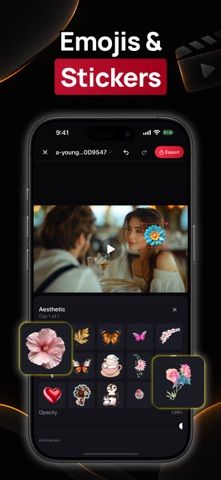
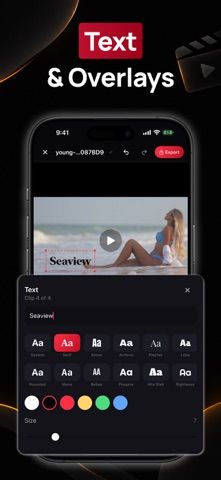
- Generate captions on-device and add text, stickers, emoji, music, or voiceovers.
- Adjust colors, apply filters and effects, and remove or replace backgrounds.
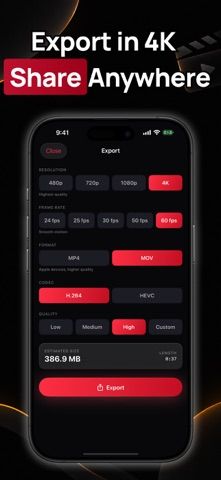
- Export up to 4K at 60 fps with MP4 or MOV and optional codec and bitrate controls.
A good fit for
- Mobile creators who want detailed offline editing controls and high-resolution exports.
Worth knowing
- Video Editor Pro unlocks premium assets and advanced export options through weekly or yearly auto-renewing subscriptions.
- The listing does not state subscription prices; current local pricing appears before purchase.
Frequently asked questions
Answers based on the app’s official listing and reviewed information.
What is VidWing: Video Editor & Maker used for?
An offline video editor with timeline controls, captions, background removal, effects, audio tools, and up to 4K export.
What can you do with VidWing: Video Editor & Maker?
Trim, split, reorder, and duplicate clips on a timeline with undo and preview. Generate captions on-device and add text, stickers, emoji, music, or voiceovers. Adjust colors, apply filters and effects, and remove or replace backgrounds. Export up to 4K at 60 fps with MP4 or MOV and optional codec and bitrate controls.
Who is VidWing: Video Editor & Maker designed for?
Mobile creators who want detailed offline editing controls and high-resolution exports.
What should you know before downloading VidWing: Video Editor & Maker?
Video Editor Pro unlocks premium assets and advanced export options through weekly or yearly auto-renewing subscriptions. The listing does not state subscription prices; current local pricing appears before purchase.
Does VidWing: Video Editor & Maker include paid features?
Video Editor Pro offers weekly and yearly auto-renewing plans; current prices are shown before purchase.
Which platforms support VidWing: Video Editor & Maker?
Greatooly's reviewed app information lists iOS.
Researched from official sources; this is not a hands-on review. Last checked 2026-11-04.
Keep exploring
More apps that might be a good fit.

Verde: AI Backyard Design Plan
Verde turns photos of gardens, balconies, and rooms into AI redesigns that account for existing structures and practical dimensions.

RoomMakeover: AI Room Design
RoomMakeover previews AI interior-design ideas from room photos, with style controls, credit packs, and Pro plans.

Zu3D
Zu3D combines stop-motion capture, drawing, video editing, green-screen effects, sound, and export tools for animated films.