
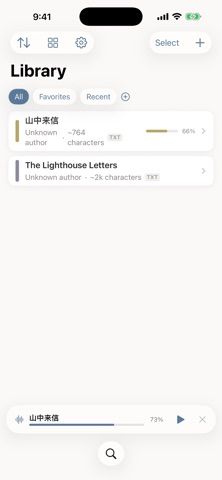
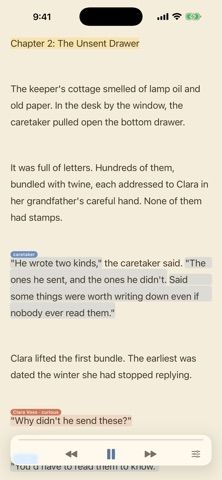
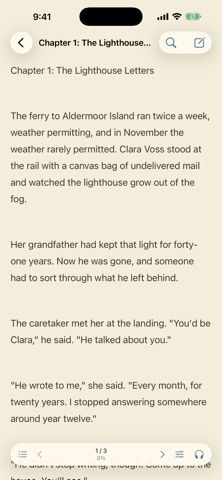
Wen is an audiobook-style reader for books and documents a person already owns. It opens TXT, EPUB, and PDF files, and can import a folder or ZIP archive with multiple books. Basic narration is generated on the device and can work offline. Optional cloud voices provide more natural narration, while Theater Mode attempts to distinguish dialogue and give characters separate voices. Readers can search inside a book or describe a remembered scene to find a title or passage using semantic search. Wen says imported text stays on the device by default and that cloud narration sends content to a voice provider only after consent. The US App Store lists Standard, Premium, and credit-pack purchases, but its public listing does not explain the billing period for those offers. Cloud narration and account-related features may require network access.
Wen: Audiobook Reader & TTS
An ebook reader that turns personal TXT, EPUB, and PDF files into audio, with on-device narration, optional cloud voices, and semantic search.
Overview
A closer look at Wen: Audiobook Reader & TTS.
A closer look
App screenshots
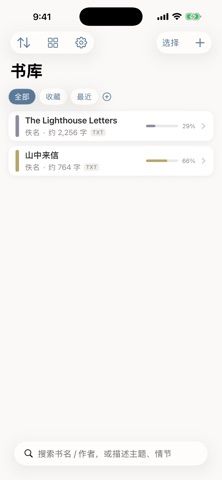
Choose with confidence
The useful details.
What it does
- Import TXT, EPUB, and PDF books, including batches from folders or ZIP files.
- Listen with offline device narration or opt in to cloud-generated voices.
- Use a theatrical mode that gives dialogue and characters separate voices.
- Search within a book or find titles by describing a remembered scene.
A good fit for
- Readers who want to listen to personal ebook files and keep basic narration available offline.
Worth knowing
- Cloud narration requires sending selected book content to a voice provider after consent; the US App Store lists paid offers but does not state their billing periods.
Frequently asked questions
Answers based on the app’s official listing and reviewed information.
What is Wen: Audiobook Reader & TTS used for?
An ebook reader that turns personal TXT, EPUB, and PDF files into audio, with on-device narration, optional cloud voices, and semantic search.
What can you do with Wen: Audiobook Reader & TTS?
Import TXT, EPUB, and PDF books, including batches from folders or ZIP files. Listen with offline device narration or opt in to cloud-generated voices. Use a theatrical mode that gives dialogue and characters separate voices. Search within a book or find titles by describing a remembered scene.
Who is Wen: Audiobook Reader & TTS designed for?
Readers who want to listen to personal ebook files and keep basic narration available offline.
What should you know before downloading Wen: Audiobook Reader & TTS?
Cloud narration requires sending selected book content to a voice provider after consent; the US App Store lists paid offers but does not state their billing periods.
Does Wen: Audiobook Reader & TTS include paid features?
The reviewed listing does not confirm current in-app purchase options.
Which platforms support Wen: Audiobook Reader & TTS?
Greatooly's reviewed app information lists iOS.
Researched from official sources; this is not a hands-on review. Last checked 2026-11-04.
Keep exploring
More apps that might be a good fit.

Siftivo: What to Read Next
Siftivo suggests books from a reader’s taste and combines daily picks with reading shelves, reviews, reader follows, and a journal.

ReadFlow - Book Tracker
ReadFlow tracks print, ebook, and audiobook progress with session logs, quotes, shelves, and import tools.

Margin: Reading Streak
Margin is a reading streak tracker, EPUB and PDF reader, book library, and audiobook recorder with optional Plus storage.