
YaYDraw helps artists use a phone as a drawing reference while working on paper. A reference image can be imported, photographed, or selected from a built-in gallery, then positioned and locked over the live camera view so it remains aligned while the artist draws. Grayscale options simplify the image into a few light-and-shadow levels, while opacity, brightness, grids, and line tools help match the reference to the page. A local recovery point can preserve alignment when the phone is moved. The app can also scan finished artwork, correct perspective, crop the background, and add a frame or signature before saving. YaYDraw requires a subscription after an introductory trial, with monthly and yearly plans. Reference alignment and saving behavior depend on camera positioning and the chosen photo or file location.

YaYDraw
A drawing-reference tool that overlays images on a camera view, simplifies light and shadow, and scans finished artwork.
Overview
A closer look at YaYDraw.
A closer look
App screenshots
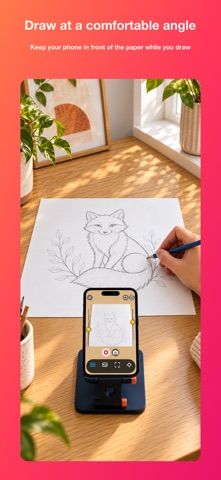
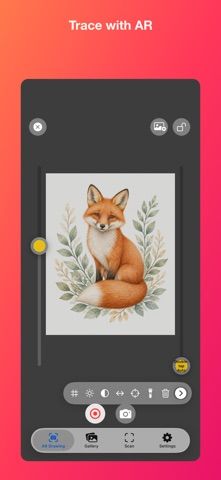
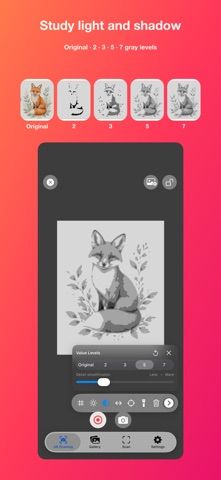
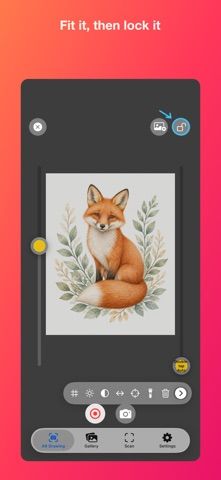
Choose with confidence
The useful details.
What it does
- Overlay and lock a photo reference in the live camera view while drawing.
- Adjust image scale, rotation, opacity, brightness, grids, and line tools.
- Simplify a reference into grayscale levels to study light and shadow.
- Scan finished artwork, correct perspective, crop, frame, and save it.
A good fit for
- Traditional artists who want to transfer a visual reference to paper or digitize a finished drawing.
Worth knowing
- A subscription is required after the introductory trial; the app depends on camera placement and offers a drawing aid rather than a full digital painting canvas.
Frequently asked questions
Answers based on the app’s official listing and reviewed information.
What is YaYDraw used for?
A drawing-reference tool that overlays images on a camera view, simplifies light and shadow, and scans finished artwork.
What can you do with YaYDraw?
Overlay and lock a photo reference in the live camera view while drawing. Adjust image scale, rotation, opacity, brightness, grids, and line tools. Simplify a reference into grayscale levels to study light and shadow. Scan finished artwork, correct perspective, crop, frame, and save it.
Who is YaYDraw designed for?
Traditional artists who want to transfer a visual reference to paper or digitize a finished drawing.
What should you know before downloading YaYDraw?
A subscription is required after the introductory trial; the app depends on camera placement and offers a drawing aid rather than a full digital painting canvas.
Does YaYDraw include paid features?
The US App Store lists YaYDraw Premium at $3.99 monthly or $34.99 yearly after an introductory trial; prices may vary by region.
Which platforms support YaYDraw?
Greatooly's reviewed app information lists iOS.
Researched from official sources; this is not a hands-on review. Last checked 2026-11-04.
Keep exploring
More apps that might be a good fit.

Verde: AI Backyard Design Plan
Verde turns photos of gardens, balconies, and rooms into AI redesigns that account for existing structures and practical dimensions.

RoomMakeover: AI Room Design
RoomMakeover previews AI interior-design ideas from room photos, with style controls, credit packs, and Pro plans.

Zu3D
Zu3D combines stop-motion capture, drawing, video editing, green-screen effects, sound, and export tools for animated films.