
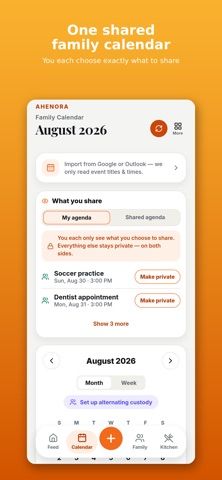
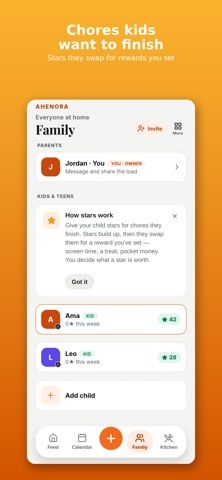
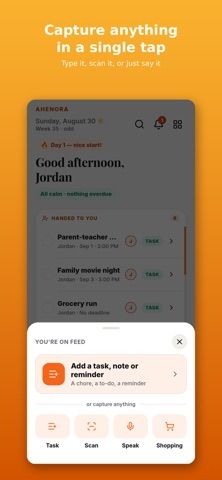
Ahenora is a shared family organizer for households that want daily tasks, schedules, meals, and children's routines in one place. Members can capture tasks by typing or scanning a school letter or appointment card, import events from Google Calendar, and control which details stay private. Chore charts award stars that children can exchange for parent-set rewards, while meal plans can build a grocery list. The app also includes grocery spending, a household document vault, family chat, and hand-off notes for co-parents managing two homes. The developer offers a free plan for two adults and a 14-day trial of paid features. The App Store lists Family at $5.99 monthly or $44.99 yearly and Household at $14.99 monthly or $129.99 yearly. Ahenora requires iOS 16.4 or later.

Ahenora: Family Organizer
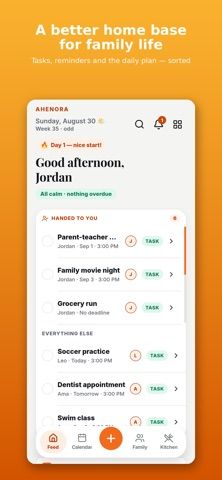
Ahenora brings family tasks, a shared calendar, meals, shopping lists, children's chores, and household documents together.
Overview
A closer look at Ahenora: Family Organizer.
A closer look
App screenshots
Choose with confidence
The useful details.
What it does
- Coordinate tasks, a shared family calendar, reminders, and Google Calendar events.
- Assign children's chores, award stars, and set household rewards with a PIN-protected kid view.
- Plan meals, create a shopping list, track grocery spending, and store household documents.
- Use privacy controls and hand-off notes to coordinate co-parenting across two homes.
A good fit for
- Families coordinating household tasks, school schedules, chores, and meals across adults and children.
- Co-parents who need shared schedule details while keeping selected items private.
Worth knowing
- The free plan is limited to two adults and basic tasks, calendar, and shared lists; paid tiers add meal planning, child profiles, and larger household limits.
- Subscriptions renew automatically unless cancelled before renewal; current plan details and pricing should be confirmed in the App Store.
- Requires iOS 16.4 or later; the App Store listing does not verify Android support.
Frequently asked questions
Answers based on the app’s official listing and reviewed information.
What is Ahenora: Family Organizer used for?
Ahenora brings family tasks, a shared calendar, meals, shopping lists, children's chores, and household documents together.
What can you do with Ahenora: Family Organizer?
Coordinate tasks, a shared family calendar, reminders, and Google Calendar events. Assign children's chores, award stars, and set household rewards with a PIN-protected kid view. Plan meals, create a shopping list, track grocery spending, and store household documents. Use privacy controls and hand-off notes to coordinate co-parenting across two homes.
Who is Ahenora: Family Organizer designed for?
Families coordinating household tasks, school schedules, chores, and meals across adults and children. Co-parents who need shared schedule details while keeping selected items private.
What should you know before downloading Ahenora: Family Organizer?
The free plan is limited to two adults and basic tasks, calendar, and shared lists; paid tiers add meal planning, child profiles, and larger household limits. Subscriptions renew automatically unless cancelled before renewal; current plan details and pricing should be confirmed in the App Store. Requires iOS 16.4 or later; the App Store listing does not verify Android support.
What does Ahenora: Family Organizer cost?
Free download includes a free plan for two adults, plus a 14-day trial of paid features for new households. The App Store lists the Family plan at $5.99 monthly or $44.99 yearly, and the Household plan at $14.99 monthly or $129.99 yearly. Confirm current prices in the purchase screen.
Which platforms support Ahenora: Family Organizer?
Greatooly's reviewed app information lists iOS.
Researched from official sources; this is not a hands-on review. Last checked 2026-11-10.
Keep exploring
More apps that might be a good fit.

CleanHaus: Airbnb Turnovers
CleanHaus automates short-term rental turnovers by connecting booking calendars with cleaners, schedules and property tasks.

GoalStar: Daily Goal Tracker
GoalStar makes daily goals visible with a gold-star chart, streaks, reminders, widgets and optional NFC tap tags.

Accessbox - Password Manager
Accessbox stores passwords, passkeys and verification codes in encrypted Accesscards with AutoFill, breach alerts and optional iCloud sync.