
AI Trip Planner & Travel Guide combines a landmark map with photo-based place recognition and an AI guide chat. The App Store says travelers can look up nearby attractions, view place cards with details, ask about history and local tips, and create or edit custom routes and tours. It also lists favorites, saved tours, and audio guides in recent version notes. The app is free to download, but some features require Pro. The current US listing shows several overlapping weekly and annual products, including prices from $7.99 to $49.99; some product names and prices appear in duplicate or discounted variants, so check the in-app purchase sheet for the exact term. The app requires iOS 16 or later. Apple’s unverified privacy label lists device identifiers for tracking and analytics, plus coarse location and diagnostics.

AI Trip Planner & Travel Guide
Find landmarks on a map, identify places from photos, ask an AI guide for context, and build custom walking tours.
Overview
A closer look at AI Trip Planner & Travel Guide.
A closer look
App screenshots


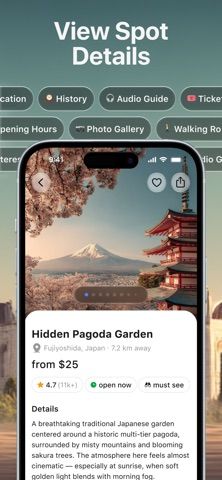
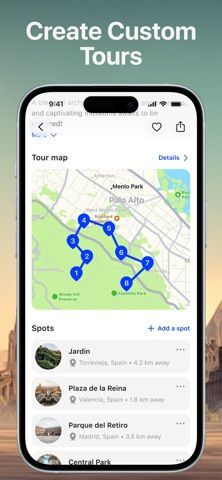
Choose with confidence
The useful details.
What it does
- Recognize landmarks from a photo taken with the camera or selected from the photo library.
- Explore nearby attractions on an interactive map with place details.
- Ask the AI Guide about history, legends, and local visiting tips.
- Plan, edit, and save custom tours or routes with favorites and trip history.
- Use audio guides and localized app or AI content in the languages listed by the developer.
A good fit for
- Travelers who want place discovery and a basic guided route in one app.
- Visitors who like using photos and conversational prompts to explore landmarks.
Worth knowing
- Requires iOS 16 or later and an internet connection for map, AI, and current place information.
- The listing shows multiple overlapping Pro and Premium products with different prices; confirm the exact subscription and renewal period before purchase.
- Apple’s unverified privacy label lists a device identifier for tracking, coarse location, and diagnostics; AI-generated travel details may need independent checking.
Frequently asked questions
Answers based on the app’s official listing and reviewed information.
What does AI Trip Planner & Travel Guide do?
It combines landmark discovery, photo recognition, map-based place details, AI travel questions, and custom tours or routes.
Can it identify a place from a photo?
Yes. The App Store says it can recognize landmarks from a photo taken with the camera or selected from the photo library.
Can I create and save a walking tour?
The listing describes custom tours and routes, favorites, and saved tour history. Check route details and opening hours independently before setting out.
How much does the Pro plan cost?
The US listing shows several Weekly Premium and AI Pro products from $7.99 to $49.99, with overlapping annual and discounted variants. Confirm the exact renewal term in the purchase sheet.
What privacy data does the listing disclose?
Apple’s unverified label lists device identifiers used for tracking and analytics, coarse location, and diagnostics. Review the current label and policy before enabling location or photo access.
Which iPhone version does the app require?
The US App Store lists iPhone support and requires iOS 16 or later. Some features require a Pro subscription.
Researched from official sources; this is not a hands-on review. Last checked 2026-11-19.
Keep exploring
More apps that might be a good fit.

Lure – Trip Planner
Create day-by-day city itineraries with custom maps, geographically grouped stops, restaurant ideas, visit estimates, and budget notes.

AeroTrace: Flight Tracker
Track flight status, gates, delays, and connections with Live Activities, boarding-pass import, airport tools, and offline maps.

EzRoute - Travel
Browse and share day-by-day itineraries from travelers, with places, meals, activities, transport notes, and tips.