
Audio Editor Lite is a mobile editing workspace for people who need to record or make quick changes to audio on an iPhone. Import a file or record directly, then trim sections, remove unwanted parts, adjust volume, fade audio in or out, change speed, or replace a segment. Built-in effects include pitch, reverb, distortion, delay, and equalization, with a preview step before saving. The app can also convert supported audio formats, extract audio from video, and prepare a clip as a ringtone. A file manager and project system organize recordings and edited versions. Its listing positions it for music ideas, voice recordings, podcast clips, voiceovers, and other short edits. The description does not specify current pricing, supported export formats in full, or limits, so check the app before starting a long project.

Audio Cutter: MP3 Editor
Audio Editor Lite is an iPhone audio editor and recorder with trim, cut, copy, mix, effects, equalization, format conversion, and ringtone export. It can import audio from Files, video, other apps, and the clipboard, then organize recordings and projects. Current pricing is not specified in the description.
Overview
A closer look at Audio Cutter: MP3 Editor.
A closer look
App screenshots
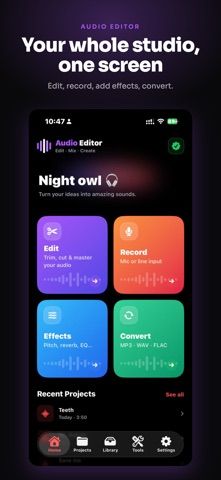
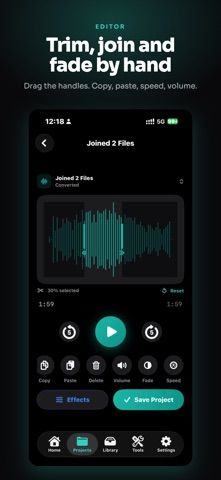
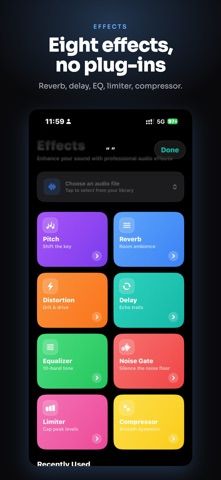
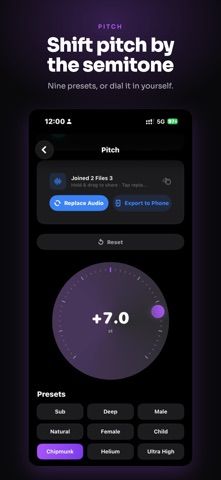
Choose with confidence
The useful details.
What it does
- Record, trim, cut, rearrange, and adjust audio
- Effects including pitch, reverb, delay, distortion, and equalizer
- Convert supported formats and create ringtone clips
- Import from Files, video, other apps, or clipboard
A good fit for
- Creators making quick voice, podcast, or music edits on iPhone
- Users who need a simple recorder and audio file organizer
Worth knowing
- Supported format and export limits are not detailed in the listing; current pricing is also unspecified.
Frequently asked questions
Answers based on the app’s official listing and reviewed information.
What is Audio Cutter: MP3 Editor used for?
Audio Editor Lite is an iPhone audio editor and recorder with trim, cut, copy, mix, effects, equalization, format conversion, and ringtone export. It can import audio from Files, video, other apps, and the clipboard, then organize recordings and projects. Current pricing is not specified in the description.
What can you do with Audio Cutter: MP3 Editor?
Record, trim, cut, rearrange, and adjust audio Effects including pitch, reverb, delay, distortion, and equalizer Convert supported formats and create ringtone clips Import from Files, video, other apps, or clipboard
Who is Audio Cutter: MP3 Editor designed for?
Creators making quick voice, podcast, or music edits on iPhone Users who need a simple recorder and audio file organizer
What should you know before downloading Audio Cutter: MP3 Editor?
Supported format and export limits are not detailed in the listing; current pricing is also unspecified.
Does Audio Cutter: MP3 Editor include paid features?
The reviewed listing does not confirm current in-app purchase options.
Which platforms support Audio Cutter: MP3 Editor?
Greatooly's reviewed app information lists iOS.
Researched from official sources; this is not a hands-on review. Last checked 2026-11-04.
Keep exploring
More apps that might be a good fit.

Help Me Binge: TV Show Tracker
Help Me Binge tracks TV episodes, movies and sports, finds streaming options, and highlights subscriptions you may not be using.
Music Discovery: SkipFresh
SkipFresh uses handpicked genre playlists to introduce less familiar music and avoid repeating tracks you have already heard.

VocaBurst: Language Learning
VocaBurst teaches vocabulary through typing, spoken recall, quizzes and spaced repetition in a language-learning arcade game.