
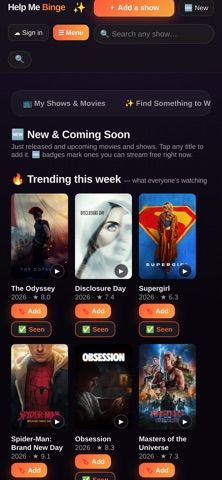
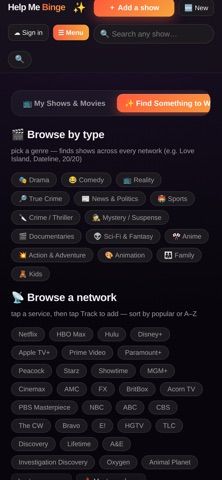
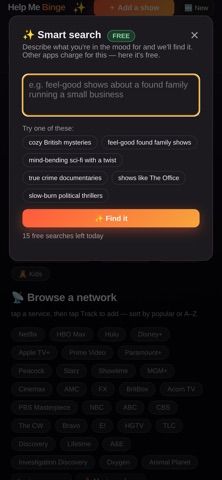
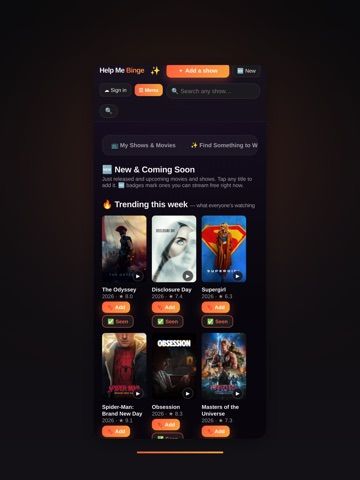
Help Me Binge keeps a personal record of TV shows, movies, and live sports so viewers can pick up where they left off. Import a TV Time export, rebuild a list from service viewing activity, or add titles manually; the app then tracks episodes, watchlists, ratings, calendars, and upcoming games. Search can find a title from an actor, plot, or mood, while streaming checks show free ad-supported options and help identify subscriptions that may be idle. The app requires no account to start, stores data on the device unless you opt into sign-in and sync, and is free with no ads according to the listing. Help Me Binge supports iPhone and iPad with iOS 15 or later. It tracks viewing and availability; it does not provide the streaming content itself.

Help Me Binge: TV Show Tracker
Help Me Binge tracks TV episodes, movies and sports, finds streaming options, and highlights subscriptions you may not be using.
Overview
A closer look at Help Me Binge: TV Show Tracker.
A closer look
App screenshots
Choose with confidence
The useful details.
What it does
- Track TV episodes, movies, live sports, watchlists, ratings, and upcoming release dates.
- Import a TV Time export or rebuild a viewing list from supported streaming activity.
- Check free ad-supported services and review paid streaming subscriptions you may not use.
- Search by title, actor, plot, or mood and follow sports teams with game reminders.
A good fit for
- Viewers who want one watch history for series, films, and sports schedules.
- People moving from TV Time or trying to keep track of streaming subscriptions and free viewing options.
Worth knowing
- Requires iOS 15 or later and supports iPhone and iPad. Sync across devices requires optional sign-in; streaming availability and sports schedules depend on supported data sources.
- The App Store lists the app as free with no ads and no in-app purchases. It tracks content and where to watch but does not stream shows or games.
Frequently asked questions
Answers based on the app’s official listing and reviewed information.
What is Help Me Binge: TV Show Tracker used for?
Help Me Binge tracks TV episodes, movies and sports, finds streaming options, and highlights subscriptions you may not be using.
What can you do with Help Me Binge: TV Show Tracker?
Track TV episodes, movies, live sports, watchlists, ratings, and upcoming release dates. Import a TV Time export or rebuild a viewing list from supported streaming activity. Check free ad-supported services and review paid streaming subscriptions you may not use. Search by title, actor, plot, or mood and follow sports teams with game reminders.
Who is Help Me Binge: TV Show Tracker designed for?
Viewers who want one watch history for series, films, and sports schedules. People moving from TV Time or trying to keep track of streaming subscriptions and free viewing options.
What should you know before downloading Help Me Binge: TV Show Tracker?
Requires iOS 15 or later and supports iPhone and iPad. Sync across devices requires optional sign-in; streaming availability and sports schedules depend on supported data sources. The App Store lists the app as free with no ads and no in-app purchases. It tracks content and where to watch but does not stream shows or games.
What does Help Me Binge: TV Show Tracker cost?
Free to download. Free to download with no ads; the reviewed App Store listing does not show in-app purchases.
Which platforms support Help Me Binge: TV Show Tracker?
Greatooly's reviewed app information lists iOS.
Researched from official sources; this is not a hands-on review. Last checked 2026-11-10.
Keep exploring
More apps that might be a good fit.

Syntheremin: Theremin Synth
Syntheremin uses iPhone hand tracking to turn air gestures into continuous pitch, volume, filter changes and layered harmony without touching the screen.

Title Card: Media Diary
Title Card is an on-device media diary for movies, TV, books and podcasts, with notes, ratings, annual top tens, imports and backup exports.

Groupiez: Local Concerts
Groupiez logs concert memories and upcoming shows, discovers nearby events and fans, and supports taste matching, chats and live-music recaps.