
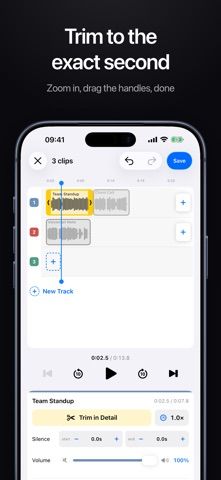
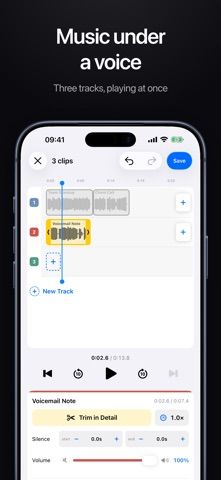
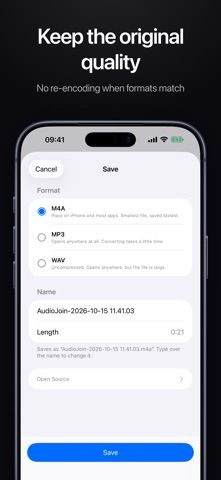
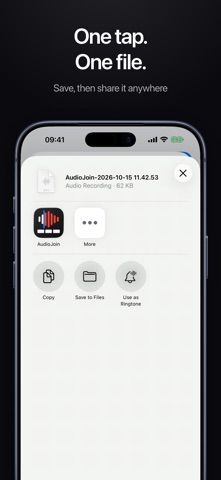
AudioJoin edits audio files on iPhone using a zoomable timeline and waveform controls. Users can import from Files or share recordings from Voice Memos, trim clip edges, adjust speed, and layer tracks such as music beneath a voice recording. Joining up to two clips and saving as M4A is free. AudioJoin Plus is a one-time purchase that unlocks joining three or more clips, additional tracks, silence removal, and MP3 or WAV export. The developer says processing happens on-device and the app has no ads, account requirement, or subscription. It is a focused editor for basic audio assembly rather than a full multitrack production suite.

AudioJoin - Joiner & Cutter
An audio editor for trimming and joining clips on-device, with a one-time upgrade for more tracks and export formats.
By mongdaewonReleased 2026/09/22App Store rating 4.3 (3)Official store informationPublished 2026/11/04Checked 2026-11-04
Overview
A closer look at AudioJoin - Joiner & Cutter.
A closer look
App screenshots
Choose with confidence
The useful details.
What it does
- Trim clips on a zoomable timeline or detailed waveform
- Join up to two clips and save as M4A for free
- Layer tracks and adjust clip speed
- Unlock silence removal, more tracks, and MP3 or WAV export
A good fit for
- People joining or trimming voice recordings on an iPhone
- Users who want local audio processing without a subscription
Worth knowing
- Joining more than two clips and several export options require a one-time purchase; current price is not stated in the listing.
Frequently asked questions
Answers based on the app’s official listing and reviewed information.
What is AudioJoin - Joiner & Cutter used for?
An audio editor for trimming and joining clips on-device, with a one-time upgrade for more tracks and export formats.
What can you do with AudioJoin - Joiner & Cutter?
Trim clips on a zoomable timeline or detailed waveform Join up to two clips and save as M4A for free Layer tracks and adjust clip speed Unlock silence removal, more tracks, and MP3 or WAV export
Who is AudioJoin - Joiner & Cutter designed for?
People joining or trimming voice recordings on an iPhone Users who want local audio processing without a subscription
What should you know before downloading AudioJoin - Joiner & Cutter?
Joining more than two clips and several export options require a one-time purchase; current price is not stated in the listing.
Does AudioJoin - Joiner & Cutter include paid features?
Trimming, joining up to two clips, and saving as M4A are free. AudioJoin Plus unlocks more tracks, larger joins, silence removal, and MP3 or WAV export; current price is not stated.
Which platforms support AudioJoin - Joiner & Cutter?
Greatooly's reviewed app information lists iOS.
Researched from official sources; this is not a hands-on review. Last checked 2026-11-04.
Keep exploring
More apps that might be a good fit.

Help Me Binge: TV Show Tracker
Help Me Binge tracks TV episodes, movies and sports, finds streaming options, and highlights subscriptions you may not be using.

Music Discovery: SkipFresh
SkipFresh uses handpicked genre playlists to introduce less familiar music and avoid repeating tracks you have already heard.

VocaBurst: Language Learning
VocaBurst teaches vocabulary through typing, spoken recall, quizzes and spaced repetition in a language-learning arcade game.