
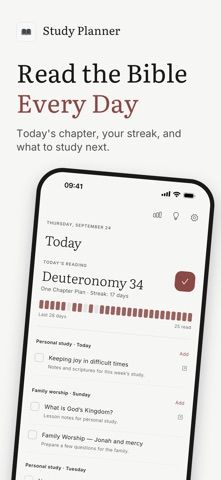
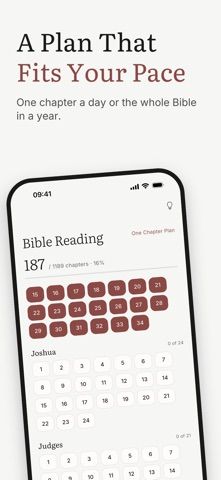
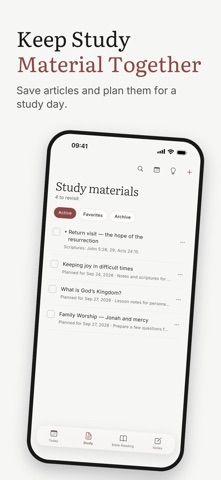
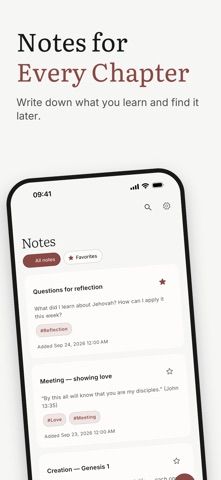
Bible Study Planner combines a Bible reading schedule with notes and study materials. Users can choose among four reading sequences, track chapter completion independently for each plan, and review progress through a streak and six-month calendar. The Today view can list articles or links assigned to a study day, while notes can be tied to a Bible book and chapter, tagged, searched, and paired with photos or files. Widgets display a verse or reflection questions, and a chosen reminder can prompt daily reading. The developer says core features are free, with no ads, subscription, or account; progress and study materials are stored on the device. Optional tips in the App Store unlock no features. The app supports English, Russian, Ukrainian, and Romanian and requires iOS 18.6 or later.

Bible Study Planner
Bible Study Planner organizes reading plans, chapter notes, study materials, reminders, and reading progress on Apple devices.
Overview
A closer look at Bible Study Planner.
A closer look
App screenshots
Choose with confidence
The useful details.
What it does
- Follow four Bible reading sequences and keep progress separately for each plan.
- Schedule articles, links, personal study days, and family worship days with reminders.
- Attach notes, photos, or files to chapters, then tag and search saved notes.
- Use home screen widgets for a yearly verse and reflection questions.
A good fit for
- Readers who want a structured Bible reading plan and chapter-linked study notes.
- People who prefer an offline, account-free reading log with optional study reminders.
Worth knowing
- The developer says reading progress and notes are stored on the device; the listing does not describe cloud sync or collaborative study.
- Requires iOS 18.6 or later; users supply or open Bible text through another Bible app or website.
- Optional App Store tips support the developer but do not unlock additional features.
Frequently asked questions
Answers based on the app’s official listing and reviewed information.
What is Bible Study Planner used for?
Bible Study Planner organizes reading plans, chapter notes, study materials, reminders, and reading progress on Apple devices.
What can you do with Bible Study Planner?
Follow four Bible reading sequences and keep progress separately for each plan. Schedule articles, links, personal study days, and family worship days with reminders. Attach notes, photos, or files to chapters, then tag and search saved notes. Use home screen widgets for a yearly verse and reflection questions.
Who is Bible Study Planner designed for?
Readers who want a structured Bible reading plan and chapter-linked study notes. People who prefer an offline, account-free reading log with optional study reminders.
What should you know before downloading Bible Study Planner?
The developer says reading progress and notes are stored on the device; the listing does not describe cloud sync or collaborative study. Requires iOS 18.6 or later; users supply or open Bible text through another Bible app or website. Optional App Store tips support the developer but do not unlock additional features.
What does Bible Study Planner cost?
Free download includes every listed feature, with no ads, subscription, or account required. Optional one-time tips are listed at $1.99, $3.99, and $9.99; they unlock no features.
Which platforms support Bible Study Planner?
Greatooly's reviewed app information lists iOS, macOS.
Researched from official sources; this is not a hands-on review. Last checked 2026-11-10.
Keep exploring
More apps that might be a good fit.

CleanHaus: Airbnb Turnovers
CleanHaus automates short-term rental turnovers by connecting booking calendars with cleaners, schedules and property tasks.

GoalStar: Daily Goal Tracker
GoalStar makes daily goals visible with a gold-star chart, streaks, reminders, widgets and optional NFC tap tags.

Accessbox - Password Manager
Accessbox stores passwords, passkeys and verification codes in encrypted Accesscards with AutoFill, breach alerts and optional iCloud sync.