
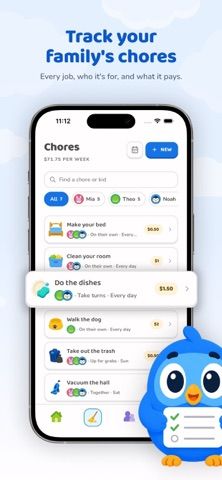
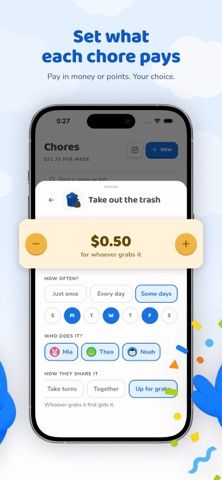
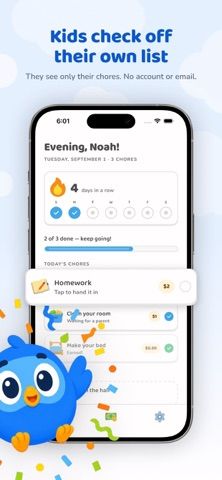
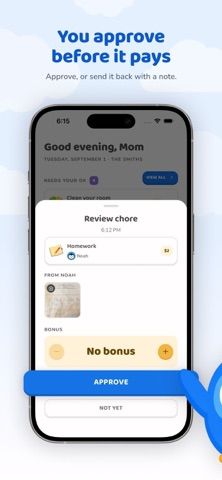
Choro turns household chores into a shared task and savings-goal system. Parents assign one-time, daily, or weekly jobs, set a point or money value, and approve each completion; children see only their own list behind a four-digit PIN and cannot approve their own work. Families can rotate tasks or make them available to a child who wants to take them. Kids track a balance and savings goal, while parents review a weekly grid of assignments and payouts. The app supports a shared iPad and multiple phones. The developer says Choro tracks a family ledger rather than handling actual money; cash is handed over separately. The free tier includes every child, five chores, savings goals, and the full approval flow. Choro Plus adds unlimited chores, photo proof, bonus rewards, full history, streaks, and additional caregivers for $6.99 monthly or $29.99 yearly.

Choro: Kids Chore Chart
Choro helps families assign chores, approve completion, track points, and connect household work to savings goals and rewards.
Overview
A closer look at Choro: Kids Chore Chart.
A closer look
App screenshots
Choose with confidence
The useful details.
What it does
- Assign one-time, daily, or weekly chores and set a value for each task.
- Require parent approval before a completed chore changes a child’s balance.
- Let children track personal tasks and savings goals behind a four-digit PIN.
- Rotate tasks, use open chores, and review a weekly grid of assignments and payouts.
- Upgrade for unlimited chores, photo proof, bonus rewards, full history, streaks, and extra caregivers.
A good fit for
- Families who want to connect chores with parent-approved points or savings goals.
- Parents managing household assignments across a shared iPad and several phones.
Worth knowing
- Choro is a family ledger rather than a bank or payment app; it does not transfer money.
- The free plan allows five chores; Choro Plus subscriptions are $6.99 monthly or $29.99 yearly and auto-renew unless cancelled at least 24 hours before the period ends.
Frequently asked questions
Answers based on the app’s official listing and reviewed information.
What is Choro: Kids Chore Chart used for?
Choro helps families assign chores, approve completion, track points, and connect household work to savings goals and rewards.
What can you do with Choro: Kids Chore Chart?
Assign one-time, daily, or weekly chores and set a value for each task. Require parent approval before a completed chore changes a child’s balance. Let children track personal tasks and savings goals behind a four-digit PIN. Rotate tasks, use open chores, and review a weekly grid of assignments and payouts.
Who is Choro: Kids Chore Chart designed for?
Families who want to connect chores with parent-approved points or savings goals. Parents managing household assignments across a shared iPad and several phones.
What should you know before downloading Choro: Kids Chore Chart?
Choro is a family ledger rather than a bank or payment app; it does not transfer money. The free plan allows five chores; Choro Plus subscriptions are $6.99 monthly or $29.99 yearly and auto-renew unless cancelled at least 24 hours before the period ends.
What does Choro: Kids Chore Chart cost?
Free download includes every child, five chores, savings goals, and the parent approval flow. Choro Plus costs $6.99 per month or $29.99 per year. It adds unlimited chores, photo proof, bonus rewards, full history, streaks, and extra parents or caregivers. Subscriptions auto-renew unless cancelled at least 24 hours before the current period ends.
Which platforms support Choro: Kids Chore Chart?
Greatooly's reviewed app information lists iOS.
Researched from official sources; this is not a hands-on review. Last checked 2026-11-10.
Keep exploring
More apps that might be a good fit.

CleanHaus: Airbnb Turnovers
CleanHaus automates short-term rental turnovers by connecting booking calendars with cleaners, schedules and property tasks.

GoalStar: Daily Goal Tracker
GoalStar makes daily goals visible with a gold-star chart, streaks, reminders, widgets and optional NFC tap tags.

Accessbox - Password Manager
Accessbox stores passwords, passkeys and verification codes in encrypted Accesscards with AutoFill, breach alerts and optional iCloud sync.