
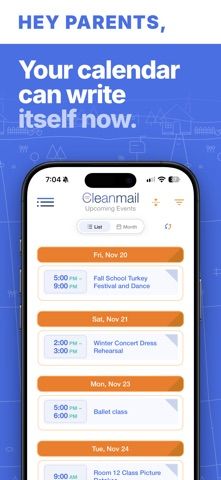
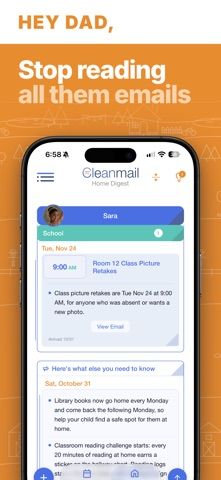
Cleanmail: Family Inbox helps a household turn selected Gmail messages about school, camp, and sports into a shared schedule. Users choose which senders to follow; Cleanmail summarizes relevant mail in short points, extracts dates, and groups events by child. It syncs its calendar both ways with Google Calendar and can add plans from a photo or voice note, open PDF attachments, and set reminders. A household can share the schedule with up to four people and connect up to three Gmail inboxes. The developer says Cleanmail only reads mail from chosen senders and does not send, delete, or change messages; it says data is encrypted and account information can be deleted in the app. The app is free to download. Cleanmail Household costs $6.99 monthly or $68.99 yearly after a 14-day trial, and renews automatically.

Cleanmail: Family Inbox
Cleanmail turns selected school, camp, and sports emails into child-sorted family digests, shared calendar events, and reminders.
Overview
A closer look at Cleanmail: Family Inbox.
A closer look
App screenshots
Choose with confidence
The useful details.
What it does
- Summarize selected school, camp, and sports emails as short updates sorted by child.
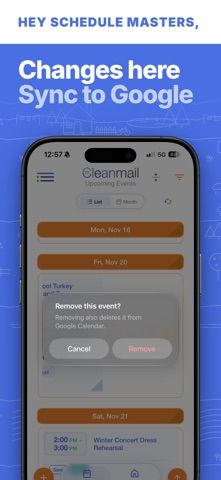
- Extract dates into a shared family calendar that syncs both ways with Google Calendar.
- Add calendar items from a photo or voice note, open email attachments, and set reminders.
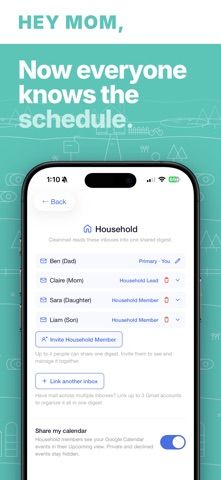
- Share with up to four household members and connect as many as three Gmail inboxes.
- Choose which email senders to follow; the developer says messages are not sent, deleted, or changed.
A good fit for
- Parents and caregivers coordinating school, camp, or sports schedules from Gmail.
- Households that want selected inbox messages and calendar events organized in one shared view.
Worth knowing
- Gmail access is required, and users choose which senders Cleanmail can read.
- The 14-day trial converts to the paid, auto-renewing Household subscription unless cancelled; Apple lists $6.99 monthly or $68.99 yearly.
Frequently asked questions
Answers based on the app’s official listing and reviewed information.
What is Cleanmail: Family Inbox used for?
Cleanmail turns selected school, camp, and sports emails into child-sorted family digests, shared calendar events, and reminders.
What can you do with Cleanmail: Family Inbox?
Summarize selected school, camp, and sports emails as short updates sorted by child. Extract dates into a shared family calendar that syncs both ways with Google Calendar. Add calendar items from a photo or voice note, open email attachments, and set reminders. Share with up to four household members and connect as many as three Gmail inboxes.
Who is Cleanmail: Family Inbox designed for?
Parents and caregivers coordinating school, camp, or sports schedules from Gmail. Households that want selected inbox messages and calendar events organized in one shared view.
What should you know before downloading Cleanmail: Family Inbox?
Gmail access is required, and users choose which senders Cleanmail can read. The 14-day trial converts to the paid, auto-renewing Household subscription unless cancelled; Apple lists $6.99 monthly or $68.99 yearly.
What does Cleanmail: Family Inbox cost?
Free download; a 14-day trial is offered before the paid Household subscription. Cleanmail Household costs $6.99 per month or $68.99 per year after a 14-day free trial. The subscription auto-renews unless cancelled; manage or cancel it in iPhone Settings.
Which platforms support Cleanmail: Family Inbox?
Greatooly's reviewed app information lists iOS.
Researched from official sources; this is not a hands-on review. Last checked 2026-11-10.
Keep exploring
More apps that might be a good fit.

CleanHaus: Airbnb Turnovers
CleanHaus automates short-term rental turnovers by connecting booking calendars with cleaners, schedules and property tasks.

GoalStar: Daily Goal Tracker
GoalStar makes daily goals visible with a gold-star chart, streaks, reminders, widgets and optional NFC tap tags.

Accessbox - Password Manager
Accessbox stores passwords, passkeys and verification codes in encrypted Accesscards with AutoFill, breach alerts and optional iCloud sync.