
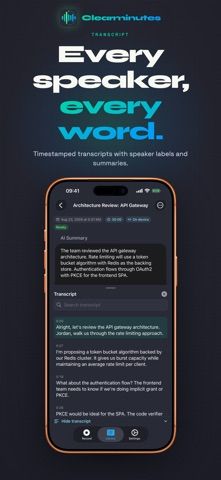
Clearminutes is a private recorder for meetings, lectures, interviews, and voice notes. It captures audio on iPhone or Apple Watch, transcribes it on the device, and lets users search and replay the transcript with tap-to-seek. The free plan includes five AI-generated meeting summaries each month, along with recording in the foreground or background, filler-word removal, custom vocabulary, Siri and Shortcuts support, and encrypted peer-to-peer transfer to a Mac or Windows PC. Clearminutes says it does not upload audio or require an account. Clearminutes Pro adds unlimited summaries, automatic summarization, custom prompts, and templates; the US App Store lists $4.99 monthly or $39.99 yearly, with a two-week trial on the annual plan. It requires iOS 17 or later and the download is about 505 MB. Transcription and summaries are processed locally, so device storage and model compatibility matter.
Clearminutes: AI Meeting Notes
Clearminutes records meetings and creates on-device transcripts and summaries, with searchable playback and optional encrypted computer transfer.
Overview
A closer look at Clearminutes: AI Meeting Notes.
A closer look
App screenshots
Choose with confidence
The useful details.
What it does
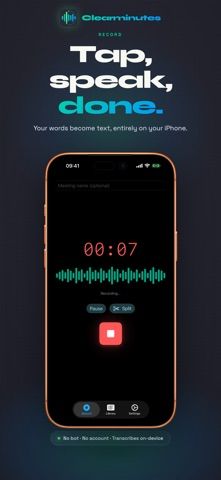
- Record meetings, lectures, and voice notes from iPhone or Apple Watch, including in the background.
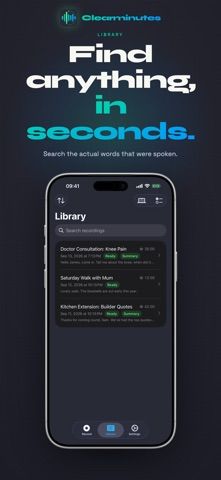
- Transcribe on device, search the transcript, and replay audio from a selected passage.
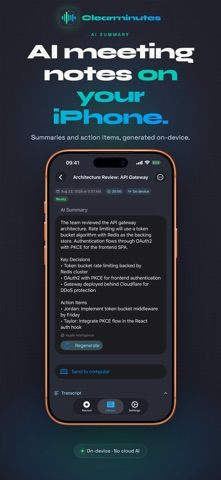
- Generate up to five summaries monthly for free, with key decisions and action items.
- Transfer recordings to Mac or Windows over an encrypted peer-to-peer connection.
A good fit for
- People who want searchable meeting transcripts without uploading audio to a cloud service.
- Users who record interviews, lectures, or work meetings and need local summaries.
Worth knowing
- Requires iOS 17 or later and uses about 505 MB of storage.
- The free plan includes five AI summaries per month; Pro costs $4.99 monthly or $39.99 yearly in the US App Store.
- Local transcription and Apple Foundation Model features depend on device capabilities; computer transfer is an optional manual step.
Frequently asked questions
Answers based on the app’s official listing and reviewed information.
What is Clearminutes: AI Meeting Notes used for?
Clearminutes records meetings and creates on-device transcripts and summaries, with searchable playback and optional encrypted computer transfer.
What can you do with Clearminutes: AI Meeting Notes?
Record meetings, lectures, and voice notes from iPhone or Apple Watch, including in the background. Transcribe on device, search the transcript, and replay audio from a selected passage. Generate up to five summaries monthly for free, with key decisions and action items. Transfer recordings to Mac or Windows over an encrypted peer-to-peer connection.
Who is Clearminutes: AI Meeting Notes designed for?
People who want searchable meeting transcripts without uploading audio to a cloud service. Users who record interviews, lectures, or work meetings and need local summaries.
What should you know before downloading Clearminutes: AI Meeting Notes?
Requires iOS 17 or later and uses about 505 MB of storage. The free plan includes five AI summaries per month; Pro costs $4.99 monthly or $39.99 yearly in the US App Store. Local transcription and Apple Foundation Model features depend on device capabilities; computer transfer is an optional manual step.
What does Clearminutes: AI Meeting Notes cost?
Free to download. Free tier includes recording, on-device transcription, transcript search and playback, and five AI meeting summaries per month. Clearminutes Pro is listed at $4.99 monthly or $39.99 yearly in the US App Store. The annual plan includes a two-week free trial; subscriptions auto-renew unless canceled.
Which platforms support Clearminutes: AI Meeting Notes?
Greatooly's reviewed app information lists iOS.
Researched from official sources; this is not a hands-on review. Last checked 2026-11-10.
Keep exploring
More apps that might be a good fit.

CleanHaus: Airbnb Turnovers
CleanHaus automates short-term rental turnovers by connecting booking calendars with cleaners, schedules and property tasks.

GoalStar: Daily Goal Tracker
GoalStar makes daily goals visible with a gold-star chart, streaks, reminders, widgets and optional NFC tap tags.

Accessbox - Password Manager
Accessbox stores passwords, passkeys and verification codes in encrypted Accesscards with AutoFill, breach alerts and optional iCloud sync.