
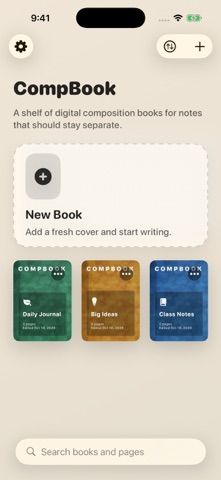
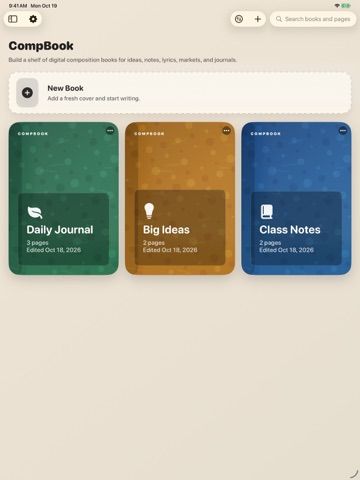
CompBook recreates a composition notebook as a set of customizable digital books for notes, journals, lyrics, classwork, business ideas, and sketches. Give each book a cover, choose lined, dotted, or graph paper, and switch between typing and drawing on the same page. Search the library or a single book, reorder or duplicate pages, and move content between notebooks. On iPad, a compatible Apple Pencil can be used for drawing. Books and pages can be exported to PDF, while local backups can be moved to another device through Files or AirDrop. CompBook costs $1.00 to download in the US App Store and has no in-app purchases, account requirement, or automatic cloud sync. Notebook content stays on the device unless the user exports or shares a file. It requires iOS 17 or iPadOS 17 on iPhone or iPad.
CompBook: Notes & Sketches
CompBook turns digital notebooks into a local library for typed notes, sketches, custom covers, paper styles, and PDF export.
Overview
A closer look at CompBook: Notes & Sketches.
A closer look
App screenshots
Choose with confidence
The useful details.
What it does
- Create separate notebooks with custom colors, icons, photos, and lined, dotted, or graph paper.
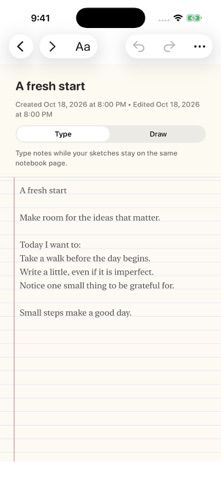
- Combine typed notes and touch drawing on a page, including Apple Pencil input on iPad.
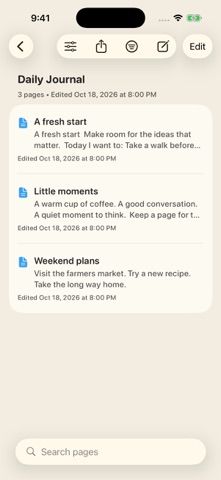
- Search books and pages, reorder or duplicate pages, and move content between notebooks.
- Export notebooks to PDF and create local backups that can be transferred with Files or AirDrop.
A good fit for
- Students, journal keepers, and note takers who like organizing ideas as separate notebooks.
- iPad users who want to combine handwriting, drawing, and typed notes on one page.
Worth knowing
- Costs $1.00 to download in the US App Store; no in-app purchases are listed.
- Requires iOS 17 or iPadOS 17 or later.
- Notebooks are stored locally and do not sync automatically through iCloud; transfers require export, Files, or AirDrop.
Frequently asked questions
Answers based on the app’s official listing and reviewed information.
What is CompBook: Notes & Sketches used for?
CompBook turns digital notebooks into a local library for typed notes, sketches, custom covers, paper styles, and PDF export.
What can you do with CompBook: Notes & Sketches?
Create separate notebooks with custom colors, icons, photos, and lined, dotted, or graph paper. Combine typed notes and touch drawing on a page, including Apple Pencil input on iPad. Search books and pages, reorder or duplicate pages, and move content between notebooks. Export notebooks to PDF and create local backups that can be transferred with Files or AirDrop.
Who is CompBook: Notes & Sketches designed for?
Students, journal keepers, and note takers who like organizing ideas as separate notebooks. iPad users who want to combine handwriting, drawing, and typed notes on one page.
What should you know before downloading CompBook: Notes & Sketches?
Costs $1.00 to download in the US App Store; no in-app purchases are listed. Requires iOS 17 or iPadOS 17 or later. Notebooks are stored locally and do not sync automatically through iCloud; transfers require export, Files, or AirDrop.
What does CompBook: Notes & Sketches cost?
1 USD to download. One-time App Store download price is $1.00 USD; the listing reports no in-app purchases.
Which platforms support CompBook: Notes & Sketches?
Greatooly's reviewed app information lists iOS.
Researched from official sources; this is not a hands-on review. Last checked 2026-11-10.
Keep exploring
More apps that might be a good fit.

CleanHaus: Airbnb Turnovers
CleanHaus automates short-term rental turnovers by connecting booking calendars with cleaners, schedules and property tasks.

GoalStar: Daily Goal Tracker
GoalStar makes daily goals visible with a gold-star chart, streaks, reminders, widgets and optional NFC tap tags.

Accessbox - Password Manager
Accessbox stores passwords, passkeys and verification codes in encrypted Accesscards with AutoFill, breach alerts and optional iCloud sync.