
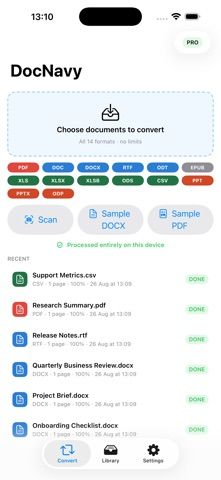
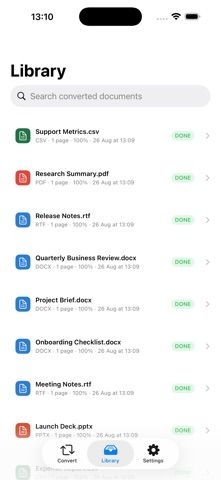
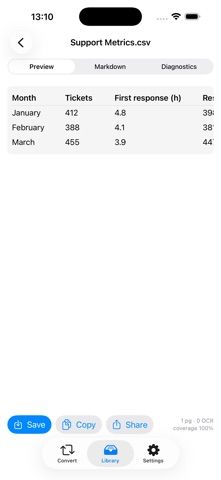
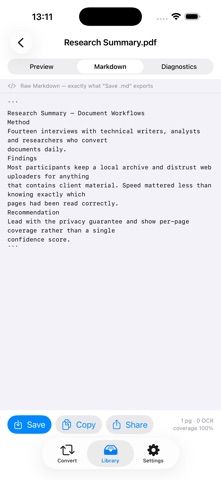
DocNavy converts common office files and PDFs into Markdown for note systems and plain-text libraries. It supports 14 formats across PDF, Word, spreadsheets, presentations, EPUB, and related open formats. Text-based pages are parsed directly, while scanned pages can use on-device OCR with automatic language detection. The app preserves structures such as tables, headings, lists, footnotes, and formulas, and reports which pages were read, OCR-processed, or unsuccessful. Users can preview the result, convert whole folders, and export Markdown and supporting files as a ZIP. The developer says conversions make no network requests and documents stay on the device. The free tier includes every conversion feature but limits use to five documents a day and 50 pages per file. Pro removes both limits: the US App Store lists $2.99 monthly with a three-day trial or a $29.99 one-time purchase. It supports iPhone, iPad, and Mac.

DocNavy: Docs to Markdown
DocNavy converts 14 document formats into Markdown with on-device OCR, folder conversion, exports and per-page diagnostics.
Overview
A closer look at DocNavy: Docs to Markdown.
A closer look
App screenshots
Choose with confidence
The useful details.
What it does
- Convert PDF, Word, Excel, PowerPoint, EPUB, and other supported formats into Markdown.
- Run OCR on scanned pages on device and review per-page extraction diagnostics.
- Preserve tables, headings, nested lists, formulas, footnotes, images, and folder structure where supported.
- Preview Markdown and export individual files or folder conversions as a ZIP.
A good fit for
- People moving documents into Obsidian, Logseq, Bear, or another Markdown-based notes library.
- Users who need local document conversion and want to inspect OCR or parsing results before saving.
Worth knowing
- Requires iOS 17 or later; free use is limited to five documents per day and 50 pages per file.
- Pro removes the free limits and costs $2.99 monthly after a three-day trial or $29.99 once in the US App Store. OCR and layout conversion can still depend on the quality and structure of the source document.
Frequently asked questions
Answers based on the app’s official listing and reviewed information.
What is DocNavy: Docs to Markdown used for?
DocNavy converts 14 document formats into Markdown with on-device OCR, folder conversion, exports and per-page diagnostics.
What can you do with DocNavy: Docs to Markdown?
Convert PDF, Word, Excel, PowerPoint, EPUB, and other supported formats into Markdown. Run OCR on scanned pages on device and review per-page extraction diagnostics. Preserve tables, headings, nested lists, formulas, footnotes, images, and folder structure where supported. Preview Markdown and export individual files or folder conversions as a ZIP.
Who is DocNavy: Docs to Markdown designed for?
People moving documents into Obsidian, Logseq, Bear, or another Markdown-based notes library. Users who need local document conversion and want to inspect OCR or parsing results before saving.
What should you know before downloading DocNavy: Docs to Markdown?
Requires iOS 17 or later; free use is limited to five documents per day and 50 pages per file. Pro removes the free limits and costs $2.99 monthly after a three-day trial or $29.99 once in the US App Store. OCR and layout conversion can still depend on the quality and structure of the source document.
What does DocNavy: Docs to Markdown cost?
Free to download. Free tier includes all 14 supported formats, on-device OCR, folder conversion, ZIP export, and diagnostics, with limits of five documents per day and 50 pages per file. DocNavy Pro removes daily document and per-file page limits. The US App Store lists $2.99 per month with a three-day free trial. The US App Store lists a $29.99 one-time DocNavy Pro purchase that removes the free conversion limits.
Which platforms support DocNavy: Docs to Markdown?
Greatooly's reviewed app information lists iOS, macOS.
Researched from official sources; this is not a hands-on review. Last checked 2026-11-10.
Keep exploring
More apps that might be a good fit.

CleanHaus: Airbnb Turnovers
CleanHaus automates short-term rental turnovers by connecting booking calendars with cleaners, schedules and property tasks.

GoalStar: Daily Goal Tracker
GoalStar makes daily goals visible with a gold-star chart, streaks, reminders, widgets and optional NFC tap tags.

Accessbox - Password Manager
Accessbox stores passwords, passkeys and verification codes in encrypted Accesscards with AutoFill, breach alerts and optional iCloud sync.