
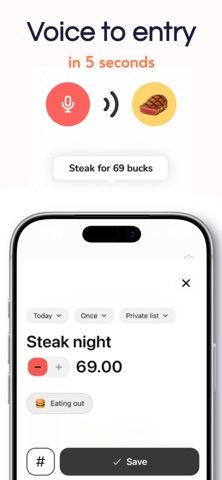
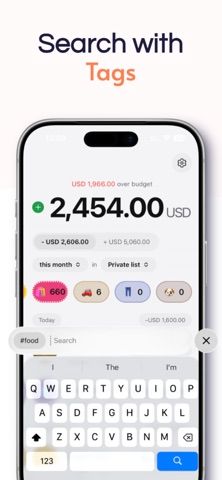
TrackDad lets users record an expense by speaking a short description, such as an amount and what it was spent on. The app turns the entry into a transaction and suggests a category, which can be reviewed and edited before saving. Users can also enter transactions manually, set category budgets and alerts, schedule recurring income or expenses, and keep separate lists for personal, household, travel, or business spending. The listing describes an anonymous profile and optional sign-in for accessing information across supported devices. Premium features start with a seven-day trial for eligible subscribers, followed by monthly or yearly auto-renewing plans; current prices appear before purchase.
Expense Tracker - TrackDad
A voice-first expense tracker with AI categorization, budgets, recurring transactions, and separate personal or business lists.
By Lothar TjipuejaReleased 2026/07/28App Store rating 5.0 (1)Official store informationPublished 2026/11/04Checked 2026-11-04
Overview
A closer look at Expense Tracker - TrackDad.
A closer look
App screenshots


Choose with confidence
The useful details.
What it does
- Add expenses by voice or manual entry
- Review and edit AI-suggested transaction categories
- Set category budgets, alerts, and recurring transactions
- Organize personal, household, travel, and business expenses in separate lists
A good fit for
- People who want to log expenses without filling out long forms
- Users tracking several budgets or expense contexts in one app
Worth knowing
- Premium requires a subscription after a seven-day trial; the listing does not specify where voice processing occurs.
Frequently asked questions
Answers based on the app’s official listing and reviewed information.
What is Expense Tracker - TrackDad used for?
A voice-first expense tracker with AI categorization, budgets, recurring transactions, and separate personal or business lists.
What can you do with Expense Tracker - TrackDad?
Add expenses by voice or manual entry Review and edit AI-suggested transaction categories Set category budgets, alerts, and recurring transactions Organize personal, household, travel, and business expenses in separate lists
Who is Expense Tracker - TrackDad designed for?
People who want to log expenses without filling out long forms Users tracking several budgets or expense contexts in one app
What should you know before downloading Expense Tracker - TrackDad?
Premium requires a subscription after a seven-day trial; the listing does not specify where voice processing occurs.
Does Expense Tracker - TrackDad include paid features?
The App Store lists a free download; eligible new subscribers can try Premium for seven days. Premium continues on a monthly or yearly auto-renewing plan after the trial; prices vary by region and appear before purchase.
Which platforms support Expense Tracker - TrackDad?
Greatooly's reviewed app information lists iOS.
Researched from official sources; this is not a hands-on review. Last checked 2026-11-04.
Keep exploring
More apps that might be a good fit.

Jars: Savings Goal Tracker
Jars tracks user-entered savings goals, deposits, and withdrawal plans without holding or moving money.

Coal - Gift List & Budget
Budget for gifts by recipient and track each purchase through delivery, wrapping, and returns.

Budget Planner App: Tally
A personal budget app with voice expense entry, automatic category suggestions, spending limits, and charts.