GreatoolyGreatooly
Expenses: Spending Tracker app icon

Expenses: Spending Tracker

Track expenses and income, scan receipts, view spending trends, and sync or share records across Apple devices.

By BLUE COMET LABS LLCApp Store rating 4.8 (1,838)Official store informationPublished 2026/11/03Checked 2026-11-03

Overview

A closer look at Expenses: Spending Tracker.

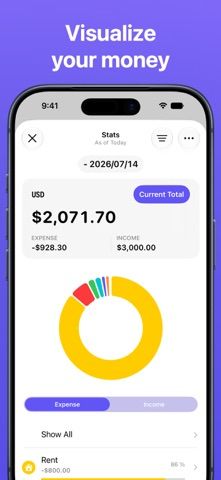
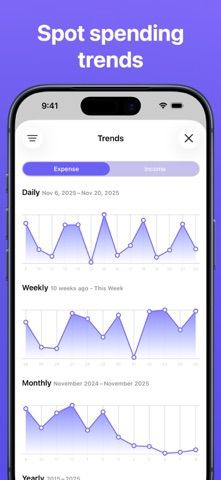
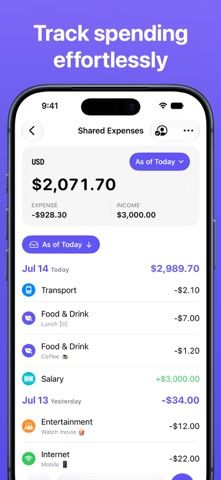
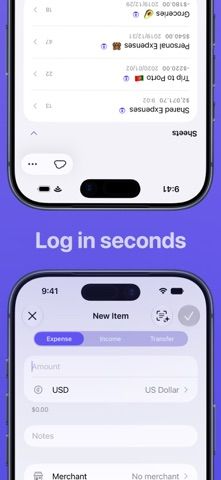
Expenses: Spending Tracker is a personal finance app for recording income and spending without creating an account. Users can enter transactions in multiple currencies, categorize them by merchant, and review trends over time. Receipt scanning is intended to reduce manual entry, while custom exchange rates are available when a traveler needs to adjust a conversion.

The listing describes iCloud syncing across iPhone, iPad, Mac, and Apple Vision Pro, shared sheets for tracking expenses with other people, CSV import, widgets, and Shortcuts support. It presents the app as focused on privacy, though that characterization comes from the developer and should be checked against the current privacy policy.

This is a manual tracker rather than a bank account or a guaranteed record of every transaction. Users should reconcile totals against statements and protect receipt images that contain addresses or payment details. We have not tested receipt recognition, currency conversion timing, shared-sheet access, or import accuracy. Current paid feature terms are not clear in the listing reviewed.
A closer look

App screenshots

Expenses: Spending Tracker official iOS screenshot 1Expenses: Spending Tracker official iOS screenshot 2Official iOS store screenshotOfficial iOS store screenshot

Choose with confidence

The useful details.

What it does

  • Record income and expenses in different currencies
  • Scan receipts and categorize transactions by merchant
  • Review spending trends and custom reports
  • Sync through iCloud, share expense sheets, and import CSV records

A good fit for

  • People who want a manual spending tracker with receipt capture and Apple-device syncing

Worth knowing

  • Manual entries may omit transactions; reconcile totals with official statements.
  • Receipt images and shared sheets can contain sensitive financial details; review access and privacy settings.
  • We have not verified receipt recognition, exchange rates, or current paid feature terms.

Frequently asked questions

Answers based on the app’s official listing and reviewed information.

What is Expenses: Spending Tracker used for?

Track expenses and income, scan receipts, view spending trends, and sync or share records across Apple devices.

What can you do with Expenses: Spending Tracker?

Record income and expenses in different currencies Scan receipts and categorize transactions by merchant Review spending trends and custom reports Sync through iCloud, share expense sheets, and import CSV records

Who is Expenses: Spending Tracker designed for?

People who want a manual spending tracker with receipt capture and Apple-device syncing

What should you know before downloading Expenses: Spending Tracker?

Manual entries may omit transactions; reconcile totals with official statements. Receipt images and shared sheets can contain sensitive financial details; review access and privacy settings. We have not verified receipt recognition, exchange rates, or current paid feature terms.

Does Expenses: Spending Tracker include paid features?

The reviewed listing does not confirm current in-app purchase options.

Which platforms support Expenses: Spending Tracker?

Greatooly's reviewed app information lists iOS.

Researched from official sources; this is not a hands-on review. Last checked 2026-11-03.

Keep exploring

More apps that might be a good fit.

Budget Planner App: Tally

A personal budget app with voice expense entry, automatic category suggestions, spending limits, and charts.