
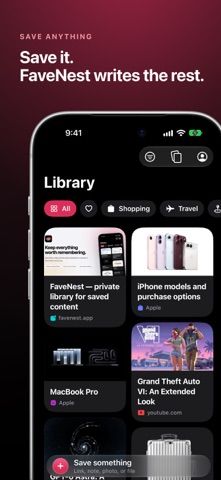
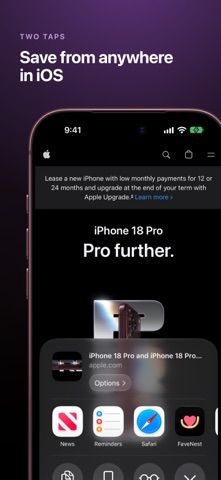
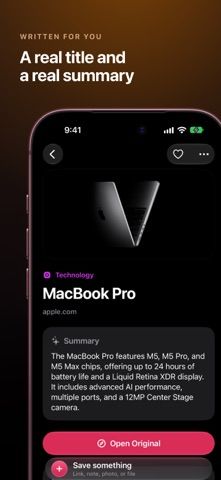
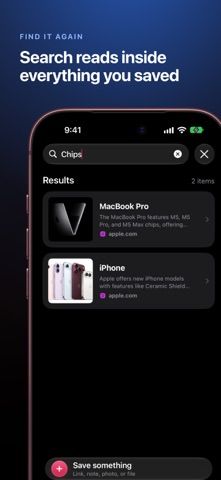
FaveNest is a visual library for links, notes, screenshots, PDFs, and saved places. Share an item from Safari, Photos, Maps, or Files, then search its text, page content, or screenshot words later. The app syncs through the user’s iCloud account without a FaveNest account or server, and it can export the full library as JSON. Apple Intelligence can create titles, summaries, categories, and tags on compatible devices; users can also connect their own API key to use a cloud model. Free use includes unlimited saves, sync, search, and export. FaveNest Pro adds AI organization, the Places map, unlimited custom categories, and interface tints. The US App Store lists $2.99 monthly with a seven-day trial, $19.99 yearly with a one-month trial, or $49.99 lifetime. FaveNest supports iPhone, iPad, and Mac and requires iOS 26 or macOS 26. Using a personal cloud API key may incur separate provider charges.

FaveNest – Visual Bookmarks
FaveNest saves links, notes, files, screenshots, and places into a searchable visual library that syncs through private iCloud.
Overview
A closer look at FaveNest – Visual Bookmarks.
A closer look
App screenshots
Choose with confidence
The useful details.
What it does
- Save links, notes, PDFs, screenshots, and map places from other apps into a visual library.
- Search notes, webpage text, and text recognized inside saved screenshots; filter by tags or favorites.
- Sync through iCloud without a separate FaveNest account and export the library as JSON.
- Use Apple Intelligence or a personal API key for richer titles, summaries, categories, and tags.
A good fit for
- People who save useful links and files across Apple devices and want to find them later.
- Users who want a private bookmark library with searchable notes and offline webpage previews.
Worth knowing
- Requires iOS 26 or later on iPhone/iPad and macOS 26 or later on Mac.
- Apple Intelligence organization requires compatible hardware; a cloud model requires the user’s own API key and may have separate provider costs.
- Pro is optional but paid: $2.99 monthly, $19.99 yearly, or $49.99 lifetime in the US App Store.
Frequently asked questions
Answers based on the app’s official listing and reviewed information.
What is FaveNest – Visual Bookmarks used for?
FaveNest saves links, notes, files, screenshots, and places into a searchable visual library that syncs through private iCloud.
What can you do with FaveNest – Visual Bookmarks?
Save links, notes, PDFs, screenshots, and map places from other apps into a visual library. Search notes, webpage text, and text recognized inside saved screenshots; filter by tags or favorites. Sync through iCloud without a separate FaveNest account and export the library as JSON. Use Apple Intelligence or a personal API key for richer titles, summaries, categories, and tags.
Who is FaveNest – Visual Bookmarks designed for?
People who save useful links and files across Apple devices and want to find them later. Users who want a private bookmark library with searchable notes and offline webpage previews.
What should you know before downloading FaveNest – Visual Bookmarks?
Requires iOS 26 or later on iPhone/iPad and macOS 26 or later on Mac. Apple Intelligence organization requires compatible hardware; a cloud model requires the user’s own API key and may have separate provider costs. Pro is optional but paid: $2.99 monthly, $19.99 yearly, or $49.99 lifetime in the US App Store.
What does FaveNest – Visual Bookmarks cost?
Free to download. Free use includes unlimited saves, iCloud sync, search, and JSON export; organization uses metadata and keywords. FaveNest Pro is listed at $2.99 monthly with a 7-day trial or $19.99 yearly with a 1-month trial in the US App Store. FaveNest Pro Lifetime is listed as a one-time $49.99 purchase in the US App Store.
Which platforms support FaveNest – Visual Bookmarks?
Greatooly's reviewed app information lists iOS, macOS.
Researched from official sources; this is not a hands-on review. Last checked 2026-11-10.
Keep exploring
More apps that might be a good fit.

CleanHaus: Airbnb Turnovers
CleanHaus automates short-term rental turnovers by connecting booking calendars with cleaners, schedules and property tasks.

GoalStar: Daily Goal Tracker
GoalStar makes daily goals visible with a gold-star chart, streaks, reminders, widgets and optional NFC tap tags.

Accessbox - Password Manager
Accessbox stores passwords, passkeys and verification codes in encrypted Accesscards with AutoFill, breach alerts and optional iCloud sync.