
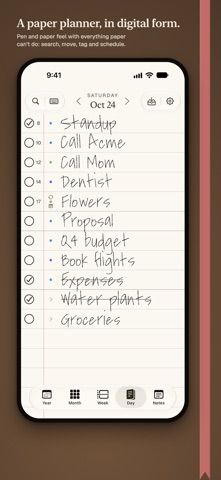
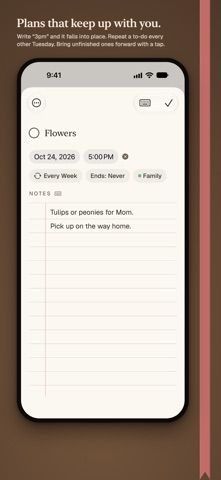
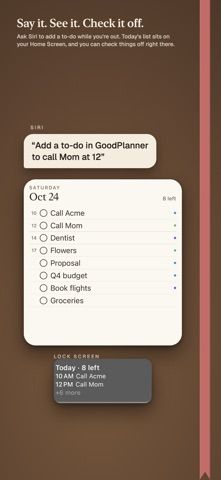
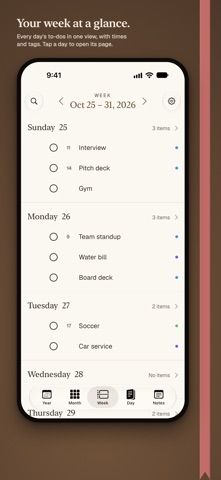
GoodPlanner is a daily planner designed to feel like writing on a clean sheet of paper. Users can handwrite or type a line, then turn it into a to-do with a time, repeat schedule, tags, or notes. It pairs daily planning with separate note pages and can recognize handwriting on-device. The listing says plans sync through the user's iCloud across iPhone, iPad, Mac, and family devices, without an account, ads, or collected data. Every feature is available for 14 days; after that, one $29.99 purchase unlocks the app across the listed Apple devices and family members. There is no recurring subscription, and notes remain available to read and search if the trial ends before purchase. This may fit people who prefer a handwritten daily page but still want searchable reminders and recurring tasks.
GoodPlanner - Daily Planner
A paper-inspired daily planner that combines handwriting, notes, and actionable to-dos, with iCloud sync across Apple devices.
Overview
A closer look at GoodPlanner - Daily Planner.
A closer look
App screenshots
Choose with confidence
The useful details.
What it does
- Write or type daily notes and turn a line into a timed or repeating to-do.
- Use tags and notes while keeping the daily page visually uncluttered.
- Search handwriting recognized on-device and sync through the user's iCloud.
- Use the planner across iPhone, iPad, Mac, and family devices after purchase.
A good fit for
- People who like a handwriting-first daily planner with searchable to-dos and recurring tasks.
Worth knowing
- The full-feature trial lasts 14 days; continuing use requires a $29.99 one-time purchase in the US.
- Sync uses the user's iCloud account and Apple devices; the listing does not describe Android or web access.
- The paper-like layout intentionally avoids dashboards, templates, and streak-based tracking.
Frequently asked questions
Answers based on the app’s official listing and reviewed information.
What is GoodPlanner - Daily Planner used for?
A paper-inspired daily planner that combines handwriting, notes, and actionable to-dos, with iCloud sync across Apple devices.
What can you do with GoodPlanner - Daily Planner?
Write or type daily notes and turn a line into a timed or repeating to-do. Use tags and notes while keeping the daily page visually uncluttered. Search handwriting recognized on-device and sync through the user's iCloud. Use the planner across iPhone, iPad, Mac, and family devices after purchase.
Who is GoodPlanner - Daily Planner designed for?
People who like a handwriting-first daily planner with searchable to-dos and recurring tasks.
What should you know before downloading GoodPlanner - Daily Planner?
The full-feature trial lasts 14 days; continuing use requires a $29.99 one-time purchase in the US. Sync uses the user's iCloud account and Apple devices; the listing does not describe Android or web access. The paper-like layout intentionally avoids dashboards, templates, and streak-based tracking.
Does GoodPlanner - Daily Planner include paid features?
The listing offers a 14-day trial followed by a $29.99 one-time purchase in the US for iPhone, iPad, Mac, and family use. No recurring subscription is required.
Which platforms support GoodPlanner - Daily Planner?
Greatooly's reviewed app information lists iOS.
Researched from official sources; this is not a hands-on review. Last checked 2026-11-04.
Keep exploring
More apps that might be a good fit.

CleanHaus: Airbnb Turnovers
CleanHaus automates short-term rental turnovers by connecting booking calendars with cleaners, schedules and property tasks.

GoalStar: Daily Goal Tracker
GoalStar makes daily goals visible with a gold-star chart, streaks, reminders, widgets and optional NFC tap tags.

Accessbox - Password Manager
Accessbox stores passwords, passkeys and verification codes in encrypted Accesscards with AutoFill, breach alerts and optional iCloud sync.