
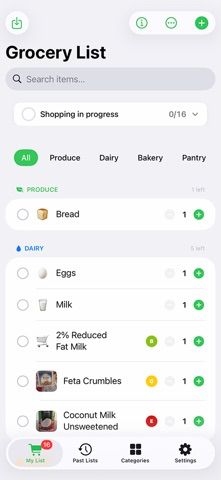
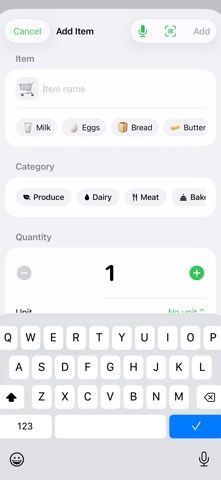
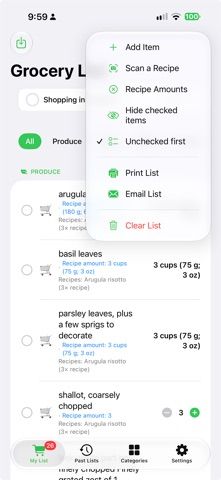
Grocery/ShoppingList combines everyday lists with barcode nutrition lookup and recipe scanning. Add groceries by typing, voice, or suggestions, then organize them by category and reuse saved lists from history. Scan a printed recipe or recipe image to recognize its ingredients on the device, review the extracted text, and combine amounts across recipes into a single shopping list. Product barcodes can show nutrition facts and grades such as Nutri-Score, NOVA, and Eco-Score using Open Food Facts data. Lower-rated products can be paired with alternatives from the same category. Lists, categories, history, and scanned data sync through the user's iCloud account without a separate app account. The iOS app is a paid download at US$0.99, with no in-app purchases listed. It requires iOS 17 or later; the developer says the app has no ads or tracking and Apple's privacy label says data is not collected.
Grocery/ShoppingList
Build grocery lists by voice or recipe scan, compare barcode nutrition grades, and sync lists with iCloud.
Overview
A closer look at Grocery/ShoppingList.
A closer look
App screenshots
Choose with confidence
The useful details.
What it does
- Create lists by typing, voice input, suggestions, or recipe-image scanning.
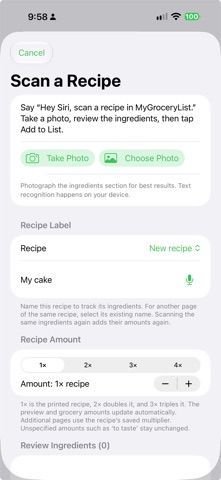
- Combine ingredient amounts from several recipes and review the text recognized from a printed recipe before adding it.
- Scan barcodes for nutrition facts and scores sourced from Open Food Facts.
- See lower-rated products and suggested alternatives in the same food category.
- Organize and reuse lists, check off items, and sync lists and history through iCloud.
A good fit for
- Shoppers who want a reusable grocery list with recipe-ingredient scanning and barcode nutrition details.
- People who prefer iCloud sync and do not want to create a separate shopping-app account.
Worth knowing
- The App Store lists the app as a US$0.99 paid download; no separate in-app purchases are shown.
- Recipe text recognition works best with the ingredients section of a printed English recipe. Review recognized amounts and product matches before shopping.
- Nutrition data depends on Open Food Facts product coverage and may be missing or incomplete for some barcodes.
- Requires iOS 17.0 or later.
Frequently asked questions
Answers based on the app’s official listing and reviewed information.
Can Grocery/ShoppingList turn a recipe into a grocery list?
Yes. Photograph a printed recipe or choose a recipe image, review the recognized ingredients, and add them to a list. Ingredients from multiple recipes can be combined.
Does the app scan product barcodes?
Yes. It looks up available nutrition data and scores from Open Food Facts, including Nutri-Score and processing information.
Can I add groceries hands-free?
Yes. The listing describes voice input as well as typing and quick suggestions.
Does Grocery/ShoppingList sync across devices?
Yes. Lists, categories, history, and scanned nutrition data can sync through iCloud for devices using the same Apple ID.
How much does Grocery/ShoppingList cost?
The US App Store lists a one-time paid download for $0.99 and shows no in-app purchases.
What iOS version is required?
The App Store lists iOS 17.0 or later.
Researched from official sources; this is not a hands-on review. Last checked 2026-11-13.
Keep exploring
More apps that might be a good fit.
PrepYourWeek: Meal Prep
A weekly meal-prep planner with 220+ recipes, macro estimates, recipe-based shopping lists, and guided cooking steps.
Taplist – Grocery List
Build grocery lists quickly, reuse regular purchases, group items by recipe, and keep shopping history on your iPhone.

Mise: Family Recipe Cookbook
Create and import recipes, scan handwritten cards, and share a digital family cookbook with collaborative Kitchens.