
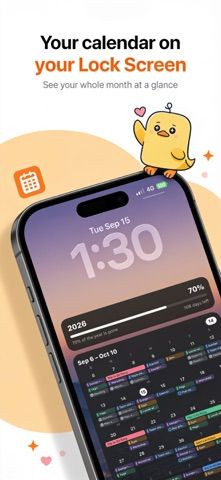
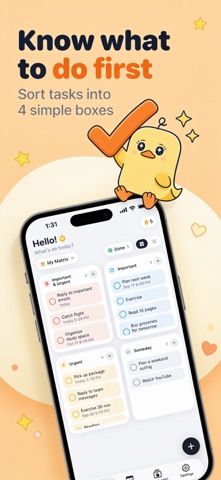
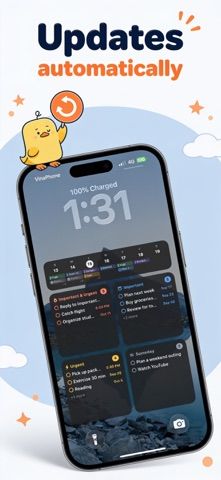
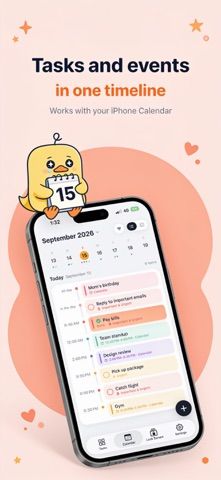
LockDay turns an iPhone Lock Screen into a glanceable view of tasks, calendar events, and notes. Users can sort priorities with a four-box matrix, see calendar items beside to-dos, and pin a checklist or note where it is easy to find. Templates can combine a month view, weekly schedule, daily timeline, countdowns, and other components, with personal photos and layout controls. A one-time Shortcuts setup keeps the Lock Screen view updated. The free tier has limits; LockDay Pro unlocks more styles, unlimited tasks and notes, repeating tasks, and iCloud sync. The app says it has no account, ads, or tracking and stores data on the device or in the user's iCloud. Pro subscriptions and lifetime purchases are available in the US App Store.

LockDay: To-Do List & Planner
A to-do list and calendar that surfaces tasks, notes, and events on a customizable iPhone Lock Screen and widgets.
By Dat PhamReleased 2026/09/23App Store rating 4.8 (90)Official store informationPublished 2026/11/04Checked 2026-11-04
Overview
A closer look at LockDay: To-Do List & Planner.
A closer look
App screenshots
Choose with confidence
The useful details.
What it does
- Show tasks, events, notes, and checklists on the Lock Screen and widgets.
- Prioritize tasks with a four-box importance and urgency matrix.
- Combine a month calendar, week strip, daily timeline, countdown, and other blocks.
- Customize templates and use a Shortcuts automation to refresh the Lock Screen.
A good fit for
- iPhone users who want their daily priorities visible without opening a planner app.
Worth knowing
- Keeping the Lock Screen current requires a one-time Shortcuts setup; repeating tasks, iCloud sync, and unlimited items require Pro.
Frequently asked questions
Answers based on the app’s official listing and reviewed information.
What is LockDay: To-Do List & Planner used for?
A to-do list and calendar that surfaces tasks, notes, and events on a customizable iPhone Lock Screen and widgets.
What can you do with LockDay: To-Do List & Planner?
Show tasks, events, notes, and checklists on the Lock Screen and widgets. Prioritize tasks with a four-box importance and urgency matrix. Combine a month calendar, week strip, daily timeline, countdown, and other blocks. Customize templates and use a Shortcuts automation to refresh the Lock Screen.
Who is LockDay: To-Do List & Planner designed for?
iPhone users who want their daily priorities visible without opening a planner app.
What should you know before downloading LockDay: To-Do List & Planner?
Keeping the Lock Screen current requires a one-time Shortcuts setup; repeating tasks, iCloud sync, and unlimited items require Pro.
Does LockDay: To-Do List & Planner include paid features?
The US App Store lists LockDay Pro at $3.99 monthly or $11.99 yearly; current regional pricing and renewal terms appear in the store. The US App Store also lists lifetime unlocks at $19.99 and $24.99; confirm the available option in the purchase screen.
Which platforms support LockDay: To-Do List & Planner?
Greatooly's reviewed app information lists iOS.
Researched from official sources; this is not a hands-on review. Last checked 2026-11-04.
Keep exploring
More apps that might be a good fit.

CleanHaus: Airbnb Turnovers
CleanHaus automates short-term rental turnovers by connecting booking calendars with cleaners, schedules and property tasks.

GoalStar: Daily Goal Tracker
GoalStar makes daily goals visible with a gold-star chart, streaks, reminders, widgets and optional NFC tap tags.

Accessbox - Password Manager
Accessbox stores passwords, passkeys and verification codes in encrypted Accesscards with AutoFill, breach alerts and optional iCloud sync.