
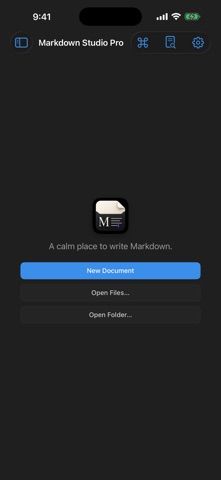
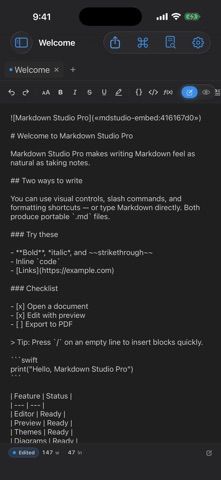
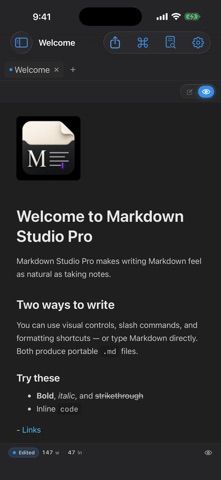
Markdown Studio Pro is a writing environment for people who want Markdown files to remain portable. Open or save .md, .markdown, .mdown, and .mkd documents, write in a source editor with formatting controls, and preview the rendered result beside the text or on its own. Folder workspaces, recents, autosave for files with a path, and Quick Open help manage projects without a hosted notes account. Images can be embedded in Markdown files, while themes, typography, line numbers, and a command palette provide editing controls. The app can export to PDF, HTML, or plain text and print through the system sheet. It is free to download and the App Store lists no in-app purchases. The iPhone and iPad versions require iOS 17 or later; the native Mac compatibility listing requires macOS 14 or later with Apple silicon. Documents stay in the file locations users choose, so backups and cloud sync depend on those locations.
Markdown Studio Pro
Markdown Studio Pro edits portable Markdown files with source and live-preview modes, folder workspaces, themes, and export tools.
Overview
A closer look at Markdown Studio Pro.
A closer look
App screenshots
Choose with confidence
The useful details.
What it does
- Edit and preview Markdown files in source, live, or split-view layouts.
- Open common Markdown extensions and organize files with folder workspaces, recents, Quick Open, and autosave.
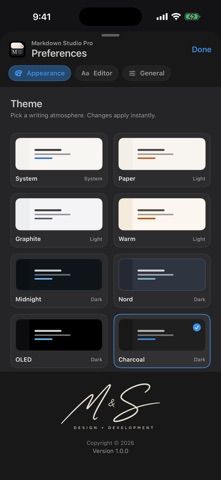
- Embed images, customize themes and typography, and use a command palette.
- Export Markdown content to PDF, HTML, or plain text and print from the system sheet.
A good fit for
- Writers and developers who want a focused Markdown editor for files they control.
- People who need Markdown previews while keeping documents portable across editors.
Worth knowing
- Requires iOS 17 or later on iPhone and iPad; Mac use requires macOS 14 or later on Apple silicon.
- The listing describes file-based editing rather than a hosted collaboration workspace.
- Documents remain in chosen device or Files locations; cross-device syncing depends on the storage location selected.
Frequently asked questions
Answers based on the app’s official listing and reviewed information.
What is Markdown Studio Pro used for?
Markdown Studio Pro edits portable Markdown files with source and live-preview modes, folder workspaces, themes, and export tools.
What can you do with Markdown Studio Pro?
Edit and preview Markdown files in source, live, or split-view layouts. Open common Markdown extensions and organize files with folder workspaces, recents, Quick Open, and autosave. Embed images, customize themes and typography, and use a command palette. Export Markdown content to PDF, HTML, or plain text and print from the system sheet.
Who is Markdown Studio Pro designed for?
Writers and developers who want a focused Markdown editor for files they control. People who need Markdown previews while keeping documents portable across editors.
What should you know before downloading Markdown Studio Pro?
Requires iOS 17 or later on iPhone and iPad; Mac use requires macOS 14 or later on Apple silicon. The listing describes file-based editing rather than a hosted collaboration workspace. Documents remain in chosen device or Files locations; cross-device syncing depends on the storage location selected.
What does Markdown Studio Pro cost?
Free to download. Free to download; the US App Store lists no in-app purchases.
Which platforms support Markdown Studio Pro?
Greatooly's reviewed app information lists iOS, macOS.
Researched from official sources; this is not a hands-on review. Last checked 2026-11-10.
Keep exploring
More apps that might be a good fit.

CleanHaus: Airbnb Turnovers
CleanHaus automates short-term rental turnovers by connecting booking calendars with cleaners, schedules and property tasks.

GoalStar: Daily Goal Tracker
GoalStar makes daily goals visible with a gold-star chart, streaks, reminders, widgets and optional NFC tap tags.

Accessbox - Password Manager
Accessbox stores passwords, passkeys and verification codes in encrypted Accesscards with AutoFill, breach alerts and optional iCloud sync.