
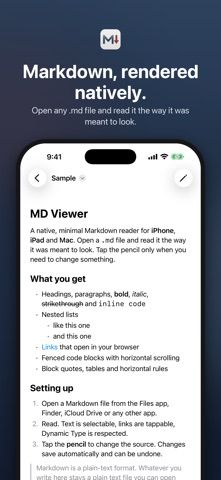
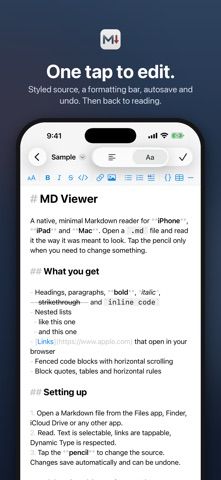
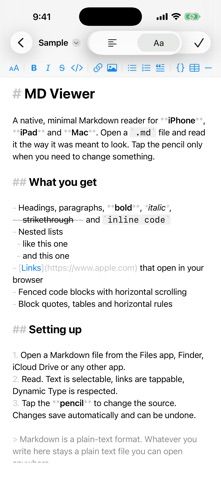
MD Viewer: Markdown Viewer opens Markdown files in a reading layout with headings, lists, quotes, tables, code blocks, links, and images rendered using system fonts and the device’s text and accent settings. Users can switch into an editor to change the source in a formatted mode with styled Markdown or a plain text mode. A formatting bar provides shortcuts for common markup, and edits save automatically to the original Markdown file with undo support. Files can be opened through Files, iCloud Drive, Finder, Dropbox, drag and drop, Open With, or the system share sheet. The app supports multiple windows on iPad and Mac and keyboard shortcuts. The developer says there are no servers, analytics, ads, or tracking; documents remain on the device, except linked images may load from their source. MD Viewer supports CommonMark, tables, and strikethrough and requires iOS 17, iPadOS 17, or macOS 14 or later. The listing does not specify paid features or subscription terms.

MD Viewer: Markdown Viewer
MD Viewer reads and edits Markdown files with formatted preview, plain-source mode, and local file-provider support.
Overview
A closer look at MD Viewer: Markdown Viewer.
A closer look
App screenshots
Choose with confidence
The useful details.
What it does
- Read Markdown files with rendered headings, lists, quotes, tables, code, links, and images.
- Edit formatted Markdown or switch to a plain-text source editor with automatic saving and undo.
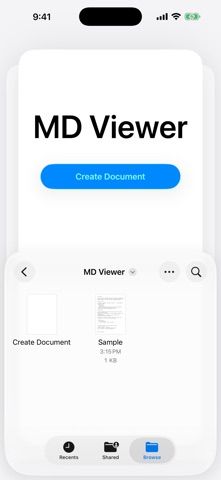
- Open files from local storage, iCloud Drive, Dropbox, Finder, or the system share sheet.
- Use multiple windows on iPad and Mac and navigate with keyboard shortcuts.
- Adjust text size and accent color while viewing documents.
A good fit for
- People who keep Markdown files in Files, iCloud Drive, Dropbox, or other folders.
- Users who want one app for readable Markdown previews and direct file editing on iPhone, iPad, or Mac.
Worth knowing
- The listing requires iOS 17, iPadOS 17, or macOS 14 or later and does not specify paid features or pricing.
- The developer says linked images may load from their source; other document contents remain on the device.
Frequently asked questions
Answers based on the app’s official listing and reviewed information.
What is MD Viewer: Markdown Viewer used for?
MD Viewer reads and edits Markdown files with formatted preview, plain-source mode, and local file-provider support.
What can you do with MD Viewer: Markdown Viewer?
Read Markdown files with rendered headings, lists, quotes, tables, code, links, and images. Edit formatted Markdown or switch to a plain-text source editor with automatic saving and undo. Open files from local storage, iCloud Drive, Dropbox, Finder, or the system share sheet. Use multiple windows on iPad and Mac and navigate with keyboard shortcuts.
Who is MD Viewer: Markdown Viewer designed for?
People who keep Markdown files in Files, iCloud Drive, Dropbox, or other folders. Users who want one app for readable Markdown previews and direct file editing on iPhone, iPad, or Mac.
What should you know before downloading MD Viewer: Markdown Viewer?
The listing requires iOS 17, iPadOS 17, or macOS 14 or later and does not specify paid features or pricing. The developer says linked images may load from their source; other document contents remain on the device.
What does MD Viewer: Markdown Viewer cost?
Apple lists a free download; the current store description does not specify whether paid features or subscriptions are available.
Which platforms support MD Viewer: Markdown Viewer?
Greatooly's reviewed app information lists iOS, macOS.
Researched from official sources; this is not a hands-on review. Last checked 2026-11-10.
Keep exploring
More apps that might be a good fit.

WellKept: Home Maintenance
WellKept builds a home maintenance plan from a property's address, equipment, local climate, and available public records.

ToteTracker: Home Inventory
ToteTracker catalogs household belongings by room and container, then helps users find items with search, scans, and shared inventories.

Shift Work Calendar: Planr
Planr organizes rotating work shifts, multiple jobs, estimated pay, and time off in a calendar built for shift workers.