
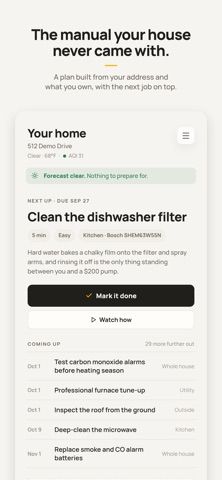
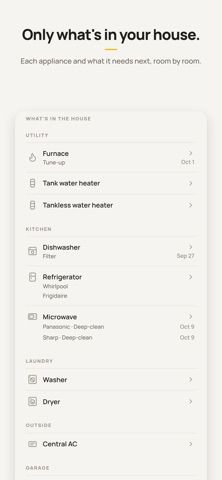
WellKept turns home upkeep into a property-specific schedule. After a homeowner enters an address and adds equipment, the service uses available public records, local water and climate conditions, and appliance details to suggest maintenance tasks and due dates. Photographing an equipment nameplate can help identify its make and model; appliance pages can include manuals, receipts, and warranty information. Tasks include step-by-step instructions, estimated time, and sometimes a short video. WellKept also checks added appliances against federal recall information and adjusts some reminders to weather events such as freezes or heat waves. A household can share one plan across phones and the web. The developer describes the service as free for homeowners. Setup requires sharing a home address and equipment details, and recommendations should be checked against product manuals and qualified professionals when needed.

WellKept: Home Maintenance
WellKept builds a home maintenance plan from a property's address, equipment, local climate, and available public records.
Overview
A closer look at WellKept: Home Maintenance.
A closer look
App screenshots
Choose with confidence
The useful details.
What it does
- Generate maintenance reminders using a home address, local climate, and the equipment added to the property.
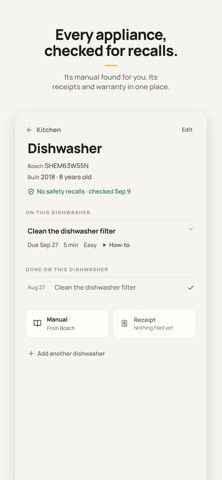
- Read appliance nameplates from the camera and keep model details, manuals, receipts, and warranty information together.
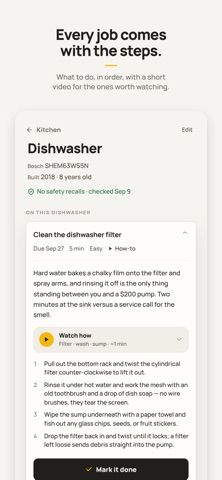
- Follow task instructions with estimated time and required supplies, plus short videos for some common jobs.
- Check listed appliances for federal recalls and share a maintenance plan with household members across phone and web.
A good fit for
- Homeowners who want reminders tailored to their home's equipment, weather, and maintenance history.
- Households that want to keep appliance records and upkeep tasks in one shared plan.
Worth knowing
- Setup asks for a home address and appliance information; property-specific suggestions depend on the records and details available.
- WellKept is a planning tool, not a home inspection, contractor, or safety authority; confirm safety-critical work with qualified sources.
- The developer says it is free for homeowners; the listing does not describe Android support.
Frequently asked questions
Answers based on the app’s official listing and reviewed information.
What is WellKept: Home Maintenance used for?
WellKept builds a home maintenance plan from a property's address, equipment, local climate, and available public records.
What can you do with WellKept: Home Maintenance?
Generate maintenance reminders using a home address, local climate, and the equipment added to the property. Read appliance nameplates from the camera and keep model details, manuals, receipts, and warranty information together. Follow task instructions with estimated time and required supplies, plus short videos for some common jobs. Check listed appliances for federal recalls and share a maintenance plan with household members across phone and web.
Who is WellKept: Home Maintenance designed for?
Homeowners who want reminders tailored to their home's equipment, weather, and maintenance history. Households that want to keep appliance records and upkeep tasks in one shared plan.
What should you know before downloading WellKept: Home Maintenance?
Setup asks for a home address and appliance information; property-specific suggestions depend on the records and details available. WellKept is a planning tool, not a home inspection, contractor, or safety authority; confirm safety-critical work with qualified sources. The developer says it is free for homeowners; the listing does not describe Android support.
What does WellKept: Home Maintenance cost?
Free to download. The developer's terms say WellKept is free for homeowners; its App Store listing shows no in-app purchases.
Which platforms support WellKept: Home Maintenance?
Greatooly's reviewed app information lists iOS.
Researched from official sources; this is not a hands-on review. Last checked 2026-11-10.
Keep exploring
More apps that might be a good fit.

CleanHaus: Airbnb Turnovers
CleanHaus automates short-term rental turnovers by connecting booking calendars with cleaners, schedules and property tasks.

GoalStar: Daily Goal Tracker
GoalStar makes daily goals visible with a gold-star chart, streaks, reminders, widgets and optional NFC tap tags.

Accessbox - Password Manager
Accessbox stores passwords, passkeys and verification codes in encrypted Accesscards with AutoFill, breach alerts and optional iCloud sync.