
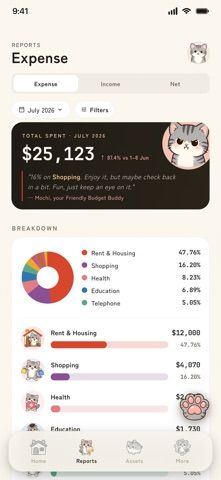
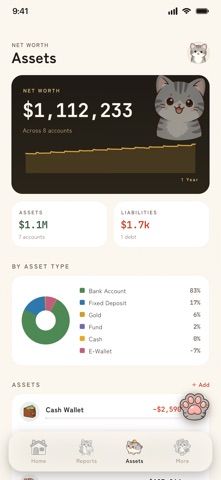
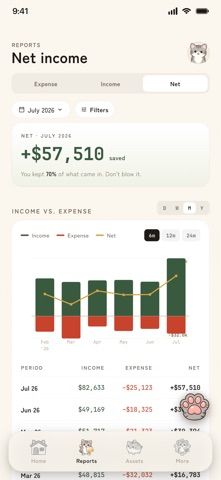
Money Meow turns manual money tracking into a more playful daily check-in. Enter expenses, income, or transfers using a calculator-style form, then organize accounts and custom categories. The app can show assets and liabilities together, including cash, savings, investments, credit cards, and loans, with multi-currency formatting and conversions for separate accounts. A cat companion responds to spending patterns, while reports and charts show trends and category breakdowns. The listing also mentions optional iCloud backups, import and export, and reminders to keep a ledger current. This is a personal finance log, not a bank-connected transaction feed; users should confirm whether integrations they need are supported before relying on it. The US App Store offers a free download, but the listing does not specify optional purchase terms or whether every feature is free.

Money Meow: Expense Tracker
A personal expense ledger with account balances, budgets, charts, and a reactive cat companion.
Overview
A closer look at Money Meow: Expense Tracker.
A closer look
App screenshots

Choose with confidence
The useful details.
What it does
- Record expenses, income, and transfers between accounts
- Track assets, liabilities, and balances across multiple currencies
- Review charts, spending reports, and category trends
- Use iCloud backups, reminders, and data import or export tools
A good fit for
- People who want a visual manual ledger with a playful companion
- Users tracking several account types or currencies in one place
Worth knowing
- The listing describes quick transaction entry but does not explain whether external bank-feed syncing or paid options are available.
Frequently asked questions
Answers based on the app’s official listing and reviewed information.
What is Money Meow: Expense Tracker used for?
A personal expense ledger with account balances, budgets, charts, and a reactive cat companion.
What can you do with Money Meow: Expense Tracker?
Record expenses, income, and transfers between accounts Track assets, liabilities, and balances across multiple currencies Review charts, spending reports, and category trends Use iCloud backups, reminders, and data import or export tools
Who is Money Meow: Expense Tracker designed for?
People who want a visual manual ledger with a playful companion Users tracking several account types or currencies in one place
What should you know before downloading Money Meow: Expense Tracker?
The listing describes quick transaction entry but does not explain whether external bank-feed syncing or paid options are available.
Does Money Meow: Expense Tracker include paid features?
The US App Store lists a free download.
Which platforms support Money Meow: Expense Tracker?
Greatooly's reviewed app information lists iOS.
Researched from official sources; this is not a hands-on review. Last checked 2026-11-04.
Keep exploring
More apps that might be a good fit.

Jars: Savings Goal Tracker
Jars tracks user-entered savings goals, deposits, and withdrawal plans without holding or moving money.

Coal - Gift List & Budget
Budget for gifts by recipient and track each purchase through delivery, wrapping, and returns.

Budget Planner App: Tally
A personal budget app with voice expense entry, automatic category suggestions, spending limits, and charts.