
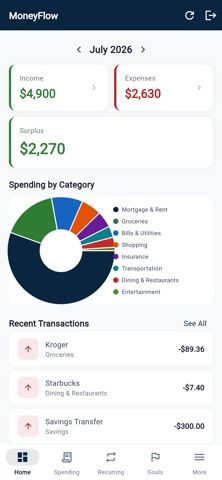
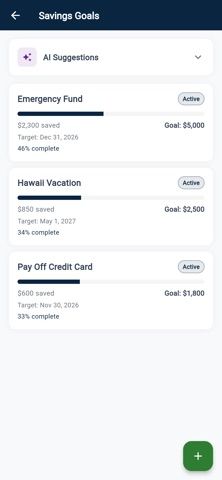
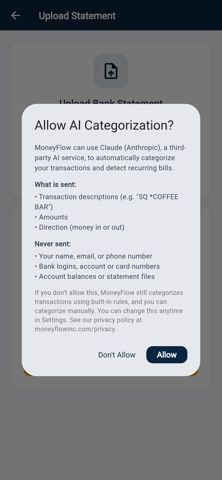
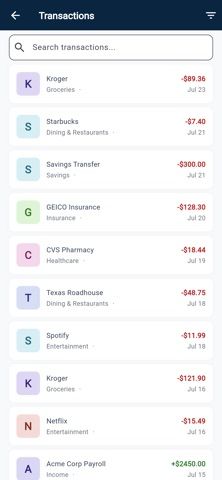
MoneyFlow is a personal-finance organizer for reviewing income, expenses, recurring payments, and upcoming bills. Users can connect an institution through Plaid for transaction sync or import PDF and CSV statements from a bank. The app says it automatically categorizes transactions, detects recurring payments and income, displays a payment calendar, and compares spending categories across months. Savings goals and an income-versus-expenses view round out the dashboard. MoneyFlow is free to get started, and the developer describes encryption, two-factor authentication, and a no-sale policy for financial data. The listing does not clarify which features require payment, how Plaid connections are scoped, or whether all banks and statement formats are supported. It is a record-keeping and budgeting aid, not investment, tax, or financial advice; confirm imported figures against bank statements.

MoneyFlow: Personal Finance
A personal finance dashboard that imports bank transactions or statements and summarizes bills, spending, and savings goals.
Overview
A closer look at MoneyFlow: Personal Finance.
A closer look
App screenshots
Choose with confidence
The useful details.
What it does
- Sync transactions through Plaid or import bank statements in PDF or CSV
- Review categorized spending, recurring payments, and income
- See upcoming bills and deposits in a payment calendar
- Compare monthly spending and track savings goals
A good fit for
- People who want a single dashboard for imported transactions and upcoming bills
- Users who prefer bank sync or statement import over manual entry
Worth knowing
- The listing does not specify paid-feature limits or supported institutions and formats; imported financial figures should be checked against source statements.
Frequently asked questions
Answers based on the app’s official listing and reviewed information.
What is MoneyFlow: Personal Finance used for?
A personal finance dashboard that imports bank transactions or statements and summarizes bills, spending, and savings goals.
What can you do with MoneyFlow: Personal Finance?
Sync transactions through Plaid or import bank statements in PDF or CSV Review categorized spending, recurring payments, and income See upcoming bills and deposits in a payment calendar Compare monthly spending and track savings goals
Who is MoneyFlow: Personal Finance designed for?
People who want a single dashboard for imported transactions and upcoming bills Users who prefer bank sync or statement import over manual entry
What should you know before downloading MoneyFlow: Personal Finance?
The listing does not specify paid-feature limits or supported institutions and formats; imported financial figures should be checked against source statements.
Does MoneyFlow: Personal Finance include paid features?
The developer says MoneyFlow is free to get started.
Which platforms support MoneyFlow: Personal Finance?
Greatooly's reviewed app information lists iOS.
Researched from official sources; this is not a hands-on review. Last checked 2026-11-04.
Keep exploring
More apps that might be a good fit.

Jars: Savings Goal Tracker
Jars tracks user-entered savings goals, deposits, and withdrawal plans without holding or moving money.

Coal - Gift List & Budget
Budget for gifts by recipient and track each purchase through delivery, wrapping, and returns.

Budget Planner App: Tally
A personal budget app with voice expense entry, automatic category suggestions, spending limits, and charts.