
Nibomo helps learners turn study material into flashcards and revisit it on a schedule that adapts to their answers. Add notes or photos, ask the AI to draft cards or explain a difficult topic, then group cards into decks and add tags for review. Saved cards can be studied offline, and the app tracks review activity and streaks. A signed-in iPhone account also enables Apple Watch reviews, while AI features require an internet connection. The US App Store lists a Premium purchase for $6.99 but does not show its billing period in the product label. Apple’s unverified privacy label includes linked contact information, photos or videos, audio, user content, identifiers, interaction, and diagnostics. The listing is rated 13+ and requires iOS/iPadOS 18 or later.
Nibomo: Make AI Flashcards
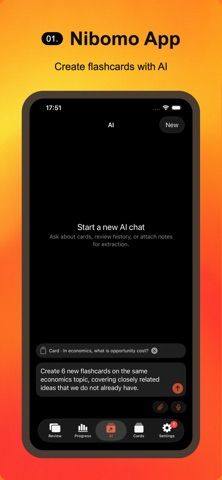
Turn study notes and photos into AI flashcards, review them with spaced repetition, and keep saved decks available offline.
Overview
A closer look at Nibomo: Make AI Flashcards.
A closer look
App screenshots
Choose with confidence
The useful details.
What it does
- Create AI flashcards from notes and photos for exam study or vocabulary practice.
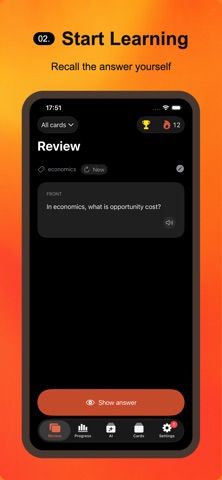
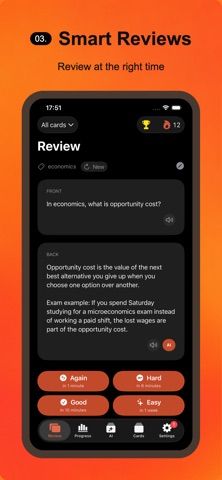
- Review cards with adaptive spaced repetition based on how you answer.
- Ask AI to explain a topic or improve the wording of a card.
- Organize materials into decks and tags and review saved cards offline.
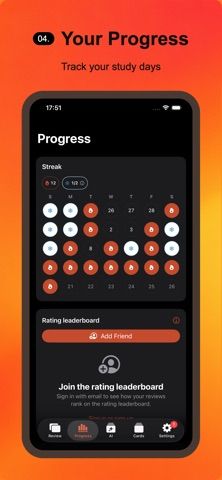
- Track review activity and streaks, with Apple Watch card review for signed-in users.
A good fit for
- Students who want to convert existing notes or images into review cards.
- Language learners and exam candidates who want spaced-repetition practice.
Worth knowing
- AI features need an internet connection; offline review applies to saved cards.
- The listing is rated 13+ and requires iOS/iPadOS 18 or later; the Apple Watch feature requires a signed-in iPhone account.
- Apple’s unverified privacy label lists linked contact details, photos or videos, audio and other user content, identifiers, usage, diagnostics, and purchase data. The $6.99 Premium label does not state a billing period.
Frequently asked questions
Answers based on the app’s official listing and reviewed information.
Can Nibomo make flashcards from my notes?
Yes. The listing says it can turn notes and photos into AI flashcards.
How does review scheduling work?
Nibomo uses spaced repetition that adapts review timing to your answers.
Can AI explain a topic or improve a card?
Yes. The app lists AI explanations for difficult topics and wording improvements for cards; those features need internet access.
Can I review without internet?
Saved cards can be reviewed offline. AI features require an internet connection.
Can I study on Apple Watch?
Yes. The listing says flashcards can be reviewed on Apple Watch using a signed-in iPhone account.
How much is Nibomo Premium?
The US App Store lists a $6.99 Premium purchase, but the product label does not state its billing period.
Researched from official sources; this is not a hands-on review. Last checked 2026-11-19.
Keep exploring
More apps that might be a good fit.
Uniform MPJE Exam Prep
Prepare for the 2026 Uniform MPJE with pharmacy-law practice questions, timed mock exams, and federal-law review sets.

Plant Identifier Care
Identify plants from photos, set watering reminders, check light levels, and browse care guides in an ad-supported iPhone app.

Comica: AI Comic Maker Story
Turn story ideas and character photos into AI-generated comic pages, then edit dialogue and visual styles in Comica.