
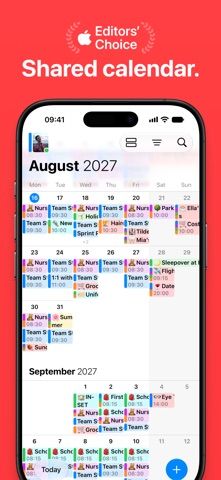
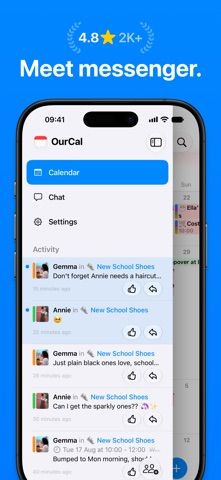
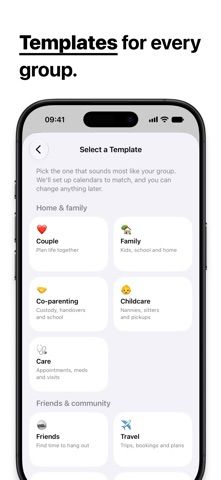
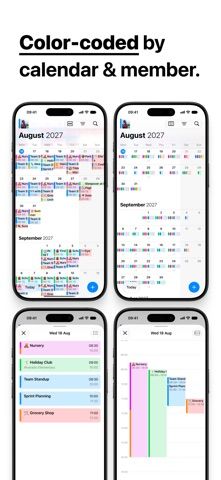
OurCal combines shared calendars with group messaging organized around events. A group can add events, discuss details in an event-specific chat, and attach photos, files, or notes so plans stay connected to the relevant date. The listing describes groups of two to 100 people and templates for families, friends, clubs, teams, and other communities. Event changes are posted for members, reducing the need to repeat the same update in separate chats. This setup may not suit groups that prefer to keep messaging and scheduling separate. Review who can see event details and attachments, and check current premium limits, sync behavior, and privacy terms before using it for work or sensitive plans.

Life & planningBabysitter scheduling appsEvent planning appsFamily calendar appsPet care scheduling appsShift scheduling apps
OurCal Calendar Messenger
Coordinate a group calendar with event-specific chats, shared files, photos, notes, and automatic updates for members.
By OurCal Ltd.App Store rating 4.7 (1,128)Official store informationPublished 2026/11/03Checked 2026-11-03
Overview
A closer look at OurCal Calendar Messenger.
A closer look
App screenshots
Choose with confidence
The useful details.
What it does
- Create shared calendars for groups and communities.
- Discuss plans in a chat attached to each event.
- Share photos, files, notes, and decisions alongside calendar events.
- Receive updates when members change shared plans.
A good fit for
- Groups that want event planning and related conversations in one shared calendar.
Worth knowing
- Members need to join the group and use the app to participate fully.
- Review event and attachment visibility before adding sensitive information.
- Check group-size limits, paid features, and privacy settings in the current app.
Frequently asked questions
Answers based on the app’s official listing and reviewed information.
What is OurCal Calendar Messenger used for?
Coordinate a group calendar with event-specific chats, shared files, photos, notes, and automatic updates for members.
What can you do with OurCal Calendar Messenger?
Create shared calendars for groups and communities. Discuss plans in a chat attached to each event. Share photos, files, notes, and decisions alongside calendar events. Receive updates when members change shared plans.
Who is OurCal Calendar Messenger designed for?
Groups that want event planning and related conversations in one shared calendar.
What should you know before downloading OurCal Calendar Messenger?
Members need to join the group and use the app to participate fully. Review event and attachment visibility before adding sensitive information. Check group-size limits, paid features, and privacy settings in the current app.
Does OurCal Calendar Messenger include paid features?
The reviewed listing does not confirm current in-app purchase options.
Which platforms support OurCal Calendar Messenger?
Greatooly's reviewed app information lists iOS.
Researched from official sources; this is not a hands-on review. Last checked 2026-11-03.
Keep exploring
More apps that might be a good fit.

VowFolio: Wedding Planner
VowFolio Planner organizes a couple’s guest list, seating chart, budget, checklist, vendors, wedding website, and guest photos.

LevelUp! Kids
LevelUp! Kids turns family chores into quests, letting children earn points for screen time or rewards that parents approve.

Wantd - Curated Wishlist
Wantd saves products from online shops into shareable wishlists, keeps gift reservations secret, and supports group gifts and a social feed.