
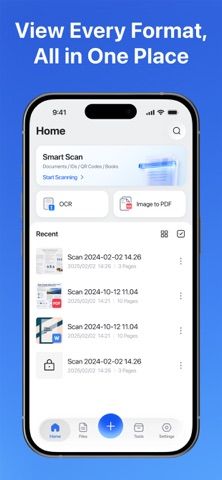
PDF Scanner: AI PDF Scan combines document scanning, OCR, file conversion, and PDF editing on an iPhone or iPad. Users can scan with the camera or import images, convert documents into searchable PDFs, and extract text to edit, copy, search, share, or translate. The app can export scans as images, PDFs, or Word files and supports conversions among PDF, Office documents, images, Markdown, text, and web pages. Other tools include merging or splitting files, rearranging pages, adding signatures or watermarks, encrypting PDFs, annotating pages, and measuring the length or area of objects with the camera. The store description does not state paid feature limits, subscription terms, account requirements, or whether document processing happens on-device or through a service. Because scans may include IDs, passports, contracts, receipts, and other sensitive records, users should review the privacy policy before importing personal documents.
PDF Scanner: AI PDF Scan
PDF Scanner: AI PDF Scan captures documents, extracts text with OCR, edits and converts PDFs, and measures objects with a camera.
Overview
A closer look at PDF Scanner: AI PDF Scan.
A closer look
App screenshots
Choose with confidence
The useful details.
What it does
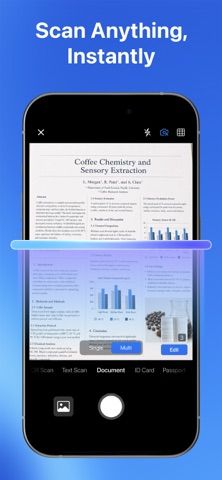
- Scan documents with the camera or import images and create searchable PDF files.
- Use OCR to extract text for editing, copying, searching, translating, or sharing.
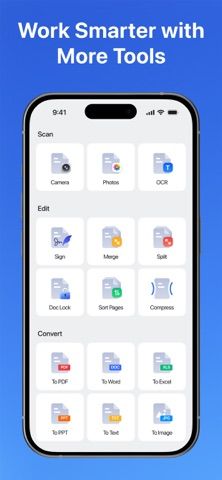
- Convert PDF, Office, Markdown, text, web, and image files among listed formats.
- Merge, split, annotate, reorder, sign, watermark, or encrypt PDF documents.
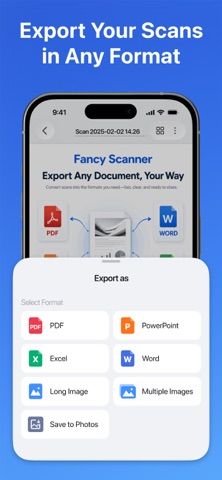
- Measure object length or area with the camera and export scans as images, PDF, or Word.
A good fit for
- People who need a mobile scanner, OCR, and PDF editing tools in one app.
- Users who convert receipts, forms, contracts, or notes into searchable files.
Worth knowing
- The listing does not specify paid limits, account requirements, or where documents and OCR requests are processed.
- Review the privacy policy before importing IDs, passports, contracts, or other sensitive documents.
Frequently asked questions
Answers based on the app’s official listing and reviewed information.
What is PDF Scanner: AI PDF Scan used for?
PDF Scanner: AI PDF Scan captures documents, extracts text with OCR, edits and converts PDFs, and measures objects with a camera.
What can you do with PDF Scanner: AI PDF Scan?
Scan documents with the camera or import images and create searchable PDF files. Use OCR to extract text for editing, copying, searching, translating, or sharing. Convert PDF, Office, Markdown, text, web, and image files among listed formats. Merge, split, annotate, reorder, sign, watermark, or encrypt PDF documents.
Who is PDF Scanner: AI PDF Scan designed for?
People who need a mobile scanner, OCR, and PDF editing tools in one app. Users who convert receipts, forms, contracts, or notes into searchable files.
What should you know before downloading PDF Scanner: AI PDF Scan?
The listing does not specify paid limits, account requirements, or where documents and OCR requests are processed. Review the privacy policy before importing IDs, passports, contracts, or other sensitive documents.
What does PDF Scanner: AI PDF Scan cost?
Apple lists a free download; the current store description does not specify paid features or subscription terms.
Which platforms support PDF Scanner: AI PDF Scan?
Greatooly's reviewed app information lists iOS.
Researched from official sources; this is not a hands-on review. Last checked 2026-11-10.
Keep exploring
More apps that might be a good fit.

CleanHaus: Airbnb Turnovers
CleanHaus automates short-term rental turnovers by connecting booking calendars with cleaners, schedules and property tasks.

GoalStar: Daily Goal Tracker
GoalStar makes daily goals visible with a gold-star chart, streaks, reminders, widgets and optional NFC tap tags.

Accessbox - Password Manager
Accessbox stores passwords, passkeys and verification codes in encrypted Accesscards with AutoFill, breach alerts and optional iCloud sync.