
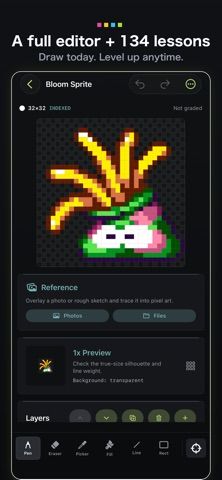
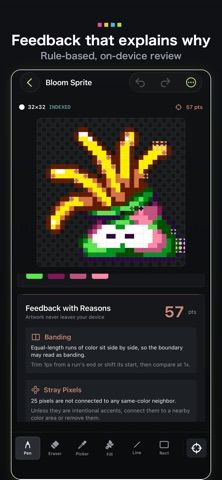
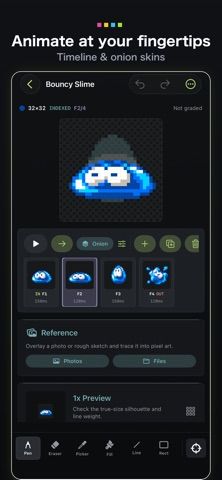
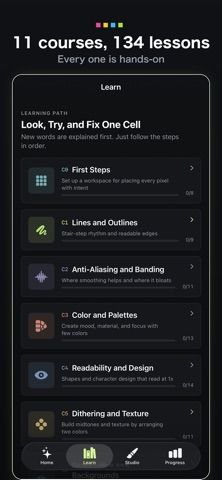
PixelHub combines a pixel-art editor with a structured learning course. The editor includes drawing and selection tools, layers, indexed palettes, reference images, undo history, and animation timelines with onion-skin frames. Artists can export crisp PNGs and sprite sheets with timing information for game engines and the web. The built-in course contains 134 interactive lessons, moving from basic pixels to shading, isometric art, and animation, with capstone projects. The developer says the app works offline without an account and keeps art and progress on the device. The listing does not clearly state whether the complete editor or course requires payment, so review purchase terms before committing to a workflow. PixelHub is specialized for pixel art rather than general illustration.

PixelHub: Pixel Art & Lessons
A pixel-art editor with layers, animation tools, sprite exports, and an offline course of guided lessons.
Overview
A closer look at PixelHub: Pixel Art & Lessons.
A closer look
App screenshots
Choose with confidence
The useful details.
What it does
- Edits pixel art with layers, indexed palettes, reference images, and undo history.
- Creates frame-based animations and exports sprite sheets with timing data.
- Includes a 134-lesson course and capstone projects that work offline.
A good fit for
- Artists learning pixel art for games, sprites, and short animations.
- Beginners who want drawing tools and guided lessons in one app.
Worth knowing
- PixelHub focuses on pixel art and game sprites; pricing and access to the full course are not clearly stated in the listing.
Frequently asked questions
Answers based on the app’s official listing and reviewed information.
What is PixelHub: Pixel Art & Lessons used for?
A pixel-art editor with layers, animation tools, sprite exports, and an offline course of guided lessons.
What can you do with PixelHub: Pixel Art & Lessons?
Edits pixel art with layers, indexed palettes, reference images, and undo history. Creates frame-based animations and exports sprite sheets with timing data. Includes a 134-lesson course and capstone projects that work offline.
Who is PixelHub: Pixel Art & Lessons designed for?
Artists learning pixel art for games, sprites, and short animations. Beginners who want drawing tools and guided lessons in one app.
What should you know before downloading PixelHub: Pixel Art & Lessons?
PixelHub focuses on pixel art and game sprites; pricing and access to the full course are not clearly stated in the listing.
Does PixelHub: Pixel Art & Lessons include paid features?
The reviewed listing does not confirm current in-app purchase options.
Which platforms support PixelHub: Pixel Art & Lessons?
Greatooly's reviewed app information lists iOS.
Researched from official sources; this is not a hands-on review. Last checked 2026-11-04.
Keep exploring
More apps that might be a good fit.

RoomMakeover: AI Room Design
RoomMakeover previews AI interior-design ideas from room photos, with style controls, credit packs, and Pro plans.

Zu3D
Zu3D combines stop-motion capture, drawing, video editing, green-screen effects, sound, and export tools for animated films.

CreasePad
Draw in a book-style sketchpad with pressure-sensitive tools, PDF annotation, and optional iCloud sync.