
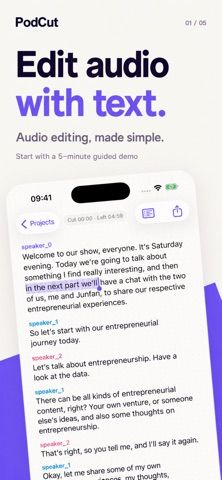
PodCut: Podcast & Audio Editor lets users edit long-form audio or video by working with a timed transcript. Media can be imported from Files, Photos, Voice Memos, WeChat, or the iOS share sheet. Users can select transcript words and remove the corresponding audio, review AI editing suggestions before applying them, and remove filler words, pauses, or off-topic sections. PodCut can generate an outline and show notes, keep transcript timing aligned with the media, preview edits, and restore changes. Edited audio, video, and notes can be exported. A built-in five-minute guided project demonstrates the workflow without consuming transcription credit. The listing does not specify paid usage limits, subscription terms, or how imported media and transcripts are processed or retained. Podcasters should review the privacy policy before importing confidential recordings or interview material.

PodCut: Podcast & Audio Editor
PodCut edits podcast audio and video through a timed transcript, with AI suggestions, filler removal, outlines, and exports.
Overview
A closer look at PodCut: Podcast & Audio Editor.
A closer look
App screenshots
Choose with confidence
The useful details.
What it does
- Import audio or video from Files, Photos, Voice Memos, WeChat, or the share sheet.
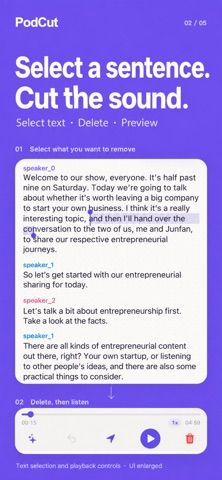
- Select words in a timed transcript to remove the matching audio precisely.
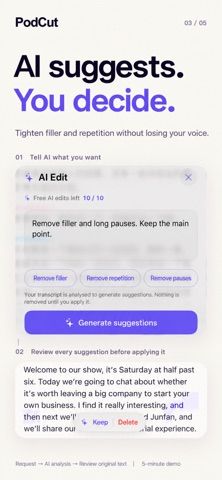
- Review AI edit suggestions and remove filler words, pauses, or off-topic sections.
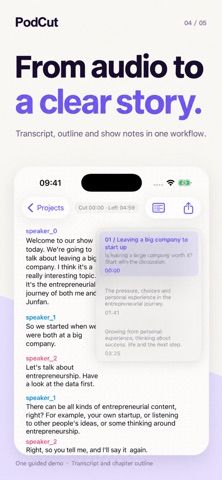
- Generate an outline or show notes and keep transcript timing aligned with the media.
- Preview edits, restore changes, and export audio, video, or show notes.
A good fit for
- Podcasters and long-form audio creators who want to edit recordings through transcripts.
- Editors who want to remove filler or pauses before exporting a polished recording.
Worth knowing
- The listing does not state paid transcription limits, subscriptions, or pricing.
- The listing does not explain how imported recordings or transcripts are processed and retained; review privacy terms before importing sensitive audio.
Frequently asked questions
Answers based on the app’s official listing and reviewed information.
What is PodCut: Podcast & Audio Editor used for?
PodCut edits podcast audio and video through a timed transcript, with AI suggestions, filler removal, outlines, and exports.
What can you do with PodCut: Podcast & Audio Editor?
Import audio or video from Files, Photos, Voice Memos, WeChat, or the share sheet. Select words in a timed transcript to remove the matching audio precisely. Review AI edit suggestions and remove filler words, pauses, or off-topic sections. Generate an outline or show notes and keep transcript timing aligned with the media.
Who is PodCut: Podcast & Audio Editor designed for?
Podcasters and long-form audio creators who want to edit recordings through transcripts. Editors who want to remove filler or pauses before exporting a polished recording.
What should you know before downloading PodCut: Podcast & Audio Editor?
The listing does not state paid transcription limits, subscriptions, or pricing. The listing does not explain how imported recordings or transcripts are processed and retained; review privacy terms before importing sensitive audio.
What does PodCut: Podcast & Audio Editor cost?
Free to download. The five-minute guided project is included without using transcription credit; the listing does not state current paid features or purchase terms.
Which platforms support PodCut: Podcast & Audio Editor?
Greatooly's reviewed app information lists iOS.
Researched from official sources; this is not a hands-on review. Last checked 2026-11-10.
Keep exploring
More apps that might be a good fit.

CleanHaus: Airbnb Turnovers
CleanHaus automates short-term rental turnovers by connecting booking calendars with cleaners, schedules and property tasks.

GoalStar: Daily Goal Tracker
GoalStar makes daily goals visible with a gold-star chart, streaks, reminders, widgets and optional NFC tap tags.

Accessbox - Password Manager
Accessbox stores passwords, passkeys and verification codes in encrypted Accesscards with AutoFill, breach alerts and optional iCloud sync.