
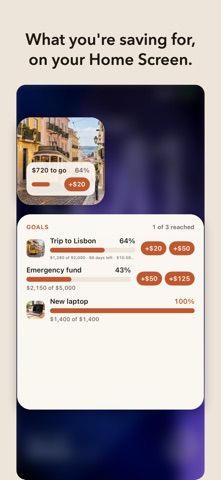
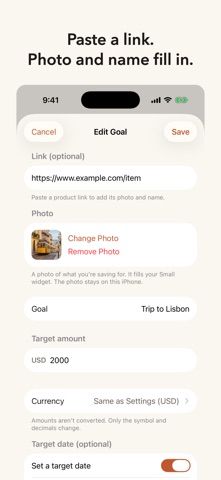
Savebar makes savings goals visible through widgets rather than bank connections. Users enter how much they have saved and can tap preset amount buttons from a Home Screen widget or Apple Watch to update a goal. A goal can include a photo of the item being saved for, and a product link can fill in its name and image. The free tier supports a small widget for one goal, while Savebar Pro adds unlimited goals and more widget layouts, including Lock Screen options and watch-face complications. Pro is a one-time purchase with no subscription, although the captured store text does not state its price. The developer says goal names, amounts, and photos stay on the iPhone; anonymous usage events can be disabled in Settings. This suits people who want a lightweight savings visual, but entries are manual and do not reconcile with bank balances.

Savebar – Savings Tracker
A savings-goal tracker with Home Screen and Lock Screen widgets, progress bars, photo reminders, and optional Apple Watch updates.
Overview
A closer look at Savebar – Savings Tracker.
A closer look
App screenshots
Choose with confidence
The useful details.
What it does
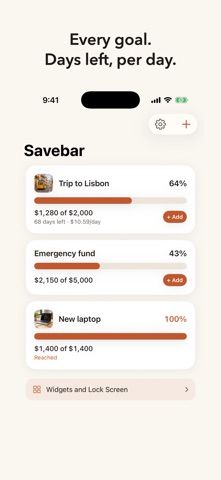
- Track a savings goal with an amount, progress bar, photo, and optional product link.
- Add preset savings amounts from Home Screen widgets or Apple Watch.
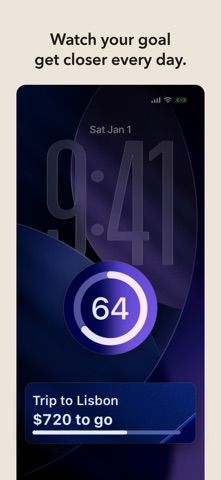
- Use Lock Screen widgets and multiple goals with Savebar Pro.
- Choose a currency for each goal and turn off anonymous usage events in Settings.
A good fit for
- People saving toward a specific purchase who want their progress visible in widgets.
Worth knowing
- Savings entries are manual; the app does not connect to a bank account.
- The free tier is limited to one goal and a small widget; Pro is required for more goals and widget layouts.
- Pro is a one-time purchase, but its price was not stated in the captured listing.
Frequently asked questions
Answers based on the app’s official listing and reviewed information.
What is Savebar – Savings Tracker used for?
A savings-goal tracker with Home Screen and Lock Screen widgets, progress bars, photo reminders, and optional Apple Watch updates.
What can you do with Savebar – Savings Tracker?
Track a savings goal with an amount, progress bar, photo, and optional product link. Add preset savings amounts from Home Screen widgets or Apple Watch. Use Lock Screen widgets and multiple goals with Savebar Pro. Choose a currency for each goal and turn off anonymous usage events in Settings.
Who is Savebar – Savings Tracker designed for?
People saving toward a specific purchase who want their progress visible in widgets.
What should you know before downloading Savebar – Savings Tracker?
Savings entries are manual; the app does not connect to a bank account. The free tier is limited to one goal and a small widget; Pro is required for more goals and widget layouts. Pro is a one-time purchase, but its price was not stated in the captured listing.
Does Savebar – Savings Tracker include paid features?
Savebar Pro is a one-time purchase with no subscription. The captured US listing did not state the price; check the current App Store page.
Which platforms support Savebar – Savings Tracker?
Greatooly's reviewed app information lists iOS.
Researched from official sources; this is not a hands-on review. Last checked 2026-11-04.
Keep exploring
More apps that might be a good fit.

Jars: Savings Goal Tracker
Jars tracks user-entered savings goals, deposits, and withdrawal plans without holding or moving money.

Coal - Gift List & Budget
Budget for gifts by recipient and track each purchase through delivery, wrapping, and returns.

Budget Planner App: Tally
A personal budget app with voice expense entry, automatic category suggestions, spending limits, and charts.