
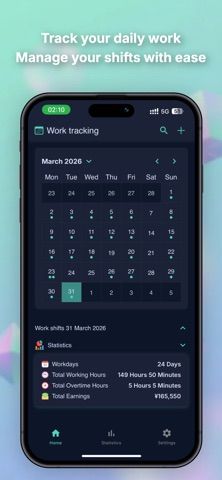
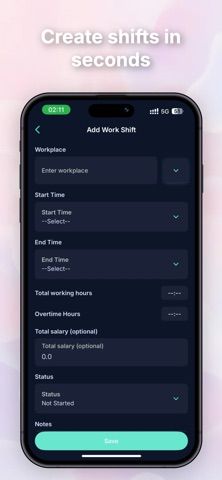
Shift Calendar is designed for people whose work schedule changes from week to week. Add one or more shifts to a day, record an hourly rate, and use the calendar to see upcoming work at a glance. Push notifications can remind you before a shift and prompt you to confirm hours afterward. The app also estimates earnings from the shift information you enter, which can help with basic planning, and iCloud sync can keep the schedule available across Apple devices. The developer says the calendar works offline and keeps data accessible without a connection. Because the earnings view depends on entered hours and rates, treat it as an estimate rather than a payroll record. Pricing and any premium limits are not described in the listing.

Life & planningDaily planning appsMedication reminders appsShift scheduling appsWedding planning apps
Shift Calendar - Shift Planner
Shift Calendar helps students and part-time workers organize work shifts. Users can add multiple shifts per day, set hourly rates, receive reminders, see estimated earnings, and sync data through iCloud. The developer says the app works offline; the listing does not specify pricing.
By Vu TrongReleased 2026/04/13No ratings yetOfficial store informationPublished 2026/11/04Checked 2026-11-04
Overview
A closer look at Shift Calendar - Shift Planner.
A closer look
App screenshots
Choose with confidence
The useful details.
What it does
- Calendar view for shifts, including multiple shifts in one day
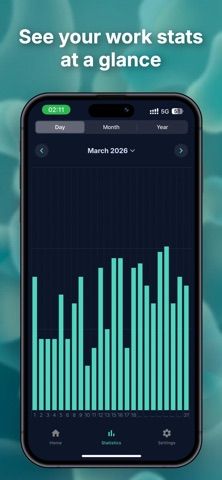
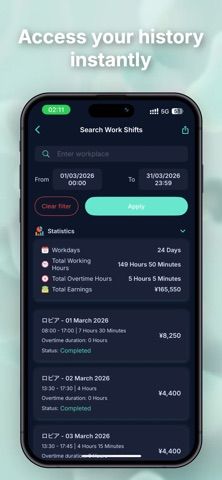
- Hourly rate entry and estimated earnings
- Before-shift reminders and after-shift hour confirmation
- Offline access and iCloud sync across Apple devices
A good fit for
- Students and part-time workers managing changing schedules
- Shift workers who want a simple earnings estimate alongside a calendar
Worth knowing
- Earnings are estimates based on entered hours and rates; the listing does not specify current pricing.
Frequently asked questions
Answers based on the app’s official listing and reviewed information.
What is Shift Calendar - Shift Planner used for?
Shift Calendar helps students and part-time workers organize work shifts. Users can add multiple shifts per day, set hourly rates, receive reminders, see estimated earnings, and sync data through iCloud. The developer says the app works offline; the listing does not specify pricing.
What can you do with Shift Calendar - Shift Planner?
Calendar view for shifts, including multiple shifts in one day Hourly rate entry and estimated earnings Before-shift reminders and after-shift hour confirmation Offline access and iCloud sync across Apple devices
Who is Shift Calendar - Shift Planner designed for?
Students and part-time workers managing changing schedules Shift workers who want a simple earnings estimate alongside a calendar
What should you know before downloading Shift Calendar - Shift Planner?
Earnings are estimates based on entered hours and rates; the listing does not specify current pricing.
Does Shift Calendar - Shift Planner include paid features?
The reviewed listing does not confirm current in-app purchase options.
Which platforms support Shift Calendar - Shift Planner?
Greatooly's reviewed app information lists iOS.
Researched from official sources; this is not a hands-on review. Last checked 2026-11-04.
Keep exploring
More apps that might be a good fit.

VowFolio: Wedding Planner
VowFolio Planner organizes a couple’s guest list, seating chart, budget, checklist, vendors, wedding website, and guest photos.

LevelUp! Kids
LevelUp! Kids turns family chores into quests, letting children earn points for screen time or rewards that parents approve.

Wantd - Curated Wishlist
Wantd saves products from online shops into shareable wishlists, keeps gift reservations secret, and supports group gifts and a social feed.