
Skip: UGC Video Editor is a first-pass editing tool for creators who record user-generated content and short-form videos. Users upload raw footage, then Skip identifies bad takes, awkward pauses, dead air, and other sections described as unusable and produces cleaner cuts. The stated goal is to reduce manual scrubbing before a creator continues editing or publishes a finished video elsewhere. The App Store description says an active subscription is required to access content and premium editing functionality, so the app is not presented as a fully functional free product. Subscription options, billing periods, prices, renewal terms, and any trial are shown before purchase but are not specified in the listing text. The description also does not explain how uploaded video is processed, stored, or deleted. Creators should review the privacy policy and avoid uploading footage they do not have permission to process or share.

Skip: UGC Video Editor
Skip automatically finds unusable UGC footage and removes pauses to create a cleaner first cut for short-form video creators.
Overview
A closer look at Skip: UGC Video Editor.
A closer look
App screenshots
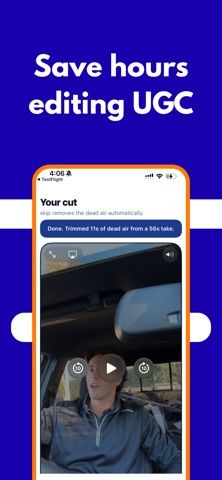
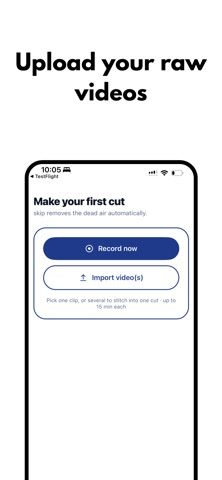
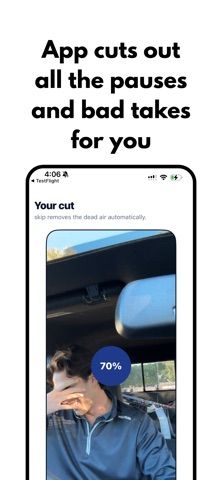
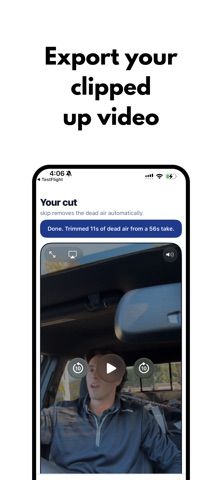
Choose with confidence
The useful details.
What it does
- Analyze uploaded UGC footage to find bad takes and sections described as unusable.
- Remove dead air and awkward pauses to create a first cut more quickly.
- Reduce manual review time for creators producing short-form videos at volume.
- Continue editing the cleaned footage in the creator’s chosen video workflow.
- Review subscription details and any applicable trial before starting access.
A good fit for
- UGC creators who record multiple takes and want help preparing a first cut.
- Short-form video teams looking to reduce manual footage review.
Worth knowing
- An active subscription is required for access; the app is not fully functional for free.
- The current listing does not state prices, billing periods, or trial terms; review the purchase screen before subscribing.
- The listing does not explain video processing or retention; upload only footage you have permission to process.
Frequently asked questions
Answers based on the app’s official listing and reviewed information.
What is Skip: UGC Video Editor used for?
Skip automatically finds unusable UGC footage and removes pauses to create a cleaner first cut for short-form video creators.
What can you do with Skip: UGC Video Editor?
Analyze uploaded UGC footage to find bad takes and sections described as unusable. Remove dead air and awkward pauses to create a first cut more quickly. Reduce manual review time for creators producing short-form videos at volume. Continue editing the cleaned footage in the creator’s chosen video workflow.
Who is Skip: UGC Video Editor designed for?
UGC creators who record multiple takes and want help preparing a first cut. Short-form video teams looking to reduce manual footage review.
What should you know before downloading Skip: UGC Video Editor?
An active subscription is required for access; the app is not fully functional for free. The current listing does not state prices, billing periods, or trial terms; review the purchase screen before subscribing. The listing does not explain video processing or retention; upload only footage you have permission to process.
What does Skip: UGC Video Editor cost?
Free to download. An active paid subscription is required to access the app’s content and editing functionality. Subscription periods, pricing, renewal details, and any trial are presented before purchase but are not specified in the listing.
Which platforms support Skip: UGC Video Editor?
Greatooly's reviewed app information lists iOS.
Researched from official sources; this is not a hands-on review. Last checked 2026-11-10.
Keep exploring
More apps that might be a good fit.

CleanHaus: Airbnb Turnovers
CleanHaus automates short-term rental turnovers by connecting booking calendars with cleaners, schedules and property tasks.

GoalStar: Daily Goal Tracker
GoalStar makes daily goals visible with a gold-star chart, streaks, reminders, widgets and optional NFC tap tags.

Accessbox - Password Manager
Accessbox stores passwords, passkeys and verification codes in encrypted Accesscards with AutoFill, breach alerts and optional iCloud sync.