
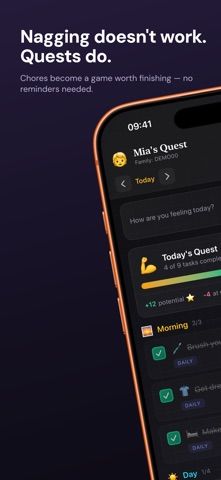
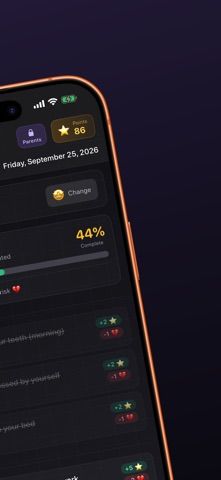
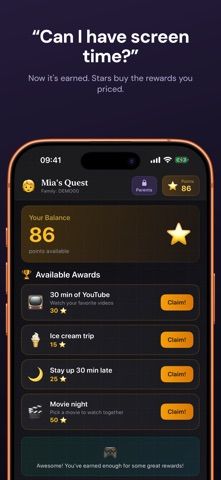
Starday is a family chore and routine tracker that presents children’s daily tasks as quests. Kids complete tasks to earn stars, build streaks, and spend points on rewards chosen by parents, such as screen time or a family activity. Parents use a passcode-protected area to set routine packs, custom tasks, rewards, and optional point penalties. The family calendar organizes tasks into morning, daytime, and evening sections, with mood check-ins and week, month, and year views. A family code connects a child’s tablet and parents’ phones so profiles, tasks, and progress sync. The free plan includes the daily routine, tasks, points, streaks, mood tracking, and rewards shop, with a five-event calendar limit. Starday Pro removes that calendar limit and unlocks custom tasks and rewards. One subscription covers the family; the US App Store lists $4.99 monthly or $29.99 yearly, with a seven-day trial. It requires iOS 17 or later.

Starday: Family Chores Tracker
Starday turns children’s daily chores into quests with points, streaks, parent-approved rewards, family profiles, and shared progress.
Overview
A closer look at Starday: Family Chores Tracker.
A closer look
App screenshots
Choose with confidence
The useful details.
What it does
- Create age-oriented routine packs and organize children’s quests across morning, day, and evening.
- Award stars for tasks and let children redeem them in a parent-managed rewards shop.
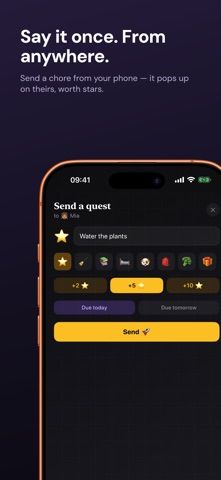
- Connect family devices with a code and keep each child’s tasks, points, and streaks synchronized.
- Review mood check-ins and family progress in calendar views spanning weeks, months, and years.
A good fit for
- Parents who want children to follow routines and earn rewards through completed tasks.
- Families coordinating chores across a child’s device and parents’ phones.
Worth knowing
- Requires iOS 17 or later on iPhone or iPad.
- The free calendar is limited to five events; Starday Pro costs $4.99 monthly or $29.99 yearly after an optional seven-day trial.
- Parents control the reward rules, but the app does not replace Apple Screen Time controls or family supervision.
Frequently asked questions
Answers based on the app’s official listing and reviewed information.
What is Starday: Family Chores Tracker used for?
Starday turns children’s daily chores into quests with points, streaks, parent-approved rewards, family profiles, and shared progress.
What can you do with Starday: Family Chores Tracker?
Create age-oriented routine packs and organize children’s quests across morning, day, and evening. Award stars for tasks and let children redeem them in a parent-managed rewards shop. Connect family devices with a code and keep each child’s tasks, points, and streaks synchronized. Review mood check-ins and family progress in calendar views spanning weeks, months, and years.
Who is Starday: Family Chores Tracker designed for?
Parents who want children to follow routines and earn rewards through completed tasks. Families coordinating chores across a child’s device and parents’ phones.
What should you know before downloading Starday: Family Chores Tracker?
Requires iOS 17 or later on iPhone or iPad. The free calendar is limited to five events; Starday Pro costs $4.99 monthly or $29.99 yearly after an optional seven-day trial. Parents control the reward rules, but the app does not replace Apple Screen Time controls or family supervision.
What does Starday: Family Chores Tracker cost?
Free to download. The free plan includes the daily calendar, tasks, points, streaks, mood check-ins, and rewards shop, with a five-event calendar limit. Starday Pro removes the calendar event limit and unlocks custom tasks and rewards. The US App Store lists $4.99 monthly or $29.99 yearly, with a seven-day free trial; one subscription covers the family.
Which platforms support Starday: Family Chores Tracker?
Greatooly's reviewed app information lists iOS.
Researched from official sources; this is not a hands-on review. Last checked 2026-11-10.
Keep exploring
More apps that might be a good fit.

CleanHaus: Airbnb Turnovers
CleanHaus automates short-term rental turnovers by connecting booking calendars with cleaners, schedules and property tasks.

GoalStar: Daily Goal Tracker
GoalStar makes daily goals visible with a gold-star chart, streaks, reminders, widgets and optional NFC tap tags.

Accessbox - Password Manager
Accessbox stores passwords, passkeys and verification codes in encrypted Accesscards with AutoFill, breach alerts and optional iCloud sync.