GreatoolyGreatooly
Supershift app icon

Supershift

Build a visual shift calendar with reusable templates, rotating schedules, and work-hour reports, making irregular weeks easier to plan around.

By Supershift GmbHOfficial store informationPublished 2026/11/03Checked 2026-11-03

Overview

A closer look at Supershift.

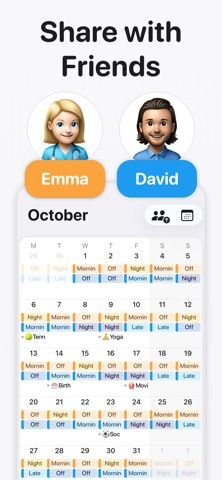
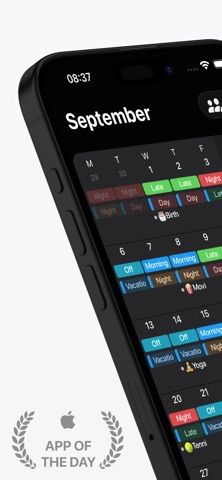
Supershift is a personal calendar for working patterns that do not fit a standard Monday-to-Friday week. Reusable shift templates and repeating rotations reduce the effort of entering a schedule, while colors make different shift types easier to distinguish. Multiple shifts can be recorded on the same day.

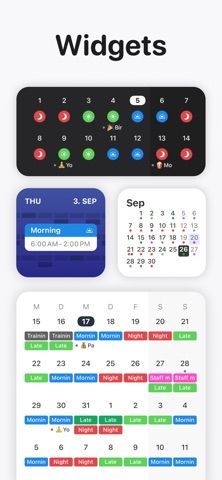
Its official listing describes reports for working hours, pay, and overtime, along with widgets and optional cloud syncing. These help with personal planning and record keeping. Report accuracy still depends on the schedule and values you enter; an employer's payroll or scheduling system remains a separate source.

The iOS listing reserves features such as calendar export, PDF reports, and external calendars for Pro. Verify the features you need in your platform's store before purchasing. This overview comes from official descriptions and does not claim hands-on testing of reminders or shift calculations.
A closer look

App screenshots

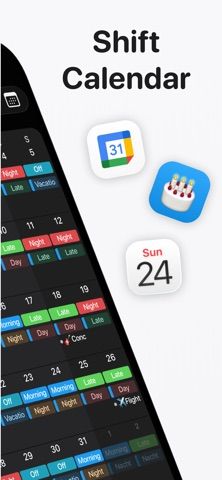
Supershift official iOS screenshot 1Supershift official iOS screenshot 2Official iOS store screenshotOfficial iOS store screenshot

Choose with confidence

The useful details.

What it does

  • Colored shift templates and multiple shifts per day
  • Rotating schedules and work-hour reports
  • Widgets and optional cloud syncing

A good fit for

  • Shift workers organizing changing schedules and time off

Worth knowing

  • Calendar export, PDF reports, and external calendar features are listed as Pro features on iOS.
  • Feature availability can differ between platforms.

Frequently asked questions

Answers based on the app’s official listing and reviewed information.

What is Supershift used for?

Build a visual shift calendar with reusable templates, rotating schedules, and work-hour reports, making irregular weeks easier to plan around.

What can you do with Supershift?

Colored shift templates and multiple shifts per day Rotating schedules and work-hour reports Widgets and optional cloud syncing

Who is Supershift designed for?

Shift workers organizing changing schedules and time off

What should you know before downloading Supershift?

Calendar export, PDF reports, and external calendar features are listed as Pro features on iOS. Feature availability can differ between platforms.

Does Supershift include paid features?

The reviewed listing does not confirm current in-app purchase options.

Which platforms support Supershift?

Greatooly's reviewed app information lists iOS.

Researched from official sources; this is not a hands-on review. Last checked 2026-11-03.

Keep exploring

More apps that might be a good fit.

Steadwell: Home Maintenance

Steadwell keeps a private home record of appliances, repairs, paint, and maintenance suggestions, with offline access and optional iCloud sync.

Sanjog: Sikh Wedding Planner

Sanjog plans Sikh wedding ceremonies together with shared guest RSVPs, budgets, checklists, schedules, vendors, and guest-ready PDFs.

VowFolio: Wedding Planner

VowFolio Planner organizes a couple’s guest list, seating chart, budget, checklist, vendors, wedding website, and guest photos.