
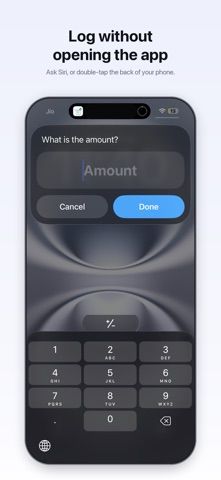
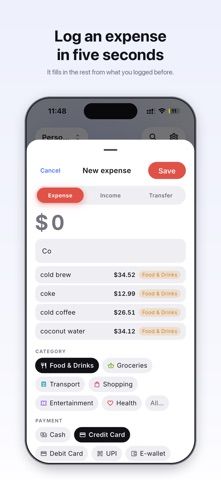
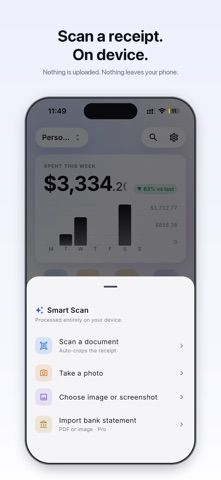
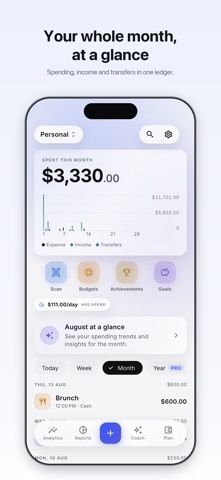
TapExpense is built for logging purchases quickly while keeping financial records under the user's control. An amount-first entry flow, category chips, and learned suggestions make common purchases faster to record. The app works offline, does not require an account, and says it has no ads, analytics, or trackers. Reports can show totals by day, week, month, or year, along with category and payment-method breakdowns. Users can maintain separate personal, business, or shared profiles, protect the app with biometrics, and export CSV or JSON files. Encrypted backups can be kept in a destination the user controls, with optional iCloud Drive backup or Notion sync. TapExpense has a permanent free plan and optional Pro monthly, yearly, and lifetime purchases; bank connections are not required.

TapExpense: Expense Tracker
An offline expense tracker that stores records on-device, learns quick-entry suggestions from local history, and exports data without an account.
Overview
A closer look at TapExpense: Expense Tracker.
A closer look
App screenshots
Choose with confidence
The useful details.
What it does
- Record expenses with quick amount entry, categories, and learned suggestions.
- Review spending by period, category, and payment method.
- Separate personal, business, and shared records into profiles.
- Export CSV or JSON, create encrypted backups, and optionally sync to Notion.
A good fit for
- People who want private, offline expense tracking without linking a bank account.
Worth knowing
- The free plan limits users to one profile, 20 categories, and current-month reporting; advanced reports, extra profiles, and some automations require Pro.
Frequently asked questions
Answers based on the app’s official listing and reviewed information.
What is TapExpense: Expense Tracker used for?
An offline expense tracker that stores records on-device, learns quick-entry suggestions from local history, and exports data without an account.
What can you do with TapExpense: Expense Tracker?
Record expenses with quick amount entry, categories, and learned suggestions. Review spending by period, category, and payment method. Separate personal, business, and shared records into profiles. Export CSV or JSON, create encrypted backups, and optionally sync to Notion.
Who is TapExpense: Expense Tracker designed for?
People who want private, offline expense tracking without linking a bank account.
What should you know before downloading TapExpense: Expense Tracker?
The free plan limits users to one profile, 20 categories, and current-month reporting; advanced reports, extra profiles, and some automations require Pro.
Does TapExpense: Expense Tracker include paid features?
The US App Store lists TapExpense Pro at $3.99 monthly or $29.99 yearly. The US App Store lists a TapExpense Pro lifetime purchase at $34.99.
Which platforms support TapExpense: Expense Tracker?
Greatooly's reviewed app information lists iOS.
Researched from official sources; this is not a hands-on review. Last checked 2026-11-04.
Keep exploring
More apps that might be a good fit.

Jars: Savings Goal Tracker
Jars tracks user-entered savings goals, deposits, and withdrawal plans without holding or moving money.

Coal - Gift List & Budget
Budget for gifts by recipient and track each purchase through delivery, wrapping, and returns.

Budget Planner App: Tally
A personal budget app with voice expense entry, automatic category suggestions, spending limits, and charts.