
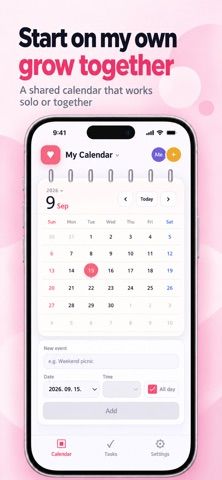
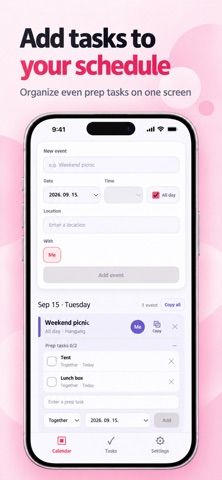
TogetherCal - Shared Calendar is a calendar and task app for couples and families. Users can add dated events with times and locations, create tasks with due dates, assign members, and review pending or completed work in a monthly calendar. An invitation code connects family members or a partner to shared spaces. Google sign-in is required to access shared spaces and tasks from another device. The listing says calendar events are stored on the device where they are created, while shared spaces and tasks can be reached on other devices after sign-in. The app can be used for grocery plans, dates, anniversaries, and household chores. Apple lists a free download, but the current description does not specify paid features, subscriptions, or pricing. Users should note that local calendar events may not automatically appear on another device unless they are added to a shared space or task workflow.

TogetherCal - Shared Calendar
TogetherCal shares a family calendar and assigned tasks through invitation codes and Google sign-in.
Overview
A closer look at TogetherCal - Shared Calendar.
A closer look
App screenshots
Choose with confidence
The useful details.
What it does
- Review a monthly calendar of events with dates, times, and locations.
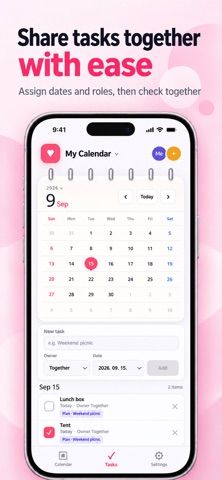
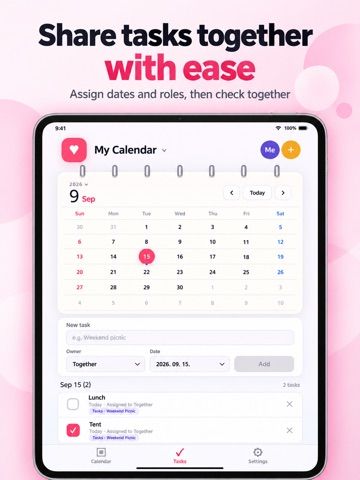
- Create tasks with due dates, assign them to family members, and track completion.
- Connect a partner or family member to shared spaces using an invitation code.
- Sign in with Google to access shared spaces and tasks from another device.
- Use shared planning for household chores, shopping, and family activities.
A good fit for
- Couples and families who want a shared calendar and simple task list.
- Households coordinating events, chores, shopping, and assigned responsibilities.
Worth knowing
- The listing says calendar events are stored on the device where they were created; shared access is described for shared spaces and tasks.
- Google sign-in is needed for shared spaces and tasks on other devices; paid terms are not stated in the listing.
Frequently asked questions
Answers based on the app’s official listing and reviewed information.
What is TogetherCal - Shared Calendar used for?
TogetherCal shares a family calendar and assigned tasks through invitation codes and Google sign-in.
What can you do with TogetherCal - Shared Calendar?
Review a monthly calendar of events with dates, times, and locations. Create tasks with due dates, assign them to family members, and track completion. Connect a partner or family member to shared spaces using an invitation code. Sign in with Google to access shared spaces and tasks from another device.
Who is TogetherCal - Shared Calendar designed for?
Couples and families who want a shared calendar and simple task list. Households coordinating events, chores, shopping, and assigned responsibilities.
What should you know before downloading TogetherCal - Shared Calendar?
The listing says calendar events are stored on the device where they were created; shared access is described for shared spaces and tasks. Google sign-in is needed for shared spaces and tasks on other devices; paid terms are not stated in the listing.
What does TogetherCal - Shared Calendar cost?
Apple lists a free download; the current store description does not specify whether paid features or subscriptions are available.
Which platforms support TogetherCal - Shared Calendar?
Greatooly's reviewed app information lists iOS.
Researched from official sources; this is not a hands-on review. Last checked 2026-11-10.
Keep exploring
More apps that might be a good fit.

CleanHaus: Airbnb Turnovers
CleanHaus automates short-term rental turnovers by connecting booking calendars with cleaners, schedules and property tasks.

GoalStar: Daily Goal Tracker
GoalStar makes daily goals visible with a gold-star chart, streaks, reminders, widgets and optional NFC tap tags.

Accessbox - Password Manager
Accessbox stores passwords, passkeys and verification codes in encrypted Accesscards with AutoFill, breach alerts and optional iCloud sync.