
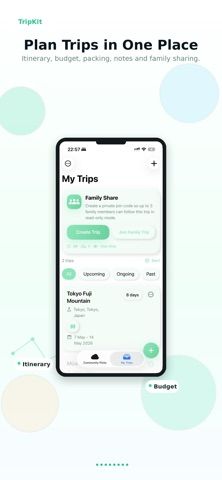
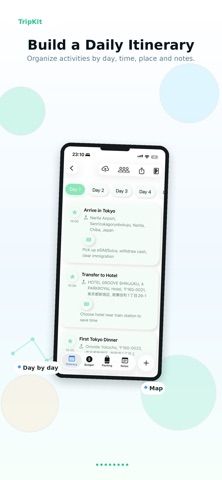
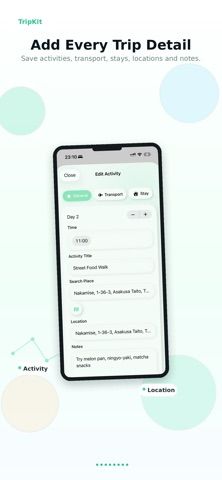
TripKit is an iPhone travel organizer for keeping trip details together without relying on a spreadsheet for every plan. Create a trip with dates, destination, budget, and currency, then build a time-based itinerary and track planned costs separately from actual expenses. Packing lists, notes, reminders, ideas, and travel details live alongside the schedule. TripKit can duplicate a trip, search or sort local plans, and share a trip as a file for another person to import. Family members can join with a private code, while trips shared with you can be viewed in read-only mode. Recent versions add a journal with map or timeline memories and photo scrapbooks. The current US App Store says the download is free and does not list in-app purchases.

TripKit: Travel Planner
Organize an itinerary, travel budget, packing list, notes, and shared plans in TripKit.
Overview
A closer look at TripKit: Travel Planner.
A closer look
App screenshots
Choose with confidence
The useful details.
What it does
- Create trips with destinations, dates, budgets, and chosen currencies.
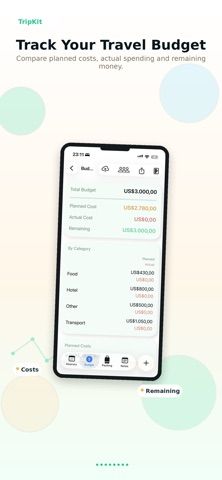
- Build daily itineraries with time-based activities and track planned and actual expenses separately.
- Organize packing lists, reminders, notes, ideas, and travel details by trip.
- Share trips as files, import another traveler's plan, or invite family with a private join code.
- Capture trip memories in a journal with map or timeline views and photo scrapbooks.
A good fit for
- Travelers who want to organize dates, schedules, expenses, and packing lists in one place.
- Families and groups who want to share a plan or exchange trip files without using a public feed.
Worth knowing
- Designed for iPhone and requires iOS 18.0 or later; the current US App Store lists a free download with no in-app purchases.
- Apple's developer-provided privacy label is unverified and lists user ID linked to identity, with possible coarse location, financial details, name, user content, and device ID in other data categories.
- Shared trips can be read-only depending on how they were shared; confirm permissions and review the developer privacy policy before storing sensitive travel or budget details.
Frequently asked questions
Answers based on the app’s official listing and reviewed information.
What trip details can I keep in TripKit?
The listing describes destinations, dates, budgets, currency, daily itineraries, packing lists, notes, reminders, ideas, and expense records.
Can I compare planned costs with actual expenses?
Yes. TripKit lets you track planned costs and actual expenses separately for a trip.
How can I share a plan with other people?
You can export a trip as a file for another person to import or invite family using a private join code. Trips shared with you can be read-only.
Does TripKit include a trip journal?
Recent version notes describe map and timeline memories plus photo scrapbooks with movable and editable pages.
Is TripKit free?
The current US App Store listing is free, and it does not show in-app purchases.
What travel information may TripKit process?
Apple's unverified privacy label lists a user ID linked to identity and other possible data including coarse location, financial information, name, user content, and device ID. Review the developer policy before saving sensitive details.
Researched from official sources; this is not a hands-on review. Last checked 2026-11-19.
Keep exploring
More apps that might be a good fit.

Lure – Trip Planner
Create day-by-day city itineraries with custom maps, geographically grouped stops, restaurant ideas, visit estimates, and budget notes.

AeroTrace: Flight Tracker
Track flight status, gates, delays, and connections with Live Activities, boarding-pass import, airport tools, and offline maps.

EzRoute - Travel
Browse and share day-by-day itineraries from travelers, with places, meals, activities, transport notes, and tips.