
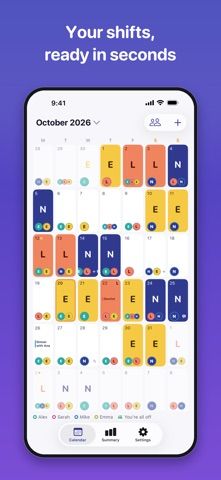
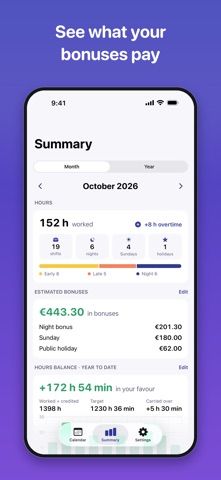
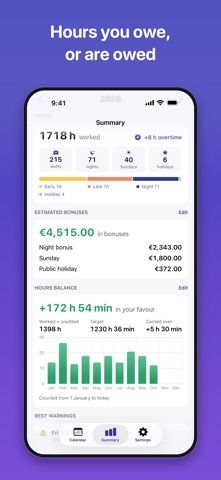
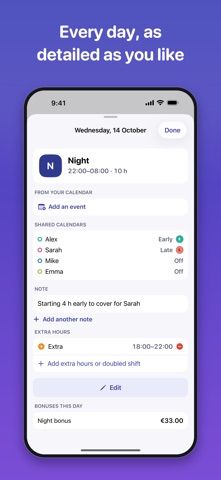
Turnada is a shift planner for people working rotating schedules, including healthcare, emergency services, and industrial roles. Users can choose a built-in rotation or create their own, paint shifts onto a calendar, and add overtime, double shifts, notes, or events. Pro can read a paper schedule from a photo, support shift swaps, export to calendars, and show bonus and hour balances. The app also estimates bonuses and hours owed from user settings; its developer says those calculations are guidance only and that the payslip and work agreement take precedence. Turnada Pro is available as a monthly subscription, a yearly plan with a seven-day trial, or a lifetime purchase; captured prices were not stated. This may help workers organize complex rotas, but pay calculations should be checked against official employment records.

Turnada: Shift Work Calendar
A rotating shift calendar with overtime and hour-balance estimates, shift swaps, photo import, and calendar export.
Overview
A closer look at Turnada: Shift Work Calendar.
A closer look
App screenshots
Choose with confidence
The useful details.
What it does
- Choose a built-in work rotation or create a custom schedule that repeats for years.
- Add overtime, double shifts, notes, and calendar events from the shift view.
- Use Pro to import a rota from a photo, manage swaps, and export shifts.
- Review estimated bonuses and hour balances based on personal settings.
A good fit for
- Workers with rotating or overnight schedules who want a calendar and overtime estimates together.
Worth knowing
- Bonus and hour balances are estimates for guidance, not payroll calculations; compare with the payslip and agreement.
- Photo import, shift swaps, calendar export, and bonus tools require Pro.
- Pro offers monthly, yearly, or lifetime options; prices were not stated in the captured listing.
Frequently asked questions
Answers based on the app’s official listing and reviewed information.
What is Turnada: Shift Work Calendar used for?
A rotating shift calendar with overtime and hour-balance estimates, shift swaps, photo import, and calendar export.
What can you do with Turnada: Shift Work Calendar?
Choose a built-in work rotation or create a custom schedule that repeats for years. Add overtime, double shifts, notes, and calendar events from the shift view. Use Pro to import a rota from a photo, manage swaps, and export shifts. Review estimated bonuses and hour balances based on personal settings.
Who is Turnada: Shift Work Calendar designed for?
Workers with rotating or overnight schedules who want a calendar and overtime estimates together.
What should you know before downloading Turnada: Shift Work Calendar?
Bonus and hour balances are estimates for guidance, not payroll calculations; compare with the payslip and agreement. Photo import, shift swaps, calendar export, and bonus tools require Pro. Pro offers monthly, yearly, or lifetime options; prices were not stated in the captured listing.
Does Turnada: Shift Work Calendar include paid features?
Turnada Pro offers a monthly subscription or a yearly subscription with a seven-day trial. The captured listing did not state prices. A lifetime purchase for Turnada Pro is also available. The captured listing did not state its price.
Which platforms support Turnada: Shift Work Calendar?
Greatooly's reviewed app information lists iOS.
Researched from official sources; this is not a hands-on review. Last checked 2026-11-04.
Keep exploring
More apps that might be a good fit.

CleanHaus: Airbnb Turnovers
CleanHaus automates short-term rental turnovers by connecting booking calendars with cleaners, schedules and property tasks.

GoalStar: Daily Goal Tracker
GoalStar makes daily goals visible with a gold-star chart, streaks, reminders, widgets and optional NFC tap tags.

Accessbox - Password Manager
Accessbox stores passwords, passkeys and verification codes in encrypted Accesscards with AutoFill, breach alerts and optional iCloud sync.