
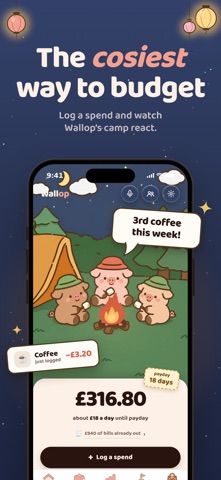
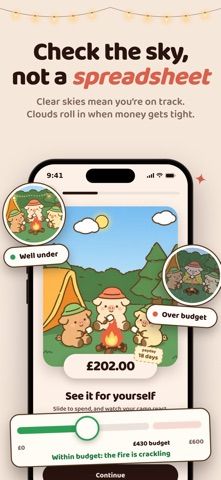
Wallop turns budget categories into named “Stashes,” such as eating out or coffee, and shows how much remains before the next payday. Users log purchases, set goals, and see a visual character respond to their progress. The approach is designed to make spending limits feel more concrete than one monthly total. The App Store listing says every feature requires an active subscription after a seven-day free trial. It lists monthly and annual plans in pounds sterling, plus separate one-time purchases for additional characters. Check the localized purchase sheet for current prices and terms before subscribing, especially if your App Store region uses another currency.

MoneyBudgeting appsCrypto portfolio tracking appsCurrency conversion appsDividend tracking appsNet worth tracking appsSubscription tracking apps
Wallop - Budget Tracker
A subscription-based budget tracker that splits spending into named categories and gives each a visual progress meter.
By GEORGE FRANCIS J COWLRICKReleased 2026/07/27No ratings yetOfficial store informationPublished 2026/11/04Checked 2026-11-04
Overview
A closer look at Wallop - Budget Tracker.
A closer look
App screenshots

Choose with confidence
The useful details.
What it does
- Split budgets into custom named spending categories
- Log purchases and view remaining amounts until payday
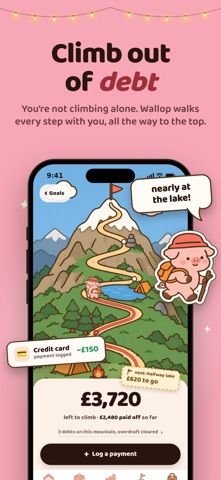
- Set savings goals and track category progress
- Use a character-based visual interface for budget feedback
A good fit for
- People who prefer several small category limits over one overall budget
- Users who like visual feedback while tracking day-to-day spending
Worth knowing
- The app requires a subscription after a seven-day trial; the listing's prices are in GBP and may not match other regions.
Frequently asked questions
Answers based on the app’s official listing and reviewed information.
What is Wallop - Budget Tracker used for?
A subscription-based budget tracker that splits spending into named categories and gives each a visual progress meter.
What can you do with Wallop - Budget Tracker?
Split budgets into custom named spending categories Log purchases and view remaining amounts until payday Set savings goals and track category progress Use a character-based visual interface for budget feedback
Who is Wallop - Budget Tracker designed for?
People who prefer several small category limits over one overall budget Users who like visual feedback while tracking day-to-day spending
What should you know before downloading Wallop - Budget Tracker?
The app requires a subscription after a seven-day trial; the listing's prices are in GBP and may not match other regions.
Does Wallop - Budget Tracker include paid features?
The listing shows £7.99 monthly or £59.99 yearly after a seven-day trial; subscriptions renew automatically. Additional characters are available as separate one-time purchases; prices are not stated in the listing.
Which platforms support Wallop - Budget Tracker?
Greatooly's reviewed app information lists iOS.
Researched from official sources; this is not a hands-on review. Last checked 2026-11-04.
Keep exploring
More apps that might be a good fit.

Jars: Savings Goal Tracker
Jars tracks user-entered savings goals, deposits, and withdrawal plans without holding or moving money.

Coal - Gift List & Budget
Budget for gifts by recipient and track each purchase through delivery, wrapping, and returns.

Budget Planner App: Tally
A personal budget app with voice expense entry, automatic category suggestions, spending limits, and charts.